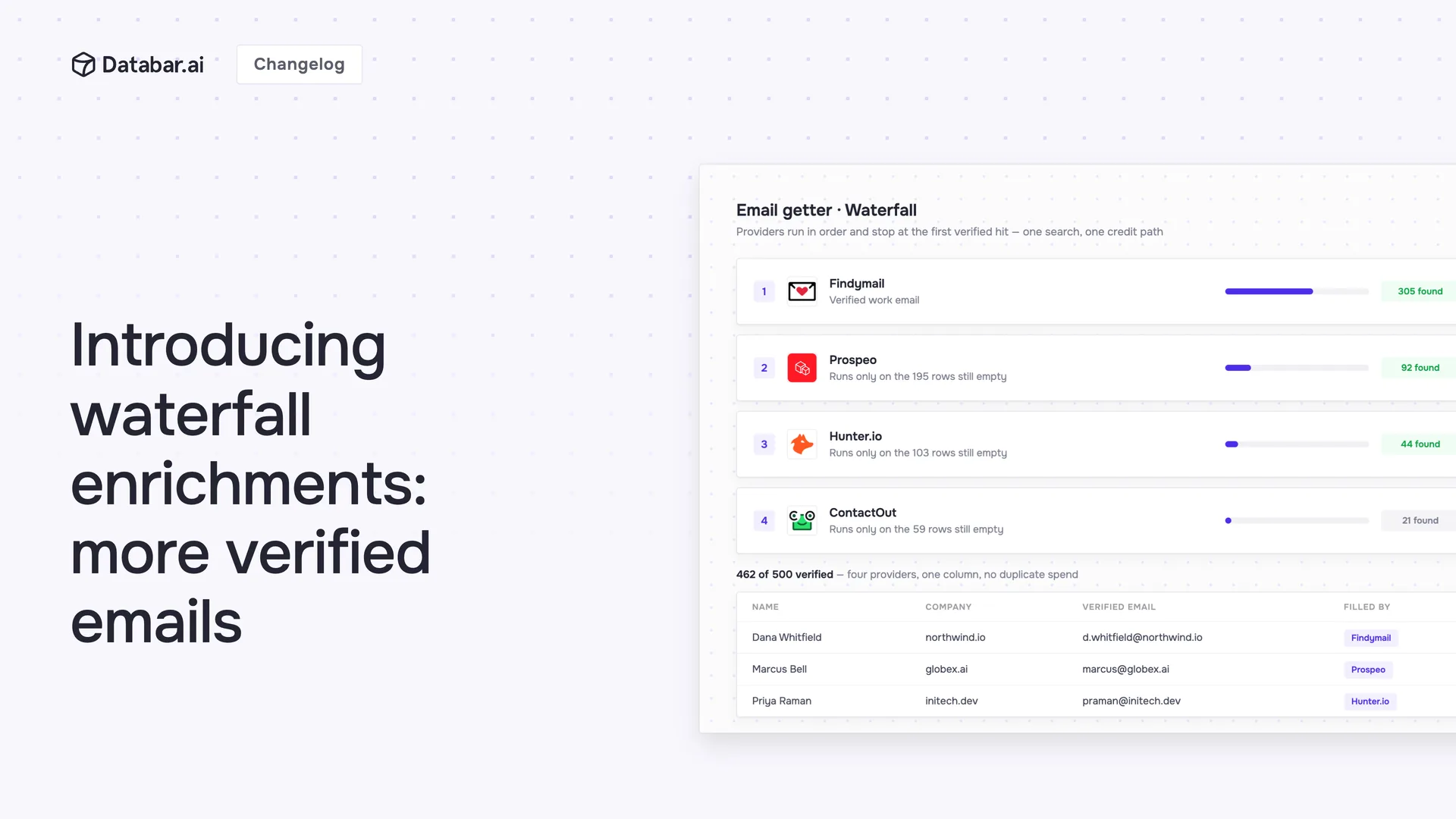
Waterfall enrichment is the practice of sending each record to a sequence of data providers, one after another, and stopping at the first one that returns a usable result. It exists because no single provider has the contact you're looking for often enough: every database has blind spots by region, company size and role, and the blind spots differ from provider to provider. A cascade turns that spread into coverage a sales team can plan around.
This guide explains how the cascade works, why single-provider match rates fall short, how to order providers so coverage goes up while cost per verified contact goes down, where waterfalls fail, and how to set one up. Every figure is attributed to a dated source or labelled as an illustration.
How a waterfall works
A waterfall is a fallback chain, not a smarter lookup. You define an ordered list of providers for one output (a work email, a mobile number, firmographics) and the system does four things for every row:
Send the input (a name plus company domain, a LinkedIn URL, an email address) to the first provider.
Check the answer. A result counts only if it passes your acceptance rule, which for emails should include verification.
Stop if the result is usable. The remaining providers never run for that row.
Fall through if the provider returned nothing, returned an error, or returned something that failed the check. The next provider gets the same input.
Two consequences follow. Provider order decides both your coverage and your bill, because early providers see every row and late providers only see the hard ones. And the definition of "usable" is where most of the quality lives: a provider that returns a candidate email for almost every input isn't better than one that returns a verified email for two thirds of them, it's just louder. This mechanism is what Databar's waterfall enrichments run for you across 160+ providers; the rest of this guide is about using it well.
Why one provider is never enough
Single-provider match rates are lower than vendor pages suggest, and the published benchmarks from the vendors who run cascades say so plainly. FullEnrich puts single-provider find rates at 30% to 40% against 80% or more for its cascade of 20+ providers. Clay's 2025 work-email benchmark found that no single provider cleared both 95% quality and 90% coverage, while a chain reached 94% usable coverage, and it cites a customer whose inbound coverage went from 40% to 80% when it moved from one provider to a waterfall. The pattern holds across the category: whichever provider you pick first, a third to a half of an ordinary B2B list comes back empty, and a different third comes back empty from the next one.
Three things about single providers matter more than the headline rate.
Phone is a different sport. Phone numbers rarely appear on public pages, they change more often than emails, and they can't be verified silently the way a mailbox can. Expect single-provider phone coverage to sit far below email coverage on the same list, and expect the gap between the best and worst phone provider to be wide. That is exactly the situation a cascade is built for.
"Always returns something" is a warning sign, not a feature. Some providers return a candidate email for almost every input. Those are pattern-based guesses (first.last@domain) that verification later sorts into deliverable and not. They belong late in a cascade, after providers that return observed addresses, and never without a verification step behind them.
Errors are misses too. Providers time out, rate-limit and return 5xx responses, sometimes for a large share of calls during an incident. A cascade has to treat an error exactly like "no data" and move on, or your coverage swings with someone else's uptime.
How coverage compounds, and where it stops
If provider misses were independent, coverage after a cascade would be 1 minus the product of each provider's miss rate. As an illustration, three phone providers that individually resolve 40%, 30% and 25% of a list would reach 68% together, and adding two more at 20% and 15% would take the chain to 79%. That's the ceiling, not the forecast. Misses are correlated: the contacts the first provider can't find (small companies, recent job changes, people who keep their numbers private) are the same ones the fourth can't find. Real cascades land well under the independence math, and the gap is your list's difficulty.
External benchmarks are consistent with that. In Clay's guide to waterfall enrichment (14 April 2026), a work-email chain reached 94% "usable coverage" in its 2025 benchmark while no single provider cleared both 95% quality and 90% coverage, and it cites one customer roughly doubling inbound coverage from 40% to 80% by moving from one provider to a cascade. FullEnrich, which cascades 20+ providers, advertises an 80%+ find rate against 30% to 40% for single-provider tools. Treat those as the top of the range, published by vendors with an interest in the number. On an ordinary B2B list, expect a well-ordered work-email chain to land somewhat below them, phone chains well below, and the harder your ICP, the lower.
The practical rule: the first two or three providers deliver most of the lift, each further provider adds a shrinking slice of hard contacts at a rising unit cost, and there's a point past which another provider costs more per incremental contact than the contact is worth. Measuring that point on your own list is the whole job.
Ordering providers: coverage first or cost first?
Because early providers see every row, order by expected cost per hit, not by brand or by headline match rate. Cost per hit is the price of a lookup divided by the share of your rows it resolves. A provider that costs a third of another and hits 60% as often is still cheaper per contact and should run first. The expensive specialist goes last, where it only ever processes the rows nobody else could resolve.
A worked example with round numbers. Take 10,000 rows and three providers. Provider A resolves 60% of rows, B resolves 45% of what it sees, C resolves 35% of what it sees.
A runs on 10,000 rows and returns 6,000.
B runs on the remaining 4,000 and returns 1,800.
C runs on the remaining 2,200 and returns 770.
Coverage goes from 60% to 86%. C, the most expensive step, only ran on 22% of the list. Reverse the order and C runs on all 10,000 rows for the same final coverage, so you pay the premium rate on the 6,000 rows that A would have resolved for less. Same contacts, very different invoice.
Three refinements once the basics work. Order by segment: a provider strong on European contacts should move up for a European list. Split by input: LinkedIn-URL chains and name-plus-domain chains have different winners, so don't force one order on both. And re-measure quarterly, because provider databases move; the ranking that was true in the spring isn't guaranteed in the autumn.
Verification inside the cascade
A returned email is a candidate. A verified email is a contact. Skipping the distinction is how teams end up with 8% bounce rates and a scorched sending domain, which costs more than every lookup combined.
Put verification inside the acceptance rule, not after the whole run. When it's inside, a candidate that fails verification counts as a miss and the cascade continues to the next provider. When it's a separate pass at the end, every failed candidate is a row you paid for and still can't email. On Databar the email waterfalls can hand each candidate to Emailable, Bouncer or ZeroBounce before accepting it. The rule is simple: verify everything you find, emails and phones alike.
Two edge cases to decide up front. Catch-all domains accept any address, so verification can't confirm the mailbox; decide whether you accept pattern matches there, and tag them so outbound can treat them differently. And a provider that returned a candidate which then failed verification has still done its job as far as billing goes, on Databar and elsewhere. That's the strongest argument for putting providers that return observed addresses ahead of providers that return guesses.
The metric that matters: cost per verified contact
Vendors quote cost per lookup. The number to manage is total spend divided by contacts that came out verified and deliverable. The difference is large. A provider quoting a low per-lookup price that resolves 60% of rows, with 78% of those passing verification and 8% of the rest bouncing, delivers a usable contact for a little over twice its headline price. The cascade's cost per verified contact is often slightly higher than the single provider's, and that's fine, because the point of the cascade is the extra share of the list you can now reach at all (26 points in the worked example). Judge it on incremental contacts against the incremental spend, then on what those contacts are worth in pipeline. For the wider picture of where enrichment money goes (credits, verification, tooling and time), see the true cost of data enrichment.
The formula, with the parts people forget:
Spend = provider lookups that returned a result (on pay-per-result platforms) or every lookup (on pay-per-call platforms), plus verification, plus re-enrichment of rows that decayed since the last run.
Verified contacts = returned candidates, minus verification failures, minus bounces, minus duplicates already in the CRM.
Cost per verified contact = spend divided by verified contacts. Track it per provider position, per month.
Where waterfalls lose
Cognism's write-up of the pros and cons (24 June 2026) lists the honest drawbacks: setup complexity across providers with different formats and refresh cycles, privacy compliance when a record touches several third parties, inconsistent field formats between sources, and cost that stacks when premium providers run on every row. All four are real and all four are what a platform that runs the cascade for you is supposed to absorb. Three more from practice:
Latency. Five providers in sequence is five round trips for the hardest rows. Fine for a list, wrong for a form fill that needs an answer in a second. Run a short chain (two providers) in real time and the long chain in batch.
Proprietary fields. A cascade finds what public and partner data holds. It won't produce a field only one vendor observes, such as a specific intent signal or a verified mobile in a country where only one provider operates. For those, the "waterfall" is one provider and you accept its price.
Compliance is per provider. A record enriched by six sources has six lawful-basis stories. For EU contacts, restrict the chain to providers whose data handling you've reviewed, and keep the provider name on the record so you can answer a data-subject request.
When is one provider enough? When the list is easy (US tech, large companies, recent LinkedIn activity) and a single source already clears 80%, a second provider adds a few points at a real cost. Measure first; add providers when the first one's miss rate is the problem, not by default.
Setting up a waterfall in Databar
Databar ships seven pre-built waterfalls: work email from name and company, work and personal email from a LinkedIn URL, reverse email lookup, phone from a LinkedIn URL, company data from a website, company website from a name, and job postings from a company website. Each lists the providers it chains, and you reorder them by dragging. The cascade stops at the first provider that returns a usable result; providers that return nothing cost nothing, and the email waterfalls can verify each candidate with Emailable, Bouncer or ZeroBounce before accepting it.
To run one: create a table, import a CSV or connect your CRM, add the waterfall as a column, choose the input column, set the provider order and the verification option, and run. The same waterfalls run from the REST API, the CLI and the MCP server, so an agent can call one cascade instead of juggling ten provider keys. Three ready-made tables to start from: work emails from name and company, emails from a LinkedIn URL and phone numbers from a LinkedIn URL. The mechanics are documented in the waterfalls guide and the API walkthrough, the product page shows the feature, and paid plans start at $99 a month (see pricing), with a 14-day full-product trial. Start free or book a founder demo if you'd rather see a cascade built on your own list.
Other ways to run a waterfall
Databar is one of several platforms that cascade providers, and the right choice depends on what surrounds the enrichment. Clay pairs its email waterfall (more than 100 email providers in sequence, billed only for the lookup that returns data, per its 14 April 2026 guide) with the widest workflow and AI-agent ecosystem in the category; if your team already lives in Clay tables, its cascade is the natural default. FullEnrich is a focused contact-waterfall tool: 20+ providers, credits deducted only when a verified email or phone is found, carrier-checked phone numbers, plans from $29 a month. Apollo and ZoomInfo both offer waterfall enrichment on top of their own databases, which is the right shape if their proprietary data is your first provider anyway. Databar's difference is breadth and access: the same 160+ providers behind a table, an API, a CLI and an MCP server, and outcome-based credits across all of them.
FAQ
What is waterfall enrichment?
Sending a record to an ordered list of data providers and stopping at the first usable result, so that the misses of one provider are covered by the next. The output is higher coverage from the same input list, at a cost that depends on provider order.
How many providers should a waterfall have?
Enough that the last one still pays for itself. On ordinary work-email lists two or three providers capture most of the lift and a fourth or fifth catches the long tail; phone chains usually need more because individual hit rates are lower. Measure the incremental contacts per provider position and cut the ones below your cost threshold.
Does a waterfall cost more than a single provider?
Per verified contact, slightly more or about the same when the chain is ordered by cost per hit. Per list, more, because it reaches a bigger share of the list (26 extra points in the worked example above). The comparison that matters is incremental spend against incremental verified contacts.
Do I still need email verification if the provider says the email is verified?
Yes. "Verified" means different things across providers, some return pattern matches, and addresses decay between the provider's check and your send. Verify inside the acceptance rule so failures fall through to the next provider.
Can a waterfall run in real time?
A short one can. Keep real-time chains to one or two fast providers and run the full cascade in batch overnight for the rows the short chain missed.
Sources and method
Worked examples in this guide use round illustrative numbers, not measurements. Independence ceilings are 1 minus the product of the illustrated miss rates and are stated as ceilings, not predictions.
External: Clay, The Complete Guide to Waterfall Enrichment (14 April 2026); FullEnrich, Waterfall Enrichment: A Complete Guide; Cognism, Waterfall Data Enrichment: Pros and Cons (24 June 2026); Databar documentation, Waterfalls.
Related reading
Related articles
See all