
Most companies assume their CRM data is fine. Records exist, fields are filled, the system looks healthy. Then someone actually checks, and discovers that half the phone numbers are disconnected, a quarter of the contacts have changed jobs, and the pipeline is inflated by duplicate records nobody noticed.
A Validity survey found that 44% of companies lose more than 10% of annual revenue due to low-quality CRM data. Not 1%. Not 5%. Ten percent or more. For a company doing $30 million, that's $3 million disappearing because reps are chasing contacts who left their companies two years ago.
CRM data quality isn't some technical checkbox for the ops team. It's the foundation everything else sits on - forecasts, lead scoring, personalization, automations. Get it wrong, and you're building on sand.
This guide covers how to measure your CRM data quality, what benchmarks actually matter, and how to build a system that keeps your data clean without driving everyone crazy.

What Does "CRM Data Quality" Mean?
Here's a simple way to think about it: CRM data quality is the degree to which your data represents reality and actually helps you sell.
That second part matters. A database can be technically "complete", every field filled in, but if those phone numbers don't connect and those email addresses bounce, what's the point?
High-quality CRM data means sales can actually reach the contacts in the system. Marketing can segment audiences in ways that make sense. When leadership asks for a pipeline report, the numbers mean something.
Poor quality data? That's reps wasting hours on contacts who changed jobs months ago. It's "sure thing" deals slipping because the champion doesn't work there anymore and nobody in the CRM knew. It's every report coming with an asterisk.
According to IBM research, bad data costs U.S. businesses around $3.1 trillion annually. And Harvard Business Review found that only 3% of enterprise data meets basic quality standards. Three percent. If your CRM data is messy, you're in crowded company.
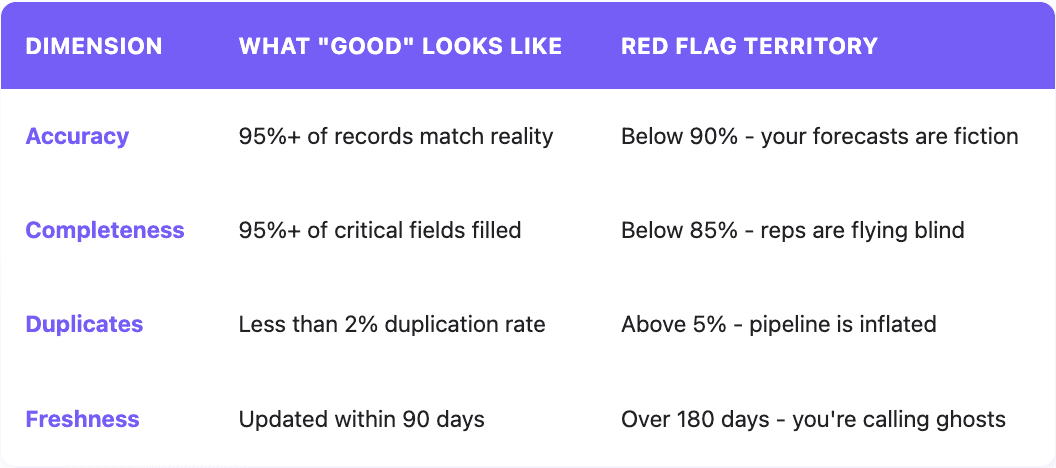
The Six Dimensions of Data Quality
Data quality professionals talk about six core dimensions. "Dimensions" sounds academic, but understanding these gives you a framework for measuring and fixing problems - not just complaining about "bad data."
1. Accuracy: Does This Match Reality?
Accuracy is the most obvious dimension: is the data correct? Does that phone number actually reach Sarah? Is that company really in healthcare? Does John still work there?
A database can look healthy by every other metric but still be useless because the underlying information is wrong. CRMs with 98% field completion rates where half the phone numbers are disconnected, that's not a healthy database. That's a well-organized list of dead ends.
How to measure it: Pull a random sample of 100-200 records and manually verify them. Check against LinkedIn, company websites, or pick up the phone. If 95 out of 100 check out, you're at 95% accuracy.
Target: 90% or higher for most B2B operations. Regulated industries like finance or healthcare might need a higher percentage for compliance.
2. Completeness: Do You Have What You Need?
A contact record with just a name and company isn't helping anyone. Completeness measures whether you have the information you actually need. This includes email, phone, job title, company size, whatever matters for your sales process.
The key word is "need." Not every field matters equally. A missing LinkedIn URL probably won't tank a deal. A missing direct phone number for a top target account? That's different. Research shows that having a valid phone number increases deal close probability by 30-50%. That missing field is revenue left on the table.
How to measure it: Define which fields are truly critical for each record type (email, phone, job title, company name, industry at minimum). Calculate what percentage of records have all those fields filled with valid data.
Target: 90%+ for critical fields. Some teams use "minimum viable" (around 80%) and "ideal" (90%+) when triaging a messy database.
3. Consistency: Is "USA" the Same as "United States"?
Pull a report of all customers in the United States and get half the results expected. Why? Some records say "USA," others say "US," others say "United States," and someone typed "America."
Consistency means data is uniform across the database. Same formats, same conventions, same values representing the same things.
Inconsistent data breaks everything downstream. Automation triggers when Industry = "Software"? It just missed every record tagged "SaaS" or "Technology" or "Software & Technology." Lead scoring weights company size? Hope everyone's using the same employee count ranges.
How to measure it: Run reports looking for variations of values that should be standardized. How many different ways is "United States" represented? How many variations of "Software" exist in the Industry field?
Target: 97%+ of records following established formatting standards.
4. Timeliness: How Stale Is This?
People change jobs constantly. Companies get acquired, rebranded, shut down. Contact information that was perfect six months ago might be useless today.
Timeliness (or freshness) measures whether data is current enough to use. The decay happens faster than most people realize. Marketing Sherpa research suggests B2B contact data degrades at roughly 2.1% per month. That's over 22% of a database going stale every year.
Nothing screams "we have no idea who you are" quite like an email addressed to someone who left two years ago. Or a cold call opening with "Hi, is this the VP of Marketing?" when that person moved to a competitor last quarter.
How to measure it: Track when records were last updated or verified. What percentage of active account contacts have been touched in the last 90 days? 180 days?
Target: 95%+ of active contacts verified within 90 days. For dormant accounts, 180 days is acceptable.

5. Validity: Does This Even Make Sense?
Validity checks whether data conforms to the right format. An email address should look like username@domain.com, not "sarah at company dot com" or "Sarah@company" (missing the extension). A US phone number should have 10 digits. A close date should be an actual date, not "Q2" or "ASAP."
Invalid data usually enters through manual entry errors. Typos happen. "gnail.com" instead of "gmail.com" seems minor until every email to that contact bounces.
How to measure it: Run validation checks against format rules. What percentage of email addresses follow proper format? What percentage of phone numbers have the right number of digits?
Target: 98%+ of records passing validation rules. This is one of the easier dimensions to enforce through CRM configuration.
6. Uniqueness: One Record Per Entity
Duplicate records cause chaos. Multiple contacts for the same person means split activity history, never seeing the full picture of interactions. Duplicate companies mean inflated pipeline numbers and territorial confusion when two reps work the same account unknowingly.
Uniqueness measures whether each entity (contact, company, opportunity) has exactly one record representing it.
The worst part about duplicates isn't that they exist - it's that they multiply. Every integration, every list import, every form submission is an opportunity for more duplicates. Without a system for catching them, they compound over time.
How to measure it: Use duplicate detection tools to identify likely matches. Calculate what percentage of the database consists of unique records versus duplicates.
Target: Less than 2% duplication rate. Above 5% is a significant problem actively distorting pipeline and reporting.
The CRM Health Check: A Practical Audit Framework
Knowing the dimensions is helpful. Actually auditing the CRM is what moves the needle.
Phase 1: Set the Standard
Before measuring quality, define what "good" looks like.
Document data standards. What format should phone numbers use? What are valid values for Industry, Lead Source, Lifecycle Stage? Who owns each record type? Get this written down somewhere the team can reference.
Identify critical fields. Not everything matters equally. For most B2B companies: email, direct phone, job title, company name, industry, employee count, and lifecycle stage. Add a few more based on specific sales process needs.
Set benchmarks. Use the targets throughout this guide as starting points, then adjust based on business needs and current reality.
Phase 2: Measure Current State
Now the actual audit happens.
Run completeness reports. For each critical field, calculate the percentage of records with valid data. Native CRM reporting handles most of this.
Check for duplicates. Use built-in duplicate detection or a third-party tool. Calculate the duplication rate. It's usually worse than expected.
Validate formats. Export data and check email formats, phone number lengths, date fields. Basic spreadsheet functions or dedicated data cleaning tools work well.
Sample for accuracy. The time-consuming part, but essential. Pull 100-200 random records and manually verify them against LinkedIn, company websites, or direct outreach. No shortcut here, true accuracy rate matters.
Assess freshness. Report on when records were last modified. What percentage of active accounts have had contact data verified in the past 90 days?
Phase 3: Find Root Causes
Raw scores show where problems exist. Understanding why they exist shows how to fix them.
Data entry practices. Are reps entering data consistently? Do they have clear guidance? Watch someone actually create a new contact—it's revealing.
Integrations. Are third-party tools syncing correctly? Integration conflicts commonly cause inconsistencies and duplicates.
Process gaps. Who's responsible for keeping data current? What happens when a contact changes roles? If the answer is "nobody" and "nothing," there's the problem.
Training. Do users understand why data quality matters? Do they know the standards? Sometimes the issue is that nobody ever explained what "good" looks like.
Phase 4: Prioritize and Fix
Everything can't be fixed at once. Prioritize by business impact.
High priority: Anything affecting current quarter revenue. Inaccurate data on active opportunities, missing contact info for target accounts, duplicate records inflating pipeline.
Medium priority: Issues affecting future quarters. Incomplete data on new leads, inconsistent segmentation values, stale data on dormant accounts.
Lower priority: Cosmetic issues. Formatting inconsistencies in non-critical fields, ancient records that will never be contacted.
For each priority issue, decide the approach: manual cleanup, automated enrichment, process changes, or some combination.
Metrics Worth Tracking Ongoing
After the initial cleanup, ongoing monitoring is essential.
Record-Level Metrics
Field fill rate by critical field. Track weekly or monthly. Catch decay early.
Duplicate creation rate. How many new duplicates created per week? A rising rate means something's broken.
Email bounce rate. Should stay below 2%. Rising bounces = accelerating data decay.
Phone connect rate. What percentage of outbound calls reach a live person? Declining connect rates often correlate with declining accuracy.
Process Metrics
Records enriched per period. Is progress actually being made on filling gaps?
Time to data correction. When an issue is spotted, how long until it's fixed?
User adoption of standards. Are people actually following the rules?
Business Impact Metrics
Forecast accuracy. Track variance between predicted and actual results. Better data should mean better forecasts.
Lead-to-opportunity conversion. Clean, complete lead data typically improves conversion rates.
Sales cycle length. Better data enables more efficient prospecting and reduces wasted effort.
Common CRM Data Quality Problems (And How to Fix Them)
Some data quality issues show up in almost every CRM. Here's what to look for and how to address each one.
Missing Phone Numbers
Direct phone numbers are gold for sales teams, but they're often the hardest field to complete. The problem is that personal phone numbers aren't publicly available, and many contacts don't list them on LinkedIn or company websites.
The fix: Automated enrichment that queries multiple data providers. Single-provider approaches hit 50-60% match rates at best. Waterfall enrichment—checking multiple sources in sequence—can reach 80-90%. For high-value target accounts, the investment pays for itself quickly.
Stale Contact Data
People change jobs constantly. The perfect contact from six months ago might work somewhere else entirely now. Without a system for catching these changes, reps waste time on contacts who can't help them.
The fix: Set up automated refresh cycles. For active accounts, verify contact data at least quarterly. For target accounts, verify before any significant outreach. Modern enrichment tools can detect job changes and flag records automatically.
Inconsistent Company Names
"IBM" vs "International Business Machines" vs "IBM Corporation" creates chaos for account-based reporting and duplicate detection. The same company appears multiple times in reports, territory assignments get confused, and duplicates slip through.
The fix: Establish canonical company names and enforce them through data standardization. Use matching algorithms that recognize variations and map them to a single master record. Most CRMs have built-in tools for this, or third-party solutions can help.
Manual Entry Errors
Typos happen. "gnail.com" instead of "gmail.com" seems minor but means emails never arrive. Wrong digits in a phone number waste time on calls that never connect.
The fix: Real-time validation at point of entry. Most CRMs can validate email formats and flag obvious errors before records are saved. Required fields and dropdown menus reduce freeform entry errors.
Duplicate Records
Duplicates proliferate when data enters from multiple sources without proper matching. Every integration, list import, and form submission is an opportunity for duplicates to sneak in.
The fix: Configure duplicate detection rules in the CRM. Run regular deduplication sweeps using matching algorithms that catch fuzzy matches (name spelling variations, for example). Most importantly, prevent duplicates at entry by showing possible matches before creating new records.
When to Automate
Manual data cleanup doesn't scale. As the database grows, the effort required to keep it clean grows faster. At some point, more time goes to managing data than using it.
CRM enrichment tools automatically fill missing fields, update stale records, and validate existing data against external sources. The economics are straightforward: if reps waste 27% of their time on bad data (which research suggests), even a few hundred dollars monthly in enrichment tools pays for itself quickly.
But single-provider enrichment isn't enough. No one data provider has complete information on every contact and company. Waterfall enrichment, querying multiple providers in sequence and taking the best data from each, typically achieves 80-90% match rates compared to 40-50% from single providers.
Quick Reference Checklist
Use this for the next data quality review:
Completeness
All contacts have valid email addresses
Target account contacts have direct phone numbers
All opportunities have close dates and deal values
Company records have industry and employee count
Accuracy
Sample verification shows 95%+ accuracy
Email bounce rate below 2%
Phone connect rate stable or improving
Consistency
Standard values used for Industry, Lead Source, Lifecycle Stage
Company names follow established conventions
Date formats consistent throughout
Uniqueness
Duplication rate below 2%
New duplicate creation tracked and declining
Merge process documented and followed
Validity
Email addresses properly formatted
Phone numbers have correct digit count
Required fields enforced at entry
Freshness
Active account contacts verified within 90 days
Stale record alerts configured
Enrichment refresh cycles scheduled
What's Next
CRM data quality isn't a one-time project but an ongoing discipline: clear standards, consistent measurement, appropriate tooling, and organizational commitment.
Start with an honest assessment of current state. Use this guide to establish a baseline. Fix highest-impact gaps first. Build sustainable processes that prevent quality from degrading.
Companies that get this right don't just have cleaner databases. They have sales teams closing more deals, marketing teams generating better leads, and leadership teams that can actually trust their numbers.
FAQ
What is CRM data quality? CRM data quality measures how well customer relationship management data represents reality and supports business decisions. High-quality data is accurate, complete, consistent, timely, valid, and unique. Poor quality data leads to wasted sales effort, broken automations, and unreliable forecasting.
What are the six dimensions of data quality? The six dimensions are: Accuracy (data correctly represents real-world entities), Completeness (required fields contain valid information), Consistency (data is uniform across the database), Timeliness (data is current enough to be useful), Validity (data conforms to defined formats), and Uniqueness (no duplicate records exist).
What's a good accuracy benchmark for CRM data? Most B2B operations should target 95% accuracy or higher. Between 90-94% is acceptable but indicates room for improvement. Below 90% is critical, forecasts and reports become unreliable, and the team wastes significant time on bad data.
How often should CRM data quality be audited? Full comprehensive audits should happen at least twice a year, ideally quarterly. Key metrics like duplicate creation rate, email bounce rate, and field completion should be monitored weekly or monthly through dashboards to catch problems early.
How fast does CRM data decay? B2B contact data degrades at approximately 2.1% per month according to Marketing Sherpa - over 22% annually. People change jobs, companies get acquired, phone numbers change. Without active maintenance, databases get significantly worse every year.
What's the difference between data quality and data integrity? Data quality focuses on whether data is accurate, complete, and usable. Data integrity is broader, encompassing overall trustworthiness including security, consistency across systems, and protection from unauthorized changes. Quality is one component of integrity.
How does enrichment improve CRM data quality? Enrichment automatically fills missing fields by pulling information from external data sources. This improves completeness (adding phone numbers, firmographic data), accuracy (validating and updating stale records), and freshness (detecting job changes). It scales data maintenance in ways manual processes cannot.
Related articles
See all