
A DigitalOcean survey of over 1,100 developers and CTOs found that 67% of organizations using AI agents report productivity gains, but only 10% are scaling agents in production. The gap between "this works in a demo" and "this runs reliably at scale" is where most GTM teams get stuck.
The reason is usually the integration layer. You have Claude Code orchestrating your GTM workflows. You have enrichment providers supplying the data. The question is how Claude Code connects to those providers, and that question has three answers: MCP, SDK, or direct API. Each one works. Each one is right for different situations. Picking the wrong one for your use case creates friction that compounds with every campaign you run.
This article is the decision framework we wish existed when we started building our own enrichment infrastructure for AI agents. It covers what each interface actually does, where each one excels, and how the three work together in a production GTM stack.
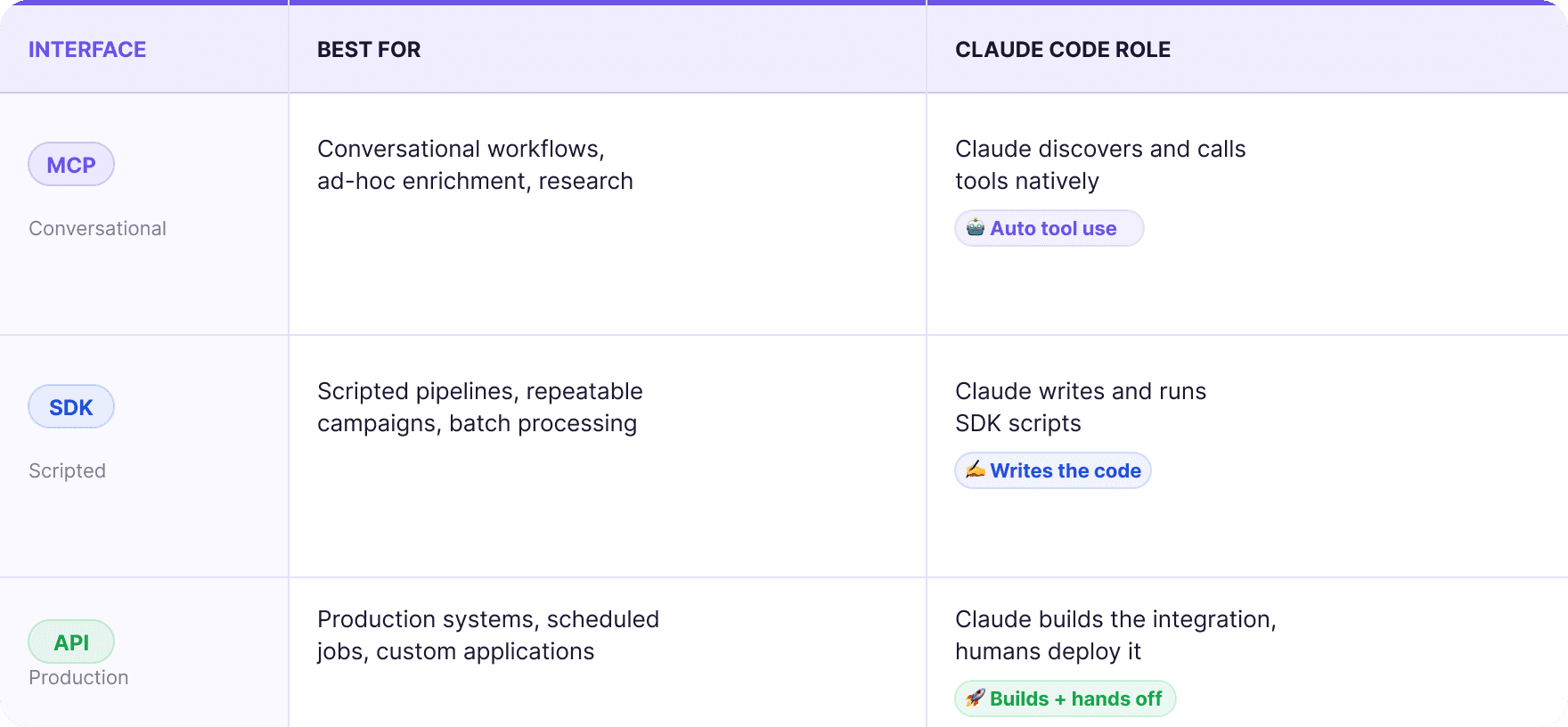
What Each One Actually Is
Quick definitions, because these terms get used loosely.
MCP (Model Context Protocol) is an open standard that lets AI agents call external tools through a standardized interface. Anthropic created it and donated it to the Linux Foundation in late 2025, with Google, OpenAI, Microsoft, AWS, and others co-founding the governance body. When you connect an MCP server to Claude Code, Claude can discover what tools are available, understand their inputs and outputs, and call them directly. No scripts or custom code. You describe what you want, and Claude figures out which tool to call and how to call it.
SDK (Software Development Kit) is a language-specific library that wraps an API into convenient functions. Instead of crafting raw HTTP requests, you import the library and call methods like databar.enrichments.run() or apollo.search.people(). Claude Code writes and executes SDK scripts as part of its workflow. The scripts are deterministic: same input, same API call, same result every time.
API (Application Programming Interface) is the raw HTTP endpoint layer. REST calls with JSON payloads. No abstraction, no wrapper. You construct the request, send it, handle the response. APIs are what both MCP servers and SDKs call under the hood. Working directly with APIs gives you maximum control and maximum responsibility.
The relationship: MCP calls APIs through a standardized protocol that AI agents understand. SDKs call APIs through language-specific wrappers that developers understand. APIs are the foundation that both sit on top of.

When MCP Is the Right Choice
MCP is the right interface when the AI agent needs to make decisions about which tools to call, in what order, and with what parameters. This is conversational, exploratory, context-dependent work.
Ad-hoc account research: You are preparing for a call with a prospect. You tell Claude Code: "Pull everything we have on this company, check their tech stack, find the VP of Engineering, and see if they have posted any jobs related to data infrastructure in the last 90 days." Claude discovers which enrichment providers can answer each part of that request, calls them in sequence, and assembles a briefing. You did not specify which API to call for the tech stack or which provider to use for job data. Claude figured that out from the MCP tool descriptions.
Building a prospect list from scratch: You have an ICP definition but no list yet. "Find 100 SaaS companies with 50 to 200 employees that raised Series A or B in the last 12 months. Get the Head of Growth or VP Marketing at each one. Verify their emails." Claude calls company search, filters by your criteria, runs a waterfall enrichment to find contacts, and verifies emails. The entire workflow runs inside one conversation.
Exploring a new data source: You just connected a new enrichment provider through MCP and want to understand what it can do. "What enrichments does this provider offer? What inputs does it need? Run it on three test companies and show me the output." Claude reads the MCP tool descriptions, understands the schema, and tests it interactively.
One-off data cleanup: A client just sent over a messy CRM export. "Audit this list, flag duplicates, identify records missing email or phone, and enrich the gaps." Claude reads the file, runs quality checks, calls enrichment tools through MCP to fill gaps, and produces a clean output. This is a one-time task, not a recurring pipeline.
The pattern: MCP excels when the workflow is exploratory, the volume a manageable number of records, and the value comes from Claude making intelligent decisions about which tools to use. The tradeoff is speed. MCP calls involve tool discovery, schema reading, and agent reasoning at each step. For 50 records, that overhead is negligible. For 5,000 records, it adds up.

When the SDK Is the Right Choice
The SDK is the right interface when you know exactly what needs to happen and you want it to happen the same way every time. This is scripted, repeatable, production-grade work.
Campaign enrichment at scale: You have 2,000 companies to enrich with firmographic data, find contacts at, and verify emails for. The workflow is defined: query company data, find decision-makers, run email waterfall, verify. Claude Code writes a Python script using the SDK that processes the batch with proper rate limiting, error handling, and retry logic. The script runs to completion without Claude making per-record decisions.
Recurring enrichment jobs: Every Monday, you pull new leads from HubSpot and enrich them before the sales team starts the week. This is a scheduled task, not an interactive conversation. Claude Code builds the script once, you run it on a schedule. Same logic, same providers, same output format, every week.
Multi-step workflows with dependencies: Score companies → filter by tier → find contacts at Tier 1 companies → enrich with waterfall → push to sending platform. Each step depends on the previous step's output. An SDK script handles the data flow between steps deterministically. No ambiguity about which provider to call or how to handle edge cases, because those decisions are encoded in the script.
Volume processing: Anything over 500 records benefits from the SDK approach. SDKs handle rate limiting, pagination, async polling for bulk operations, and structured error handling out of the box. Trying to process 3,000 records through MCP means 3,000 individual tool calls with agent reasoning overhead at each one. The SDK batches that into a handful of bulk API calls.
Here is what the difference looks like in practice for a waterfall email enrichment on 500 contacts:
Via MCP: Claude calls run_waterfall 500 times, reasoning about each result. Takes 15 to 25 minutes depending on provider response times and agent processing. Works, but slow.
Via SDK: Claude writes a script that calls bulk_run_waterfall with all 500 contacts in one batch, polls for completion, and retrieves results. Takes 3 to 5 minutes. Same data, fraction of the time.
The pattern: SDKs excel when the workflow is defined, the volume exceeds a few hundred records, and you want deterministic execution without per-record reasoning overhead.

When the Direct API Is the Right Choice
Direct API integration is the right choice when you are building a production system that will run without Claude Code in the loop at all.
Custom applications: You are building an internal tool that enriches every new lead as it enters your CRM. This runs on a server, triggered by a webhook, 24/7. Code calling endpoints with structured inputs and outputs. Direct API calls in your language of choice (Node.js, Python, Go, whatever your stack uses).
Integration with non-Claude environments: Not everything runs through Claude Code. If you use Zapier, Make, n8n, or a custom automation platform, you connect to the API directly. The API is the universal interface that every tool and platform can call.
Maximum performance tuning: Direct API calls eliminate every layer of abstraction. You control connection pooling, retry strategies, timeout handling, concurrent request limits, and response parsing. For high-throughput production systems processing tens of thousands of records, this level of control matters.
Edge cases the SDK does not cover: SDKs wrap the most common API operations, but sometimes you need a specific combination of parameters or an endpoint the SDK has not implemented yet. Direct API calls give you full access to every capability the platform exposes.
The pattern: Direct API is for production systems where reliability, performance, and control matter more than development speed. The tradeoff is implementation time. You write more code, handle more edge cases, and maintain more infrastructure.
How the Three Work Together in Claude Code
Here is the part most "MCP vs API" articles miss: you are not choosing one. You are using all three, at different stages of the same workflow.
The typical progression for a GTM campaign looks like this:
Stage 1: Research and prototyping (MCP)
You are figuring out the campaign. Which ICP segments to target. Which enrichment data points matter. Which providers return the best results for this vertical. Claude Code explores through MCP: testing providers, comparing output quality, refining the targeting criteria. This is interactive, iterative, conversational work. MCP is perfect for it.
Stage 2: Campaign build (SDK)
The ICP is defined. The enrichment flow is locked. Now you need to process 1,500 companies through that flow. Claude Code writes an SDK script that executes the enrichment pipeline, applies your scoring model, finds contacts via waterfall, and outputs a campaign-ready file. The script runs once, produces a clean result, and you review the output before pushing to your sending platform.
Stage 3: Production automation (API)
This campaign segment converts well. You want it running automatically every week with fresh data. You take the SDK script Claude Code wrote, convert the core logic into a standalone service, connect it to a scheduler, and deploy it. The production system calls the API directly without Claude Code in the loop. Claude Code built the system, but the system runs on its own.
Stage 4: Monitoring and iteration (MCP again)
Two months in, reply rates are dropping. You pull campaign analytics into Claude Code and ask: "What changed? Compare this month's target companies with last month's. Are we hitting the same segments? Is the enrichment data quality holding?" Claude investigates through MCP, testing hypotheses interactively. Then you update the SDK script with the refined logic, redeploy, and the cycle continues.
This is how the interfaces complement each other. MCP handles exploration and analysis. SDKs handle batch execution. APIs handle production deployment. Claude Code sits at the center, fluent in all three.

The Visibility Question
One thing that does not get discussed enough: you cannot see what an AI agent is doing through MCP the way you can see a script running.
When Claude Code calls tools through MCP, the execution happens inside the agent's reasoning loop. You see inputs and outputs, but the intermediate decisions, the tool selection, the parameter construction, are opaque unless you specifically ask Claude to explain its reasoning. For small-scale work, this is fine. For large-scale production workflows, it can be a concern.
This is one reason the SDK approach wins for anything at volume. A script is auditable. You can read every line, trace every API call, and predict exactly what will happen before you run it. When something goes wrong, the error trace tells you exactly which call failed and why.
The practical solution most teams land on: MCP for anything interactive where you are present and reviewing the output. SDK scripts for anything batch or recurring where you want deterministic behavior and a clear audit trail. Direct API for anything deployed to production where reliability and monitoring matter.
For agencies managing client campaigns, this visibility distinction is especially important. When a client asks "what happened with last week's enrichment batch?", you want to point to a script log, not reconstruct an MCP conversation. Scripted workflows using multi-provider enrichment platforms produce structured logs that serve as both audit trail and client reporting.
Decision Framework
If you want the simple version, here it is.
Use MCP when:
→ You are exploring, researching, or prototyping
→ The volume is relatively low (e.g. 500 records)
→ You want Claude to decide which tools to call
→ The task is one-off or infrequent
→ You are inside Claude Code or Cowork and want the fastest path to a result
Use SDK when:
→ The workflow is defined and repeatable
→ The volume is 500+ records
→ You want deterministic execution with structured error handling
→ Claude Code is writing and running the script
→ You need an audit trail and reproducible results
Use direct API when:
→ You are building a production system that runs without Claude Code
→ The volume exceeds 10,000 records or requires continuous processing
→ You need maximum control over performance, retries, and concurrency
→ The integration targets a non-Claude platform (Zapier, Make, custom app)
Use all three when:
→ You are running GTM at scale, which means prototyping in MCP, executing in SDK, and deploying in API. This is not three separate choices. It is one workflow at different maturity stages.
What to Set Up This Week
For teams running enrichment through Claude Code, here is the practical starting point.
→ Connect one MCP server for your primary enrichment provider. Start using it for ad-hoc research and account enrichment. Get comfortable with conversational tool use.
→ Ask Claude Code to write one SDK script for your most common batch operation. Probably waterfall email enrichment for a list of contacts. Run it. Compare the speed and output quality to the MCP approach.
→ Save the script in your project folder with a clear name and documentation. This becomes a reusable tool that Claude Code can run whenever you need that workflow.
In the GTM space, teams that report the most success treat this as a spectrum rather than a binary choice. They start in MCP, graduate proven workflows to SDK scripts, and eventually move high-volume production pipelines to direct API integrations. Claude Code is the environment where all three interfaces coexist, and learning to use each one at the right moment is what separates fast iteration from slow, expensive execution.
If Clay is the tool you're comparing against, Claude Code vs Clay covers the workflow side and Clay alternatives compared covers the alternatives.
FAQ
Does MCP replace APIs?
No. MCP sits on top of APIs. An MCP server is a wrapper that translates API endpoints into a format AI agents can discover, understand, and call. Under the hood, every MCP tool call eventually hits a REST API. MCP makes APIs accessible to AI agents without custom code. It does not make APIs unnecessary.
Is MCP slower than SDK calls?
For individual calls, the difference is minimal. For batch operations, yes. MCP involves agent reasoning overhead at each step: discovering tools, constructing parameters, interpreting responses. SDKs bypass all of that by calling the API directly with pre-defined parameters. At 500+ records, the difference becomes significant. At 5,000+ records, SDK scripts can be 5 to 10x faster than sequential MCP calls.
Can I use MCP outside of Claude Code?
Yes. MCP is an open standard supported by Claude Cowork, Claude Desktop, applications built on Anthropic's Agent SDK, and increasingly by other AI platforms. Google, OpenAI, and Microsoft have all adopted MCP. Any application that implements an MCP client can connect to any MCP server.
Do I need to be technical to use MCP?
No. That is one of MCP's primary advantages. You describe what you want in natural language, and Claude handles the tool calls. SDKs require writing or at least reviewing code. Direct APIs require understanding HTTP requests, authentication, and response parsing. MCP abstracts all of that behind a conversational interface.
Should agencies use MCP or SDK for client work?
Both. MCP for client-facing work where you need fast, interactive results: research during a call, quick enrichment for a meeting prep, exploring a new segment. SDK scripts for campaign production where you need consistency, speed, and a clear record of what was done. Most agencies land on MCP for the first 20% of the work (research, scoping, prototyping) and SDK for the remaining 80% (execution, delivery, reporting).
Related articles
See all