

Anthropic's Claude Cowork triggered a $285 billion selloff in software stocks within days of launching (Bloomberg, January 2026). Investors repriced SaaS companies whose products overlap with what Cowork can do: project management, data analysis, workflow automation, and writing tools all took hits.
The panic was probably premature for most categories. But for GTM teams, the signal is real. Cowork is Claude Code without the terminal. It gives non-technical sales, marketing, and RevOps operators the same agentic capabilities that developers have been using for the past year, specifically the ability to read files, connect to external tools, execute multi-step workflows, and run tasks on a recurring schedule. All through a chat interface on their desktop.
For teams already running enrichment workflows and outbound campaigns, this changes the practical question from "how do I build this automation" to "what do I tell the agent to do." The enrichment data, the CRM connections, the sequence tools are all still necessary. Cowork is the orchestration layer that sits on top and ties them together.
What Cowork Is (and Isn't)
Claude Cowork launched as a research preview in January 2026 on the Claude desktop app for macOS, with Windows following in February. It was built by Anthropic's team in roughly two weeks using Claude Code itself.
The simplest explanation: Cowork is a desktop AI agent that can access your local files and connect to external services. You point it at a folder, describe what you need done, and it figures out the steps and executes them.
What makes it different from chatting with Claude in a browser:
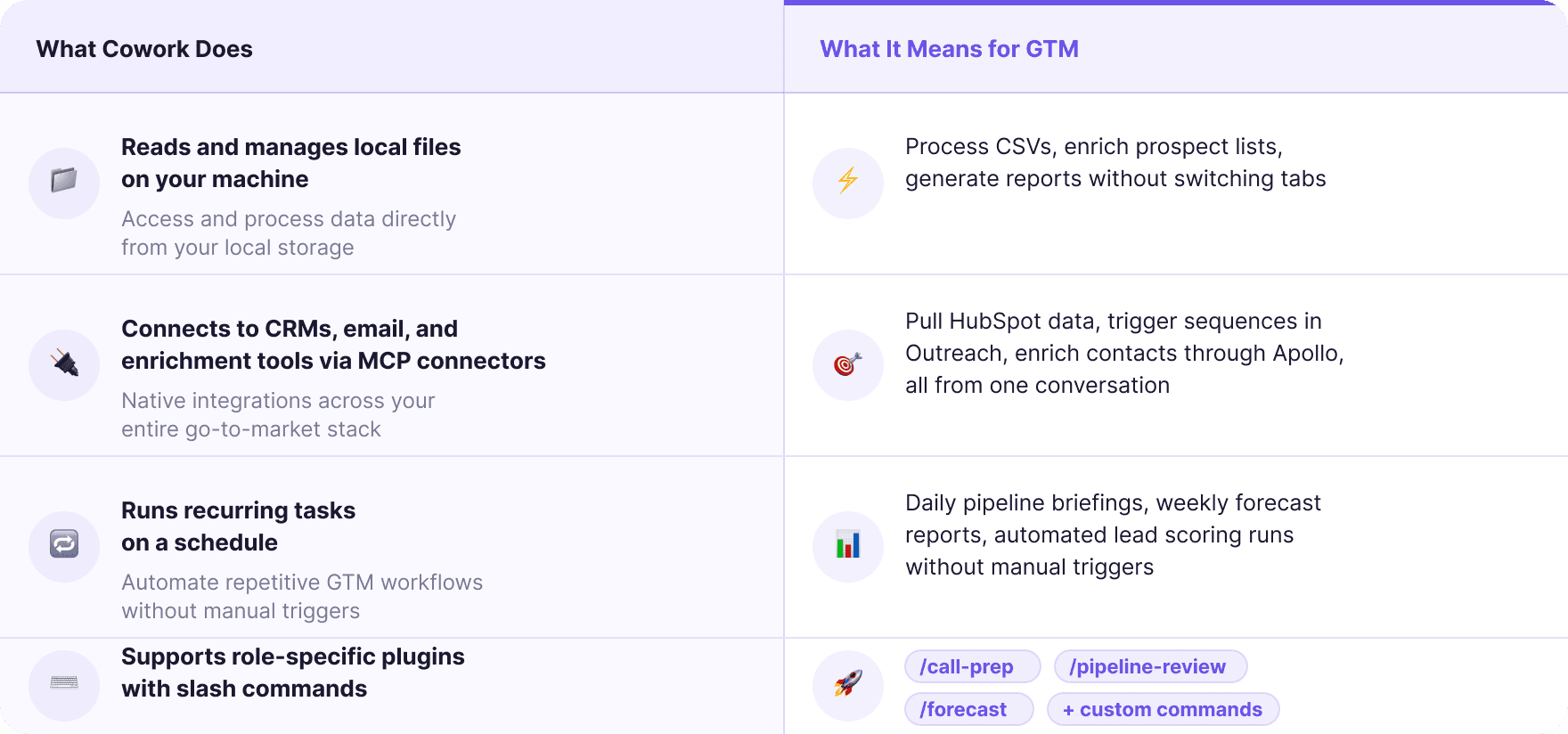
→ File system access. Cowork reads and writes files on your machine. Upload a CSV of 500 leads, and Cowork can clean it, deduplicate, score, and output a sorted file, all in one conversation.
→ MCP connectors. Model Context Protocol lets Cowork interact with external tools. As of late February 2026, available connectors include Google Drive, Gmail, Google Calendar, Outreach, DocuSign, FactSet, WordPress, and more. Each connector gives Cowork read/write access to that platform's data.
→ Plugins. Role-specific packages that bundle skills, slash commands, connectors, and sub-agents. The Sales plugin, for example, includes /call-prep, /pipeline-review, /forecast, and automatic skills for account research, competitive intelligence, and outreach drafting.
→ Recurring tasks. You can configure Cowork to execute workflows on a daily, weekly, or custom schedule. A morning pipeline briefing that pulls from your CRM, scores new leads, and sends you a prioritized list, running automatically without you opening the app.
What Cowork is not: it is not a CRM, not an enrichment provider, not a sequencing tool. It connects to all of those things. The value is in the orchestration, not in replacing any single tool in your stack.

The Sales Plugin and What It Can Do Today
Anthropic released 11 open-source plugins at launch, covering sales, marketing, finance, legal, HR, engineering, design, operations, data analysis, customer support, and productivity. The Sales plugin is the most relevant for GTM teams.
Here is what the Sales plugin includes out of the box:
→ /call-prep. Generates a pre-call brief with company research, key contacts, suggested discovery questions, and talking points based on your ICP and the prospect's situation.
→ /call-summary. Processes call notes or transcripts into structured summaries with action items and draft follow-up emails.
→ /pipeline-review. Analyzes pipeline health, flags stale deals and risks, and produces a weekly action plan.
→ /forecast. Generates weighted sales forecasts with best/likely/worst scenarios from a CSV or pipeline description.
Beyond the slash commands, the plugin includes automatic skills that activate when relevant: account research for company intel and key contacts, daily briefings with pipeline alerts, research-first outreach drafting, and competitive intelligence with differentiation matrices and battle cards.
The important detail is that all of these plugins are open source, file-based, and customizable. You install the Sales plugin as a starting point, then modify the skills, commands, and connectors to match your specific sales process, your terminology, your CRM structure, and your ICP definition. The plugin is not a fixed product. It is a template you shape to your operation.

Where Enrichment Data Fits In
Cowork can orchestrate workflows, but it needs data to orchestrate. This is where the enrichment layer matters most.
Consider a practical scenario: you want Cowork to run a daily lead scoring routine. Every morning, it pulls new leads from HubSpot, scores them against your ICP, and sends you a Slack message with the Tier 1 accounts and recommended outreach angles.
For that workflow to produce useful output, Cowork needs enriched data on each lead. Company size, revenue, industry, tech stack, funding history, hiring signals, contact verification. Without that data, the scoring is just guessing based on whatever the lead filled in on your form.
The enrichment can come from multiple places:
→ Direct MCP connectors. MCP connectors, lets Cowork search for leads, enrich contacts, and activate sequences directly inside a Claude conversation. Similar integrations from other providers are coming.
→ API-first enrichment platforms. For teams running waterfall enrichment across multiple providers (which is the only way to consistently hit 80%+ match rates on email and phone), the enrichment data flows through an API that Cowork calls as part of the workflow. You describe the enrichment step in the plugin skill file, and Cowork executes it programmatically.
→ Local files. Export enriched data from your enrichment platform, drop the CSV in a Cowork-accessible folder, and let the agent process it. Less elegant than a direct API connection, but functional today.
The teams that will get the most from Cowork are the ones with clean, comprehensive enrichment data already flowing into their CRM. Cowork makes the orchestration and analysis faster. It does not fix bad data. If your CRM records are incomplete, your CRM enrichment pipeline needs to be solid before Cowork adds meaningful value on top.

Five GTM Workflows That Work in Cowork Today
These are workflows that GTM teams can set up now, given the current state of Cowork's capabilities and connector ecosystem.
1. Morning pipeline briefing
Configure a recurring daily task. Cowork connects to your CRM, pulls all open opportunities, flags deals that have gone stale (no activity in X days), identifies accounts with new engagement signals, and produces a prioritized daily brief. Instead of logging into your CRM and building a custom view every morning, you get a structured summary waiting for you.
2. Pre-call research and prep
Use /call-prep before any prospect meeting. Cowork researches the company (website, news, LinkedIn activity, funding, hiring), identifies the key contacts in the buying committee, surfaces relevant pain points based on your ICP, and generates discovery questions tailored to the prospect's situation. This replaces the 15 to 20 minutes of manual research that sales reps do (or skip) before every call.
3. Post-call follow-up automation
After a call, paste your notes or upload a transcript. /call-summary produces a structured summary, extracts action items, drafts a follow-up email, and can update your CRM with the call outcome and next steps. The follow-up goes out while the conversation is still fresh instead of sitting in a to-do list.
4. Lead list processing and scoring
Drop a CSV of new leads into a Cowork folder. The agent cleans the data (deduplicates, standardizes formatting, validates emails), scores each lead against your ICP definition, and outputs a tiered list: Tier 1 for immediate outreach, Tier 2 for automated sequences, Tier 3 for nurture. For teams doing this manually or across multiple tools, this collapses a multi-hour process into a single conversation.
5. Competitive intelligence briefing
Set up a weekly recurring task that monitors competitor activity: website changes, new blog posts, pricing updates, job postings, product launches. Cowork uses web search and any connected data sources to compile a competitive intelligence report with relevant changes and suggested talk tracks for your sales team. The /forecast command can then factor competitive dynamics into pipeline predictions.
What This Changes for Agencies
For agencies managing multiple clients, Cowork introduces something that has been difficult to achieve with other tools: per-client configuration that scales.
Each client gets their own plugin configuration. Client A's ICP, sales process, CRM structure, and enrichment rules are encoded in one plugin. Client B's in another. When an agency operator works on Client A's pipeline, they load that plugin and Cowork behaves as if it were built specifically for that account.
This maps directly to the agency pain point of managing enrichment workflows across multiple clients. Different field structures per client. Different enrichment rules. Different ICP definitions. Instead of configuring separate workspaces in five different tools, the agency encodes each client's configuration once in a plugin and lets Cowork handle the execution.
The per-client plugin model also creates a knowledge asset. After six months of refining Client A's plugin, that configuration contains a detailed, operational understanding of their GTM process. It is not just a set of API keys and field mappings. It includes the sales methodology, the competitive landscape, the ICP scoring weights, and the outreach templates that actually work for that specific account. That accumulated context is what makes the output progressively better with each iteration.
The Limits Right Now
Cowork is still in research preview. That label is accurate, and it matters.
→ Connector ecosystem is still building. Google Workspace connectors just shipped. Many GTM tools do not have MCP connectors yet. If your core enrichment provider or sequencing tool is not connected, you are limited to file-based workflows (export CSV, process in Cowork, import back) rather than direct API integration.
→ Plugin sharing is local only (for now). Plugins currently save to your machine. Org-wide sharing and private plugin marketplaces are announced but not yet available. For agencies, this means each team member needs to install and maintain their own plugin copies until the enterprise features ship.
→ Complex spreadsheets can trip up the parser. DataCamp's testing found that heavily formatted Excel files sometimes confuse Cowork's file processing. Clean CSVs work reliably. Complex multi-sheet workbooks with formulas may need manual cleanup first.
→ Chrome automation is slow. Cowork can automate browser tasks through the Claude in Chrome extension, but the current execution speed is noticeably slower than purpose-built automation tools. This is a research preview limitation that will likely improve.
→ Paid subscription. Cowork requires a paid Claude subscription (Pro, Max, Team, or Enterprise). For heavy usage, the monthly cost ranges from $100 to $200 depending on the plan. That is not expensive compared to a dedicated sales tool, but it adds to the stack cost rather than replacing something.
Cowork vs. Claude Code for GTM
If you have been following the Claude Code for GTM conversation, the obvious question is: when do you use Cowork and when do you use Claude Code?
The practical split:
→ Cowork is for operators who want to describe a task in plain English and have it executed. No terminal. The plugin system handles configuration. Best for AEs, SDR managers, marketing ops, and agency operators who need GTM automation but do not write code.
→ Claude Code is for builders who want full programmatic control. Custom scoring models, complex multi-provider enrichment pipelines, batch processing thousands of records, building reusable skills with specific API integrations. Best for RevOps engineers, growth engineers, and technical founders.
There is overlap in the middle. A RevOps lead might use Claude Code to build a sophisticated scoring model, then package the output as a Cowork plugin that their AEs use daily. The builder creates the automation. The operator runs it.
For agencies, this creates a natural division: senior operators build client-specific plugins and enrichment workflows in Claude Code, then hand them to the team as Cowork plugins that anyone can run. The technical complexity is encapsulated in the plugin. The day-to-day usage is conversational.
What to Do This Week
If you are on a GTM team and want to start using Cowork productively:
→ Install the Sales plugin. It takes two minutes from the Claude desktop app. Run /call-prep before your next prospect meeting and evaluate the output quality.
→ Test a lead list workflow. Export 50 to 100 leads from your CRM as a CSV. Point Cowork at the file and ask it to clean, deduplicate, and score against your ICP. Compare the output to your current manual process.
→ Connect one MCP connector. Start with whichever tool you use most, whether that is Gmail, Google Calendar, Apollo, or Outreach. Run a workflow that spans your local files and the connected tool to see how the integration feels.
→ Customize the Sales plugin. Open the plugin files and add your specific ICP definition, sales methodology, and competitive landscape. The more context Cowork has about your operation, the better the outputs.
→ Set up one recurring task. A daily pipeline summary or a weekly competitive brief. Start small. Evaluate whether the automated output is good enough to replace the manual version.
The enrichment data pipeline underneath is what determines output quality. Cowork is an intelligence layer. The intelligence is only as good as the data it can access. Get the enrichment foundation right, and Cowork amplifies it across every GTM workflow you run.
FAQ
What is Claude Cowork?
Claude Cowork is a desktop AI agent from Anthropic that launched in January 2026. It runs on the Claude desktop app (macOS and Windows) and gives Claude direct access to your local files plus external tools through MCP connectors. Unlike chatting with Claude in a browser, Cowork can read, write, and manage files, connect to your CRM and email, and execute multi-step workflows on a recurring schedule.
Do I need to know how to code to use Cowork?
No. Cowork is specifically designed for non-technical users. You describe tasks in plain English, install pre-built plugins, and use slash commands to trigger workflows. Customizing plugins involves editing markdown files, not writing code. That said, users with Claude Code experience can build more sophisticated plugins.
What GTM tools does Cowork connect to?
As of February 2026, available MCP connectors include Databar, Outreach, Google Drive, Gmail, Google Calendar, DocuSign, Slack, HubSpot (via community connectors), and more. Anthropic and third-party providers are adding new connectors regularly. Apollo's connector, announced this week, specifically enables search, enrichment, and sequence activation directly inside Claude.
How much does Cowork cost?
Cowork requires a paid Claude subscription. Pro plans start at $20/month, but for heavy GTM usage, the Max plan ($100 to $200/month depending on usage) provides the compute needed for complex, recurring workflows. Team and Enterprise plans offer additional admin controls and connector management.
Can Cowork replace my enrichment tools?
No. Cowork orchestrates workflows across your existing tools. It does not have its own data. You still need enrichment providers for firmographic, technographic, contact, and intent data. Cowork makes it easier to combine data from multiple sources and act on it, but the underlying data quality depends entirely on your enrichment stack.
How is Cowork different from tools like Zapier or n8n?
Zapier and n8n are workflow automation platforms that connect apps through pre-defined triggers and actions. Cowork is an AI agent that interprets natural language instructions and figures out the steps itself. The practical difference: in Zapier, you build a workflow step by step. In Cowork, you describe the outcome and the agent determines the execution path, including handling edge cases and making judgment calls that rule-based automation cannot.
Related articles
See all