
An AI model by itself is a brain without arms. It can think, reason, and analyze, but it cannot actually do anything in your sales stack. It cannot look up a company in your CRM. It cannot pull a prospect's LinkedIn profile. It cannot check whether a target account just raised funding or posted a new job opening. All it can do is talk.
MCP servers change that. Short for Model Context Protocol, MCP is a standard created by Anthropic that gives AI models like Claude the ability to connect directly to external tools, databases, and APIs. Instead of copying data between tabs and pasting it into chat windows, you give your AI agent live access to the tools it needs, and it uses them on its own. For sales teams, this means the difference between an AI that gives you generic advice and one that actually researches your specific prospects, pulls real data from real sources, and produces outputs you can act on immediately.

The ecosystem has grown fast. There are now thousands of MCP servers available, covering everything from GitHub repos to email platforms to CRM systems. But if you work in B2B sales, most of that catalog is irrelevant. What matters is a specific subset of servers that handle the things sales teams actually care about: finding companies, researching prospects, enriching contact data, monitoring buying signals, and pushing results into your CRM.
This guide covers the MCP servers that matter for sales, how to combine them into practical workflows, and a critical mistake that quietly kills agent performance when you connect too many at once.
How MCP Servers Work (The 60-Second Version)
If you have used n8n, Zapier or Make, you already understand the concept. Those tools connect apps so data can flow between them. MCP does something similar but instead of you building the automation, the AI agent decides what to do and when.
Here is the basic flow. You install Claude Code or Claude Desktop. You configure one or more MCP servers, which just means telling Claude where to find each tool and how to authenticate. Then you give Claude a task in natural language. Claude figures out which tools it needs, calls them through the MCP connections, processes the results, and gives you the output.
The setup for each server is usually a small JSON configuration block. Something like:
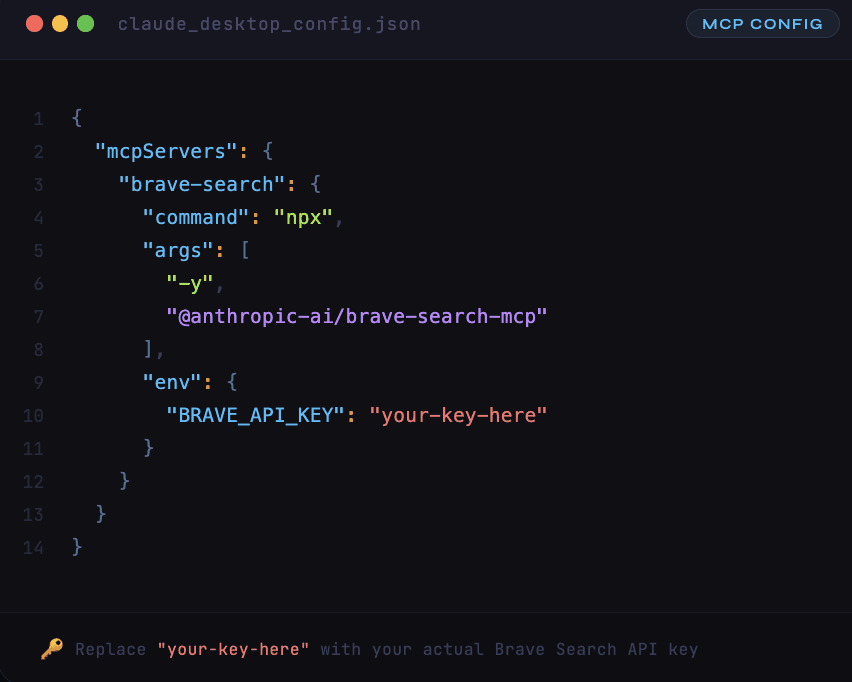
That is it. Once configured, Claude can search the web whenever it needs to, without you having to leave the conversation or open a browser. The same pattern works for CRM connections, data enrichment APIs, scraping tools, and everything else we will cover below.

The MCP Servers B2B Sales Teams Really Need
Not every sales workflow needs the same tools. A founder doing their own prospecting has different needs than an agency running outbound for ten clients simultaneously. But most sales MCP setups fall into five categories, and you will want at least one server from each.
Web Research: Brave Search
This is the foundation. Almost every sales workflow starts with some kind of web research, whether that is looking up a company, finding recent news about a prospect, checking a competitor's website, or identifying trigger events.
Brave Search MCP is free, fast, and the most commonly used research server in sales workflows. It gives Claude the ability to search the open web and return structured results. When you ask Claude to "research this company and find their recent product announcements," Brave Search is what powers that lookup.
The reason Brave works better than a generic Google search for agent workflows is that it returns clean, structured data rather than ad-heavy HTML pages. The agent gets the information it needs without having to parse through noise.
Setup cost: Free (requires a Brave Search API key, which has a generous free tier).
Company Intelligence: Crunchbase, BuiltWith, and LinkedIn
Once you have basic web search, the next layer is structured company data. This is where you get firmographics like employee count, revenue estimates, funding history, tech stack, and leadership information.
Crunchbase MCP connections give you access to funding rounds, investor information, and growth signals. When your ICP includes recently funded companies, having Crunchbase in the agent's toolkit means it can automatically filter for that.
BuiltWith fills in the technographic layer, showing you exactly what technology stack a company runs. If your analysis shows that companies using a specific CRM or marketing automation platform convert at higher rates, BuiltWith lets the agent screen for that automatically. This is data that Claude cannot get by simply browsing a company's website since tech stacks are not listed on the homepage.
LinkedIn data, accessed through various scraping-based MCP servers, covers both the company and people layers. Company searches, employee lookups, and profile data all become accessible to the agent.
There is an important distinction here. Some of these data sources require paid API access. Others work through scraping tools like Apify, which is itself available as an MCP server and can be configured to scrape LinkedIn, Google Maps, job boards, and dozens of other sources. The choice between direct API access and Apify-based scraping often comes down to volume and reliability requirements.
Contact Enrichment: Hunter, RocketReach, and Waterfall Providers
Finding companies is only half the job. You also need the people at those companies, which means emails, phone numbers, job titles, and LinkedIn profiles.
The most effective approach here is waterfall enrichment, where the agent tries multiple data providers in sequence until it finds what it needs. If Hunter does not have a verified email for your prospect, the agent falls back to RocketReach, then to ContactOut, then to PeopleDataLabs. This sequential approach dramatically increases coverage compared to relying on a single provider.
Each of these can be connected as an MCP server. But there is a practical consideration. Connecting four or five enrichment providers simultaneously adds a lot of tool descriptions to the context window (more on why this matters in a moment). A better approach for many teams is to use an aggregation platform like Databar that provides access to 100+ providers, so you only need one connection point rather than five separate MCP servers.
CRM Integration: HubSpot, Salesforce
The last piece is pushing results back into your CRM. HubSpot MCP and Salesforce MCP servers allow the agent to read existing records, update fields, create new contacts, and log activities. This closes the loop between research and execution.
Without CRM integration, every agent workflow ends with a CSV export that someone has to manually import. With it, the agent can check whether a prospect already exists in your CRM, append new data to existing records, and avoid creating duplicates.
HubSpot's MCP server has gotten quite capable in early 2026, supporting everything from contact and company record management to deal pipeline operations.

Smart MCP Routing: The Problem Nobody Talks About
Here is something we learned from talking with GTM agencies that build Claude Code workflows for multiple clients: connecting too many MCP servers at once makes the agent significantly worse.
The reason is straightforward. Every MCP server you connect adds its tool descriptions, parameters, and available functions to Claude's context window. Connect a web search API, a CRM, three enrichment providers, two scraping tools, a news feed, and a job board, and suddenly a large portion of the context window is occupied by tool definitions before the agent even starts working on your actual task.
The result is degraded reasoning quality. The agent has less room to think because so much of its working memory is consumed by knowing what tools exist. It is like sitting someone down at a desk covered with 40 different gadgets and asking them to write a strategy memo. Even if they do not use most of the gadgets, the clutter makes it harder to focus.
The solution is something we call smart MCP routing, and it is how the best agency operators structure their workflows. Instead of loading every possible MCP server for every task, you match the active servers to the specific phase of work.
During the research phase, you need web search and company intelligence. Disconnect the enrichment and CRM servers because they are not relevant yet and just add noise.
During the enrichment phase, you need the contact data providers. Turn off web search because the agent should not be browsing the internet when it should be pulling structured data from APIs.
This phased approach produces noticeably better results than the "connect everything and hope for the best" strategy that most people start with. Some tools, like datagen.dev, have started building this logic directly into their platforms. The agent evaluates which MCP it actually needs before executing a task, rather than keeping every connection active the entire time.
If you are building workflows in Claude Code manually, the simplest way to implement smart routing is to create separate CLAUDE.md configuration files for each phase, or to explicitly tell the agent in your prompt which tools to use for the current step.
Practical Sales Workflows Using MCP Servers
Let us walk through three specific workflows that sales teams are building with MCP servers right now.
Workflow 1: Account Research and Scoring
You give Claude a list of 50 target account names or domains. With Brave Search and Diffbot connected, Claude visits each company's website, pulls firmographic data, checks for recent news, identifies their tech stack, and evaluates them against your ICP criteria. The output is a scored and ranked list with a brief research summary for each account, explaining why it scored high or low.
This used to be half a day of manual work for an SDR. With MCP connections it runs in under an hour, and the quality is often better because the agent does not get fatigued or start cutting corners on company number 35.
Workflow 2: Prospect Discovery and Enrichment
Starting from a defined ICP, Claude uses LinkedIn search (via Apify MCP) to find people matching your target criteria at companies you have already qualified. Then it enriches each contact through your preferred data enrichment provider to get verified email addresses and phone numbers. The output is a campaign-ready prospect list with full contact information and personalization hooks pulled from each person's LinkedIn activity.
The key advantage over doing this in a traditional enrichment tool is that the agent can apply judgment. If a prospect's LinkedIn profile suggests they just started the role two weeks ago, the agent can flag that and suggest a different messaging angle than it would for someone who has been in the seat for two years.
Workflow 3: Signal-Triggered Outreach Lists
Claude uses Brave Search to scan for specific trigger events across your target market: recent funding announcements, leadership changes, relevant job postings, product launches, or expansion news.
When it finds a matching signal, it shifts into enrichment mode. It pulls firmographic data on the company, identifies the right decision-maker, enriches their contact information, and adds them to an outreach list with messaging tailored to the specific trigger. A company that just raised a Series B gets a different opening line than one that just posted three SDR roles.
The Scale Problem (And Where Enrichment Platforms Fit In)
One honest caveat about MCP servers for sales in their current state: they work beautifully at small to medium scale, maybe 50 to 500 companies per workflow. But when you need to process 10,000 or 40,000 companies, the current infrastructure has limitations.
Claude Code has session timeouts. Context windows fill up. There is no built-in progress tracking, so you cannot see which companies have been processed and which have not. Error handling is minimal, meaning if an API rate limit kicks in at company 847, you might not know until the session finishes (or crashes). And there is no client-facing interface, which matters a lot if you are an agency doing this work for customers who want to see what is happening.
This is not a critique of Claude Code or MCP. The technology is genuinely powerful and moving quickly. But it is important to be realistic about where agent-based workflows end and purpose-built platforms begin.
For high-volume execution, dedicated enrichment platforms like Databar handle the scale layer. They provide the visibility (progress, error logs, row-by-row status), the reliability (rate limit handling), and the interface (clients can see results as they come in). The workflow pattern that agencies are converging on is to use Claude Code with MCP servers for the strategic work, the research, analysis, ICP definition, and playbook creation, then pass the execution to an enrichment platform that can reliably process thousands of companies with full transparency.
Think of it as a division of labor. MCP gives the AI brain its hands. Enrichment platforms give those hands the endurance to do the same task 20,000 times without dropping anything.
Setting Up Your First Sales MCP Stack
If you are just getting started, here is a practical starting point that avoids the context window overload problem while covering the most important sales use cases.
Start with two servers: Brave Search for web research and your CRM MCP (HubSpot or Salesforce) for reading and writing records. These two alone let you build useful workflows like account research, competitive analysis, and CRM data quality checks.
Layer in enrichment when you need contact data at volume. Either connect individual providers as MCPs or, if you are processing more than a few dozen contacts per run, use an aggregation platform that handles multiple sources through a single endpoint.
At each stage, test the workflow at small scale before adding more tools. Connect two servers, run a few tasks, evaluate the output quality, and only then add the next server. This incremental approach prevents the common mistake of connecting eight MCP servers on day one and getting mediocre results from all of them.
What Comes Next for MCP in Sales
The trajectory is clear even if the timeline is uncertain. The agencies and growth teams building with MCP today are creating operational playbooks that will become standard practice over the next 12 to 18 months. Early adopters are connecting a few key tools and building increasingly sophisticated workflows. By mid-2026, expect MCP compatibility to become table stakes for any B2B SaaS tool that wants to remain relevant in AI-driven sales stacks.
MCP servers for sales are not a future concept. They are a current competitive advantage for the teams willing to set them up.
FAQ
What exactly is an MCP server?
An MCP server is a small program that acts as a bridge between an AI model (like Claude) and an external tool or data source. It translates the AI's requests into API calls that the external tool understands, then sends the results back. Think of it as a translator that lets Claude talk directly to your CRM, your enrichment tools, or a web search engine.
Do I need to be a developer to use MCP servers?
You need basic comfort with the terminal and editing JSON configuration files. The actual setup for most servers is copying a configuration block and adding your API key. You do not need to write code. Claude Code itself runs in the terminal, so if you are already using it, adding MCP servers is a small additional step.
Can MCP servers access my private CRM data securely?
Yes. MCP connections run locally on your machine. Your CRM credentials stay on your system and are not sent to Anthropic or any third party. The AI model receives only the data it requests through the MCP connection, not your entire database. That said, standard security practices apply. Use API tokens with limited permissions rather than admin credentials, and audit which fields the agent can access.
What is the difference between using MCP servers and using a tool like or Databar directly?
MCP servers give your AI agent the ability to decide autonomously which tools to use and how to combine them. A platform like Clay or Databar provides a structured UI for building and running enrichment workflows at scale with built-in error handling and visibility. They are complementary, not competing. Use MCP for research, analysis, and strategy where the AI's reasoning adds value. Use enrichment platforms for high-volume execution where reliability and transparency matter.
Why not just connect every MCP server I might need?
Because each connected server adds tool definitions to the AI's context window, leaving less room for actual reasoning. This is the smart routing problem described above. An agent with three focused tools will outperform an agent with fifteen tools for any given task. Connect what you need for the current phase of work, not everything you might ever need.
Are there MCP servers specifically designed for outbound sales?
A few are emerging. LeadIQ launched an MCP server in early 2026 that handles prospecting directly through Claude. GTM Skills offers an open-source MCP server with sales-specific prompts and research tools. These purpose-built servers are still early but growing quickly. For now, the most practical approach is combining general-purpose servers (Brave Search, Apify, CRM connectors) into sales-specific workflows through thoughtful prompting and Claude Code configurations.
Related articles
See all