The spray-and-pray era is officially over.
GTM teams that figured this out early are booking meetings at 2-3x the rate of teams still blasting generic sequences to purchased lists. The ones who haven't caught on are watching their domain reputation tank, their reply rates crater, and their pipeline targets slip further out of reach.
Something fundamental shifted in the outbound email landscape over the past 24 months. Google and Microsoft tightened their sender requirements. Inbox fatigue hit an all-time high. And the sheer volume of AI-generated outreach flooding inboxes trained prospects to delete anything that smells automated.
But here's what's interesting: teams getting results haven't abandoned email. They've rebuilt their entire approach - starting with the tools they use and how they fit together. This article breaks down what's working for GTM teams running outbound email in 2026, which solutions belong in your stack, and how to avoid the mistakes that sink most outbound programs before they get traction.

Why Most Outbound Email Stacks Fail
Before diving into solutions, it's worth understanding why so many GTM teams struggle with outbound despite investing heavily in tools.
The tool sprawl problem. A typical outbound workflow might involve six or seven different platforms: one for prospecting, another for email verification, a third for enrichment, a fourth for sequencing, a fifth for deliverability monitoring, and so on. Each tool does its job reasonably well in isolation. But the handoffs between them create friction, data loss, and endless manual work. Reps spend more time copying data between tabs than actually selling.
Garbage in, garbage out. The most sophisticated sequencing tool in the world can't save a campaign built on bad data. Missing phone numbers, outdated job titles, unverified emails - these problems compound at scale. When over 2% of your list bounces and another big part hits spam traps, your sender reputation takes damage that affects every future campaign.
Personalization that isn't. Most "personalization" amounts to merge tags and maybe a reference to the prospect's company name. Recipients see through this instantly. One study found that 71% of ignored cold emails lack relevance, while 43% fail on personalization. The bar has risen, and surface-level customization no longer clears it.
Volume over quality. There's a persistent belief that outbound is a numbers game - send more emails, get more replies. Data showes the opposite: smaller, highly-targeted campaigns outperformed broad blasts by nearly 3x in reply rates.

The Modern Outbound Email Stack: Core Components
An effective outbound email solution for GTM isn't a single tool - it's an integrated system. Here's how the pieces fit together:
1. Data Foundation (Prospecting + Enrichment)
Everything starts with data. You need accurate contact information for the right people at the right companies, plus enough context to personalize meaningfully.
What to look for:
Access to multiple data sources (no single provider has complete coverage)
Real-time email verification to prevent bounces before they happen
Company and contact enrichment that goes beyond basic firmographics
Intent signals showing which accounts are actively in-market
The best GTM teams use waterfall enrichment, running contact data through multiple providers in sequence to maximize hit rates. If ContactOut doesn't have the email, try Hunter. If Hunter misses, try PeopleDataLabs. This approach typically improves data completeness by 30-40% compared to relying on a single source.
Platforms like Databar specialize in this multi-source enrichment, connecting to 160+ data providers and automatically filling gaps in your CRM records. Rather than manually juggling subscriptions to ZoomInfo and five other tools, you get consolidated access with intelligent routing to whichever source has the best data for each record.
Apollo.io remains popular for combining prospecting and basic sequencing in one platform. Their 210M+ contact database is solid for initial list building, though data quality varies by segment. The built-in intent signals help prioritize accounts showing buying behavior.
ZoomInfo offers the deepest enterprise data but at enterprise prices. For larger GTM teams selling into mid-market and above, the ROI often makes sense. Their recent GTM Studio product attempts to unify planning, data, and execution in one workflow.
2. Email Sequencing + Automation
Once you have good data, you need a platform to orchestrate multi-touch campaigns across email and other channels.
The core requirements:
Multi-step sequences with conditional logic (if they open but don't reply, do X; if they click, do Y)
A/B testing for subject lines, body copy, and send times
Integration with your CRM for logging activity and syncing outcomes
Smart scheduling to spread sends throughout the day and avoid spam triggers
Instantly has emerged as a favorite among growth-stage teams for its focus on deliverability. Smart inbox rotation, email warmup, and AI-assisted personalization help campaigns reach the primary inbox instead of spam. Pricing scales reasonably as you add sending accounts.
Smartlead targets high-volume senders who need to manage dozens of email accounts without damaging deliverability. Their inbox rotation and warmup features help maintain sender reputation even at scale.
Reply.io balances functionality and price for mid-market teams. The LinkedIn integration is particularly useful for multi-channel sequences that combine email touches with connection requests and InMail.
Salesloft and Outreach remain the category leaders for larger sales organizations. Both platforms offer sophisticated sequencing, call integration, and analytics. They're overkill for a five-person startup but essential infrastructure for a 50-rep sales floor. Outreach's AI meeting summaries and automated responses have improved significantly.

3. Deliverability Infrastructure
Deliverability has become make-or-break for outbound. With Gmail and Microsoft enforcing stricter sender requirements, technical setup matters more than ever.
Non-negotiables:
SPF, DKIM, and DMARC authentication (table stakes now - campaigns fail without them)
Dedicated sending domains separate from your main company domain
Email warmup before launching campaigns from new accounts
Ongoing monitoring of bounce rates, spam complaints, and inbox placement
Mailforge and similar deliverability-focused tools help teams set up and manage the technical infrastructure. Automated DNS configuration, domain masking, and reputation monitoring reduce the risk of deliverability disasters.
Keep spam complaints below 0.1% (definitely under 0.3%) and bounce rates under 2%. These aren't suggestions - they're requirements to maintain inbox access under current email provider policies.
4. Personalization + Research Tools
This is where campaigns go from "decent" to "actually booking meetings." The goal is contextual relevance, referencing something specific about the prospect or their company that demonstrates you've done your homework.
Signal-based personalization works best. Instead of generic company descriptions, reference recent events:
Just raised a Series B? Mention how other post-funding companies use your product to scale.
Hiring aggressively for sales roles? That's a growth signal worth acknowledging.
Published a LinkedIn post about a relevant challenge? Reference their perspective specifically.
Datbar and Clay have become the go-to for GTM teams building sophisticated personalization workflows. You can pull data from dozens of sources, run AI-powered research on each prospect, and generate customized messaging at scale. The learning curve is real, but the output quality beats anything you can do manually.
These enrichment platforms can pipe intent signals and company data directly into your CRM (funding rounds, job postings, leadership changes, news mentions) so reps have context without leaving their workflow.
5. Analytics + Optimization
You can't improve what you don't measure. Good outbound programs track the full funnel: sends → opens → replies → meetings → pipeline.
Key metrics to watch:
Reply rate (primary success indicator - aim for 3%+ as baseline, 5%+ for well-targeted campaigns)
Positive reply rate (not all replies are good; track actual interest separately from "remove me from your list")
Bounce rate (keep under 2%; anything higher signals list quality or deliverability problems)
Meetings booked per emails send (this is what actually matters for revenue)
Most sequencing platforms include basic analytics. For deeper insights, tools like Gong or Chorus analyze what actually happens in the meetings you book, which messaging resonates, what objections come up, and what separates won deals from lost ones.

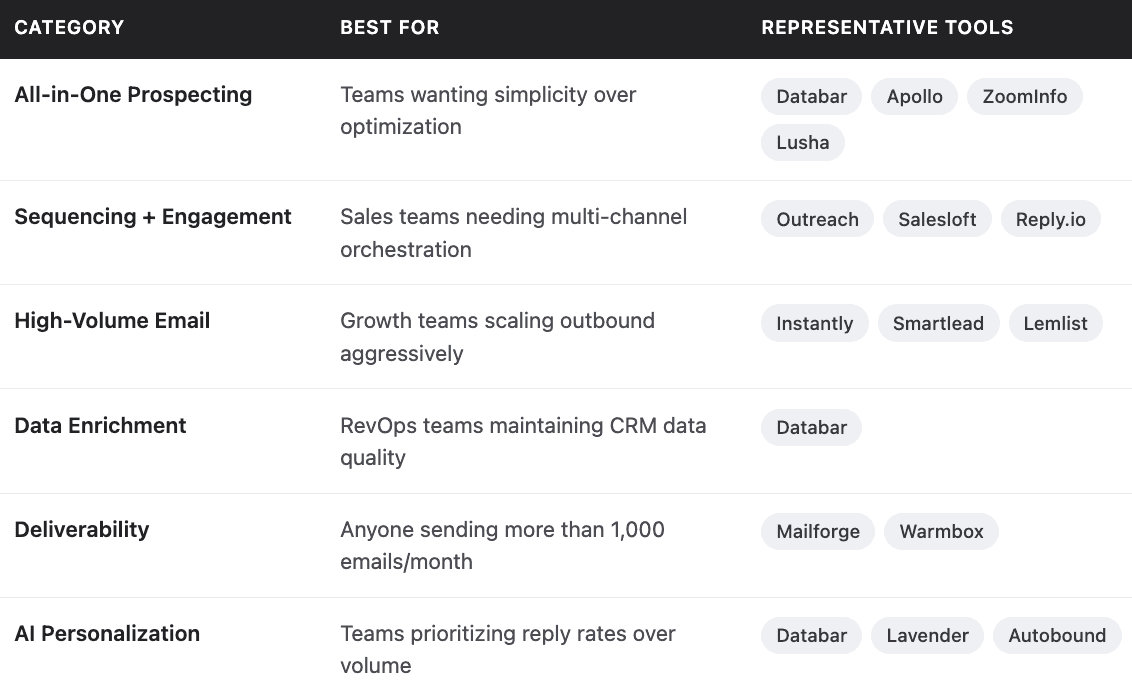
Tool Categories at a Glance
What's Really Moving the Needle: Lessons from High-Performing Teams
After looking at what separates top-performing outbound programs from average ones, a few patterns emerge:
They spend 80% of their time on list building. The teams hitting 5% reply rates aren't sending more emails, they're sending to the right people. One company increased their reply rate from 2% to 11% just by narrowing their ICP from "all SaaS companies" to "Series B SaaS companies using Salesforce with 50-200 employees."
They treat email like one channel, not the only channel. Multi-touch sequences that combine email with LinkedIn touches and phone calls outperform email-only approaches. The right contact might not respond to email but will answer a phone call if you have the number.
They respect the inbox. Shorter sequences (3-4 emails max), reasonable follow-up timing, and easy unsubscribe options maintain sender reputation over time. The first follow-up often produces 49% more replies than the initial email, but by email five, you're in negative-return territory.
They invest in signals. Instead of mass outreach to static lists, they monitor accounts for buying signals (funding rounds, job postings, leadership changes) and time outreach to moments of relevance. Companies that just received funding are significantly more likely to purchase than companies with no recent activity.
FAQs
What's a realistic reply rate to expect from outbound email?
For B2B cold email in 2025, 5-10% is solid, 10-15% is excellent, and 15%+ indicates very tight targeting with strong personalization. The average across large datasets hovers around 4-5%, meaning most campaigns underperform these benchmarks. If you're below 3%, something is broken - either your list, your messaging, or your deliverability.
How many follow-up emails should I send?
Data suggests 2-3 follow-ups after the initial email captures most of the available replies. The first follow-up can boost replies by nearly 50%, the second adds another small lift, but the third and beyond show diminishing or negative returns. Longer sequences risk spam complaints and rarely produce enough additional meetings to justify the reputation cost.
Should I use AI to write my cold emails?
AI can help with drafts and personalization at scale, but purely AI-generated emails often underperform human-written ones because they lack specificity and voice. The best approach uses AI for research and initial drafts, then human editing for the final version. Also be careful about AI-generated subject lines, they can sound generic and trigger spam filters.
How important is email deliverability vs. messaging?
Both matter, but deliverability is the gatekeeper. The best-written email is worthless if it lands in spam. Get your technical setup right first (authentication, warmup, clean lists), then optimize messaging. Many teams have the priorities reversed and wonder why improved copy doesn't move the needle.
What's the best single tool for outbound email?
There isn't one. The "best" stack depends on your team size, budget, sales motion, and technical capacity. Apollo works well for smaller teams wanting simplicity. Outreach or Salesloft suit larger sales orgs needing enterprise features. Instantly excels for high-volume sending with deliverability focus. Most successful teams combine multiple specialized tools rather than relying on any single platform.
How do I choose between buying data vs. building lists manually?
At any meaningful scale, you need purchased data - manual research doesn't scale beyond a handful of prospects per day. But purchased data requires verification and enrichment to be useful. Budget for data quality tools (verification, enrichment, deduplication) alongside your contact database. Expect 15-25% of purchased data to be outdated or incorrect, and plan your workflows accordingly.
Related articles
See all