Most teams that attempt CRM enrichment do it exactly once.
They buy a data provider, run a bulk enrichment, feel good about it for a few weeks, and then watch their fill rates slowly decay back to chaos. Twelve months later, they're back where they started - except now they've also lost trust in the process.
The problem isn't enrichment itself. It's that they never built a system. They treated enrichment like a project with an end date instead of infrastructure that runs continuously.
Fully automated CRM enrichment works differently. Once it's set up, new records get enriched the moment they enter your CRM. Existing records stay fresh without manual intervention. Job changes get detected before they cause bounces. Your database doesn't decay because the system maintains itself.
This guide walks through how to build that system from scratch - the actual steps, in order, including the parts that are more complicated than they seem.

Before You Start: The Two Mistakes That Kill Enrichment Projects
Before diving into implementation, understand the two failure modes that derail most teams:
Mistake 1: Enriching without a plan
Team decides to "clean up the CRM." They pick a data provider, connect it, and hit run. Three days later:
They've spent thousands on data credits
Half the enrichments don't map to the right fields
Some fields got overwritten that shouldn't have been
Nobody documented what happened or why
Now they have to untangle the mess before they can try again. This is avoidable.
Mistake 2: Building something too complex to maintain
Team scopes an elaborate enrichment architecture with seventeen data sources, custom scoring models, and AI categorization for fifty fields. It takes three months to build. It works great.
Then the person who built it leaves. Nobody else understands how it works. When something breaks, nobody knows how to fix it. Within six months, the whole system is abandoned.
The solution to both is to follow a structured process: start simple, test thoroughly, expand gradually. That's what this guide walks through.
Phase 1: Audit Your Current State
You can't fix what you don't understand. Before enriching anything, you need a clear picture of your current data quality.
Step 1.1: Export your CRM data
Pull a full export of your contacts and companies. You need visibility into every field you might enrich.
Most CRMs make this straightforward - HubSpot has a one-click export, Salesforce has Data Loader, Pipedrive has CSV export. Get everything in a spreadsheet where you can analyze it.
Step 1.2: Calculate fill rates by field
For each field you care about, calculate what percentage of records have data:
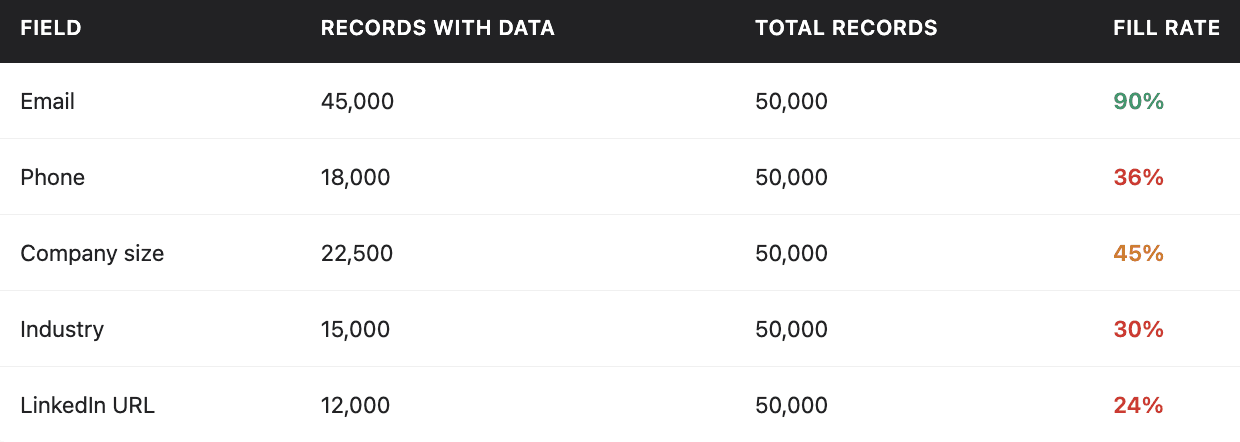
This immediately shows you where the biggest gaps are. In this example, industry and LinkedIn URL are the worst, less than a third of records have that data.
Step 1.3: Assess data freshness
Fill rate doesn't tell you whether the data is accurate. A record might have a phone number, but if it was entered two years ago, there's a good chance it's wrong.
Check the "last modified" dates across your database. How many records haven't been touched in over a year? Over two years?
B2B data decays at roughly 25-30% annually. If a significant portion of your database hasn't been updated in 18+ months, assume much of that data is stale even if the fields aren't empty.

Step 1.4: Spot-check for accuracy
Pick 20-30 records at random. Look them up manually - check LinkedIn, company websites, verify what you can.
How many have wrong job titles? Wrong company? Invalid email addresses?
This gives you a baseline accuracy estimate. If 8 out of 30 records have at least one significant error, you're looking at roughly 25% inaccuracy before you even start.
Step 1.5: Identify your priority fields
Not every field matters equally. List the fields that actually drive business decisions:
Must-have for basic operations:
Verified email (for outreach)
Company name (standardized)
Employee count (for segmentation)
Industry (for targeting)
Country/region (for territory assignment)
Important for personalization and scoring:
Job title and seniority
Phone number
LinkedIn URL
Annual revenue
Funding stage
Advanced (for ICP analysis and ABM):
Tech stack
Hiring signals
Recent funding
Custom categorizations
You probably don't need to enrich everything. Focus on the fields that will actually change how your team operates.
Output from Phase 1
By the end of this phase, you should have:
Fill rate report showing gaps by field
Freshness assessment (how stale is your data?)
Accuracy estimate from manual spot-checks
Prioritized list of fields to enrich
This tells you what you're working with and what to focus on first.

Phase 2: Map Your Properties and Sources
This is where most enrichment projects go wrong. People skip straight to "let's enrich stuff" without thinking through where data comes from, where it goes, and what happens when there's a conflict.
Step 2.1: Create a property mapping document
For every field you plan to enrich, document:
The exact CRM field it maps to. Not a general concept, the actual field name. If you're enriching "company size," that might map to number_of_employees in HubSpot or NumberOfEmployees in Salesforce. Be precise.
The data type and format. Is it a number? A text field? A dropdown with specific allowed values? If your CRM expects a dropdown value of "Technology" but your enrichment returns "Tech," the sync will fail or create garbage data.
The primary data source. Where is this data coming from? A specific provider's API? AI analysis of the company website? LinkedIn data?
The fallback source (if any). What happens if the primary source doesn't have the data? Do you try another provider?
The overwrite rule. What happens if the field already has a value? Always overwrite? Only overwrite if blank? Only overwrite if the existing data is older than X months?
The refresh frequency. How often should this field be re-enriched? Job titles change frequently (every 90 days). Industry classifications rarely change (maybe never, unless blank).
Step 2.2: Build the property mapping table
Here's what a real property mapping might look like for a B2B SaaS company:
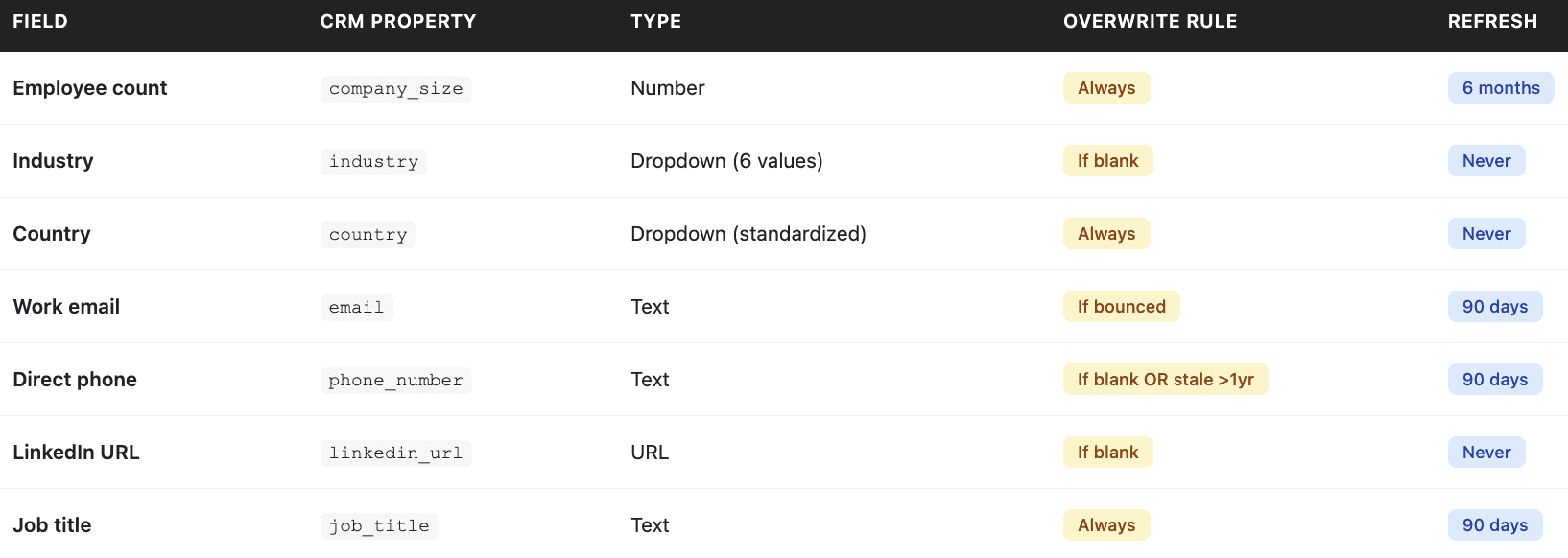
Notice how each field has different logic. Employee count gets overwritten every time because you always want the latest. Industry only gets filled if it's blank, you don't want AI guessing to overwrite a value a human intentionally set.
Step 2.3: Define overwrite rules by source
Not all existing data is equal. A phone number that came from a salesperson who talked to the contact directly is probably accurate. A phone number from a bulk import three years ago is probably stale.
Define which data sources should be "protected":
Never overwrite if source is:
Manual entry by a sales rep (within last 6 months)
Product signup data (customer entered it themselves)
Customer records verified during sales process
Generally safe to overwrite if source is:
Bulk import from unknown source
Previous enrichment older than 18 months
Data marked as "unverified" or "low confidence"
This prevents the common disaster of enrichment overwriting accurate data with worse data.
Output from Phase 2
By the end of this phase, you should have:
Completed property mapping table
Overwrite rules documented by source type
Clear understanding of which providers you'll use for which fields

Phase 3: Build and Test Your Workflow
Now you build the actual enrichment workflow. But you don't run it on your full database yet - you test on small samples first.
Step 3.1: Set up your enrichment platform
You need a platform that can:
Connect to multiple data providers
Sync bidirectionally with your CRM
Support conditional logic (waterfalls, overwrite rules)
Run on triggers (new record created) and schedules (re-enrichment)
Platforms like Databar handle this by aggregating 100+ data providers into a single interface with native CRM integrations. You configure which providers to use for which fields, set up your waterfall logic, and the platform handles the orchestration.
Whatever you use, make sure it can implement the property mapping you documented in Phase 2.
Step 3.2: Build the workflow
Configure your enrichment workflow according to your property mapping:
Define the trigger (new record created, scheduled batch, manual run)
Map each input field (what data do you have to start with?)
Configure enrichment steps for each output field
Set up waterfall logic for fields that need multiple sources
Define overwrite conditions
Configure CRM sync settings
This is where the property mapping document pays off. You're not making decisions on the fly - you're implementing a plan you already thought through.
Step 3.3: Test on 25-50 records
Export a sample of 25-50 records that represent your database:
Include some with existing data and some that are mostly blank
Include different record types (customers, prospects, leads)
Include different industries and company sizes
Include some records you know are accurate (so you can verify)
Run your enrichment workflow on just these records. Don't touch your full database yet.
Step 3.4: Manually verify results
After the test run, manually check the enriched records:
For each record, look up the company and contact on LinkedIn. Compare what your enrichment returned to reality.
Track accuracy by field:
Did employee count match? (Within 10% is usually acceptable)
Is the job title correct?
Is the industry classification accurate?
Is the email deliverable? (Run through a verification tool)
Is the phone number valid?
Calculate accuracy rates. You want 80%+ accuracy on each field before scaling. If you're hitting 60% on job titles, something's wrong - either the source is bad or the mapping is broken.
Step 3.5: Fix issues and iterate
When accuracy is below target on a field:
If the data is completely wrong: The source might not work for your market segment. Try a different provider.
If the data is formatted wrong: Adjust output formatting. If your CRM expects "Technology" but you're getting "Information Technology," add a transformation step.
If AI prompts are inconsistent: Tighten the prompt. Be explicit about allowed values. Add examples of correct outputs.
Re-run on the same sample after fixes. Compare results. Repeat until accuracy targets are met.
Step 3.6: Expand to 200-500 records
Once you're hitting targets on the small sample, expand to a larger test:
Run on 200-500 records
Spot-check 30-40 manually
Look for edge cases you didn't anticipate
Common issues that emerge at this scale:
Special characters in company names breaking things
International records getting wrong country assignments
Parent/subsidiary confusion (enrichment returns corporate HQ data instead of local office)
Fix issues. Iterate. Don't proceed until you're confident in the results.
Output from Phase 3
By the end of this phase, you should have:
Working enrichment workflow
Validated accuracy rates by field (80%+)
Documentation of any edge cases and how they're handled
Phase 4: Run the Enrichment
Now you scale to your full database - but carefully.
Step 4.1: Back up your CRM
Seriously. Before running any large-scale enrichment:
HubSpot: Export all contacts and companies to CSV
Salesforce: Use Data Loader to create a full backup
Pipedrive:Export all data via settings
Store this backup somewhere you can access it. If something goes catastrophically wrong, you want to be able to restore.
Step 4.2: Handle duplicates first
Don't pay to enrich the same company or contact twice. Run deduplication before enrichment:
Identify duplicates by email, company name, phone number
Merge obvious duplicates automatically
Flag uncertain duplicates for human review
Clean up the obvious ones now; handle edge cases after enrichment
Most CRMs have built-in duplicate management. Use it before spending enrichment credits.
Step 4.3: Run in batches
Even with testing, don't run enrichment on your entire database at once. Use batches:
First batch: 5,000 records: Run, then spot-check 30-40 records. Look for any issues that didn't appear in smaller tests.
Second batch: 10,000 records: If first batch looked good, scale up. Spot-check again.
Continue until complete: Increase batch size as confidence grows. Keep spot-checking.
This limits damage if something goes wrong. Better to catch a problem after 5,000 records than after 200,000.
Step 4.4: Monitor for errors
Watch for:
API errors or timeouts
Unusually low fill rates (might indicate source issues)
Data that looks wrong (all records getting the same industry, for example)
Sync failures to CRM
Most enrichment platforms provide logging and error reporting. Check it between batches.
Step 4.5: Validate final results
After all batches complete, run your fill rate analysis again:
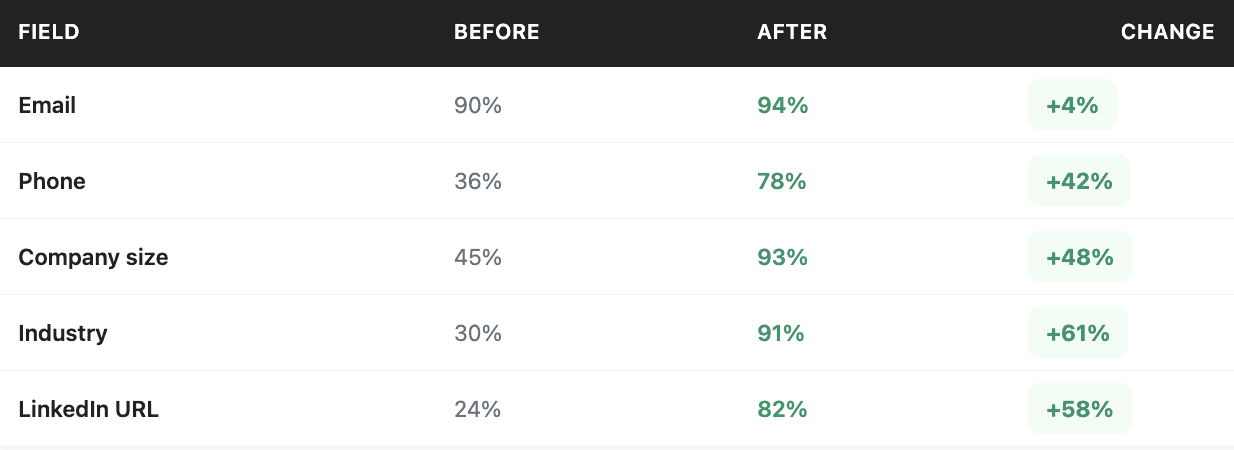
This validates that enrichment worked as expected. If any field didn't improve as much as anticipated, investigate why.
Output from Phase 4
By the end of this phase, you should have:
Enriched database with improved fill rates
Validation report comparing before vs. after
Documentation of any issues encountered
Phase 5: Set Up Ongoing Automation
Here's where most teams stop and it's exactly why their enrichment projects fail in the long term.
Data decays. If you enrich once and never again, you'll be back to your original state within 12-18 months. Ongoing automation prevents that.
Step 5.1: Automate new record enrichment
Configure your workflow to trigger automatically when new records enter your CRM:
For inbound leads:
Webhook from your form platform triggers enrichment
Record is enriched within 60-90 seconds of submission
Lead scoring runs on enriched data
Routing assigns to appropriate rep
For records created by sales:
Trigger fires when new contact/company is created
Enrichment fills in gaps automatically
Rep sees complete data without manual research
This ensures every new record gets enriched immediately, before anyone tries to work it.
Step 5.2: Schedule re-enrichment for existing records
Set up recurring enrichment for records that haven't been updated recently:
Weekly job: Re-enrich records not touched in 90+ days
Process 2,000-5,000 records per week (depending on database size)
Start with oldest records, work forward
Focus on contact-level fields that change frequently (email, phone, job title)
Monthly job: Refresh company-level data
Update employee counts, funding status, tech stack
Lower volume since company data changes slower
This creates a continuous maintenance cycle that prevents decay.
Step 5.3: Configure job change detection
For important contacts (customers, active opportunities, high-value prospects), monitor for job changes:
When detected:
Update the record with new company and title
Flag for "job change outreach" (these are warm leads)
Optionally find their replacement at the old company
Job change outreach gets 3-5x higher response rates than cold outreach. Someone who changed jobs represents both an opportunity at their new company and a gap to fill at their old one.
Output from Phase 5
By the end of this phase, you should have:
Automated enrichment for new records
Scheduled re-enrichment for existing records
Job change detection configured
Putting It All Together: The Complete System
When fully implemented, your automated CRM enrichment system works like this:
New record enters CRM → Enrichment triggers automatically → Record is scored → Lead is routed to appropriate rep → Rep sees complete data immediately
Existing record ages → Scheduled job detects it hasn't been enriched recently → Re-enrichment runs automatically → Data stays fresh without manual intervention
Contact changes jobs → Detection system flags the change → Record is updated → Opportunity is flagged for outreach
This is what separates "we did an enrichment project" from "we have enriched data." The first decays. The second maintains itself. Get started with Databar.ai and automated your CRM enrichment today!
Frequently Asked Questions
How much does fully automated CRM enrichment cost?
Costs depend on volume and depth:
Initial cleanup (5-10 fields): $0.02-0.05 per record
Ongoing maintenance: Varies by refresh frequency, typically $500-2,000/month for mid-sized databases
Deep enrichment (20+ fields): $0.20-0.55 per record
For a 100,000-record database, expect $3,000-10,000 for initial cleanup plus ongoing costs.
How long does enriched data stay accurate?
Without maintenance, B2B data decays 25-30% annually. Contact-level fields (job title, company, email) decay faster than company-level fields (employee count, industry).
With 90-day re-enrichment cycles, you can maintain 90%+ accuracy indefinitely. Without maintenance, you'll be back to baseline within 18 months.
Should I clean my database before implementing automation?
Run deduplication before enrichment, you don't want to pay to enrich duplicates. Beyond that, you can clean and automate in parallel.
Don't let "we need to clean up first" delay implementation. Get basic automation running, then tackle deeper cleanup.
What if enrichment overwrites data that was actually correct?
This is why overwrite rules matter. Define protected sources (sales rep manual entry, product signup data) that shouldn't be overwritten.
If you've already overwritten good data, restore from backup and implement proper overwrite rules before running again.
How do I know if it's working?
Track:
Fill rates by field (should improve and stay high)
Bounce rates on outreach (should decrease)
Time reps spend researching (should decrease)
Lead response time (should decrease with automated routing)
If these metrics improve and stay improved, it's working.
Related articles
See all