Most pipeline reports lie to you.
They show deal stages, probability percentages, and close dates - all based on what a rep typed into a dropdown field three weeks ago. Meanwhile, the actual buyer has gone silent, the champion stopped returning calls, and the "90% probability" deal is quietly dying.
Engagement signals tell a different story. They're the behavioral indicators, tracked in your CRM, that reveal whether a deal is truly progressing or just sitting there consuming forecast real estate.
This article breaks down which signals really matter, how to track them, and what to do when the signals tell you something your deal stages won't.

What Are Engagement Signals?
Engagement signals are observable actions or behaviors that indicate a prospect's level of interest and involvement with your company. Unlike static CRM data (industry, company size, deal amount), signals are dynamic - they change based on what the buyer does.
In B2B sales, these signals fall into several categories:
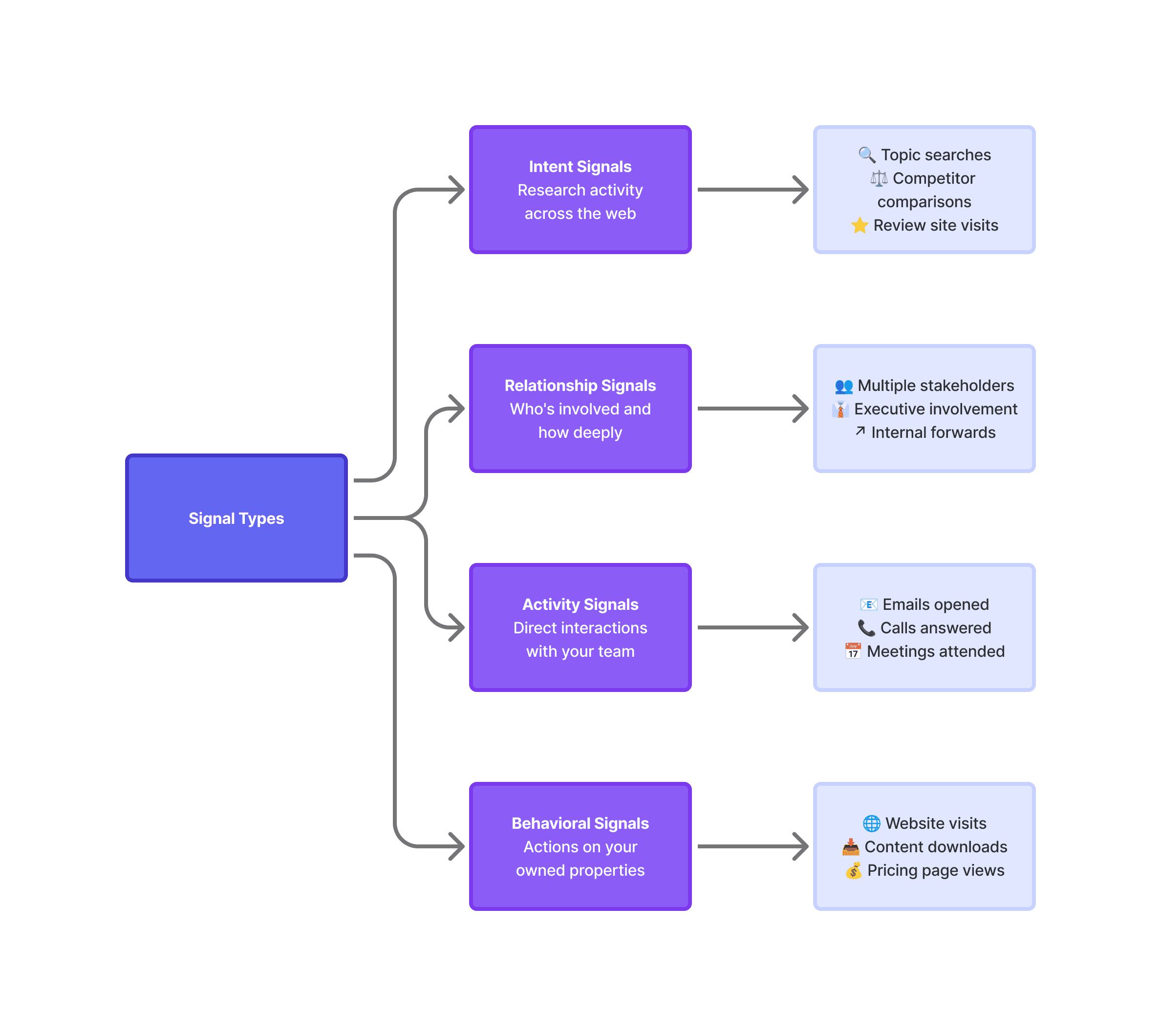
The difference between deals that close and deals that stall often comes down to these signals, not the stage a rep marked in Salesforce.
Why Deal Stages Alone Don't Work
Deal stages are necessary. They provide structure, enable forecasting, and create a common language across the sales org.
But they have a fundamental flaw: they capture what the seller thinks happened, not what the buyer is actually doing.
A rep marks a deal as "Proposal Sent" because they sent a proposal. That's accurate. What it doesn't tell you:
Did the buyer open it?
Did they share it with others?
How long did they spend on the pricing section?
Have they engaged at all since receiving it?
Stage changes require human input. Engagement signals are captured automatically, creating a more objective view of deal health.
Ideally teams use both: deal stages for process structure, engagement signals for reality checks.

The Signals That Actually Predict Deal Movement
Not all engagement signals carry equal weight. Some indicate curiosity. Others indicate intent. Here's how to distinguish between them.
High-Intent Signals (Strong Buying Indicators)
These signals suggest the buyer is seriously evaluating and likely moving toward a decision:
Multi-stakeholder engagement. When multiple people from the same account start engaging (attending meetings, opening emails, visiting your site) it indicates internal momentum. Buying committees in B2B average 6-10 people, so seeing just one contact active is actually a warning sign.
Pricing page visits. Prospects don't casually browse pricing. When someone visits your pricing page, especially multiple times or with extended time on page, they're likely building a business case or comparing options.
Integration or implementation questions. When prospects ask about how your product connects to their existing systems, deployment timelines, or onboarding processes, they're thinking past the purchase decision.
Proposal or contract engagement. Tools that track document opens can tell you whether that proposal actually got read, how many times, and which sections received attention. Multiple opens from different IPs often mean it's being circulated internally.
Response velocity. How quickly does the buyer respond to your outreach? Fast responses (within hours) indicate priority. Days-long delays suggest you're not top of mind.
Medium-Intent Signals (Active Interest)
These signals show engagement but don't necessarily indicate imminent purchase:
Email engagement patterns. Opens alone don't mean much - they can be automated or accidental. But clicks, especially on specific content like case studies or ROI calculators, show deliberate interest.
Content consumption. Downloading whitepapers, attending webinars, or reading blog content indicates the prospect is educating themselves. The type of content matters: implementation guides signal further progress than top-of-funnel thought leadership.
Meeting attendance and participation. Showing up is one thing. Asking questions, bringing colleagues, requesting follow-up materials, that's engagement.
Social engagement. Following your company page, liking posts, or commenting publicly shows the prospect is paying attention and willing to associate with your brand.

Low-Intent Signals (Worth Monitoring)
These signals indicate some awareness but shouldn't drive action alone:
Single email opens: Could be automated preview panes or accidental
Brief website visits: A 10-second homepage visit tells you almost nothing
Generic content downloads: Early-stage research, not buying readiness
LinkedIn profile views: Often accidental while scrolling
Building an Engagement Signal Framework
To make engagement signals actionable, you need a system that captures, scores, and surfaces them.
Step 1: Identify Which Signals to Track
Start with the signals that correlate with closed-won deals in your business. Review recent wins and look for patterns: what activities happened in the 30 days before close, which stakeholders were involved, and how quickly they responded.
Common signals to track: email opens, clicks, replies, and forwards; meeting attendance and participants; website page visits (especially pricing and case studies); content downloads; proposal opens and time spent; call connection rates and duration.
Step 2: Build Signal Scoring
Not all signals deserve equal weight. Create a scoring model that reflects actual deal correlation:
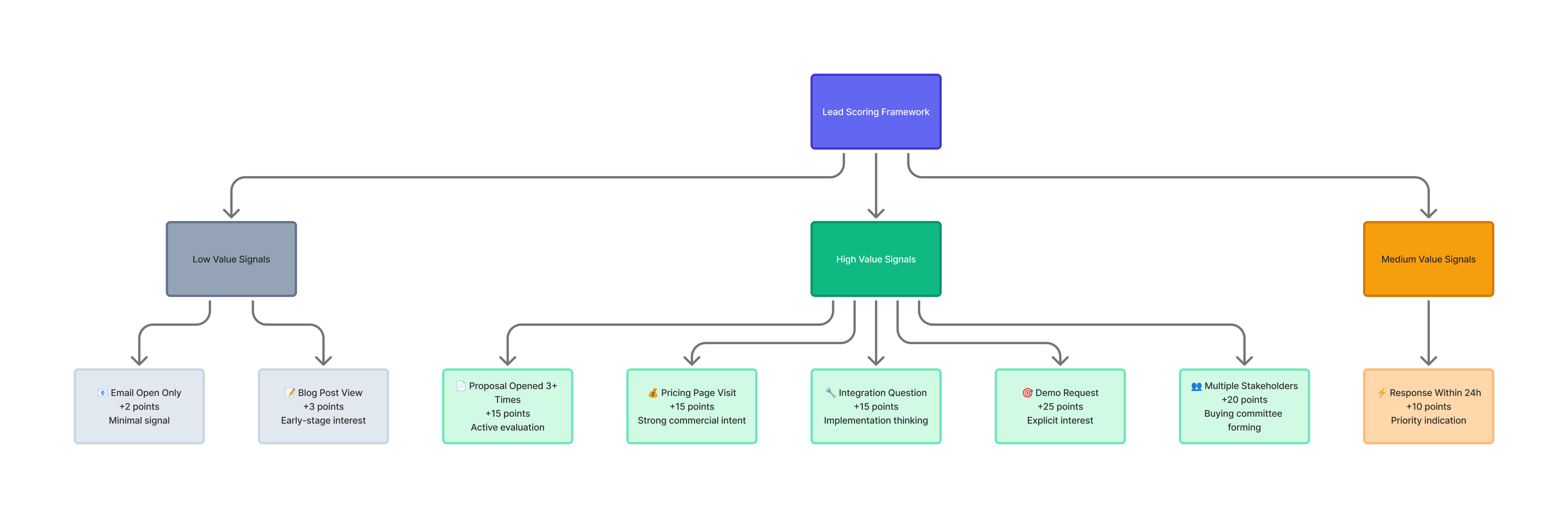
These scores feed into an overall engagement score that supplements—not replaces—your lead scoring model.
Step 3: Create Alert Thresholds
Define what engagement levels trigger action:
Engagement spike: Score increases 30+ points in 48 hours → Alert rep immediately Multi-stakeholder surge: 3+ contacts from same account engage in one week → Flag for account team review
Engagement drop: No activity in 14+ days on an active deal → Create follow-up task
Champion gone dark: Primary contact stops responding while others engage → Relationship risk alert
Step 4: Surface Signals Where Reps Work
Engagement data is useless if reps don't see it. Build signal visibility into CRM dashboards, Slack notifications for high-intent signals, and automated meeting prep briefs showing recent engagement.
Enrichment and Engagement: The Connection
Engagement signals become far more valuable when combined with enriched data. Knowing that "someone from Acme Corp visited your pricing page" is useful. Knowing that "the VP of Operations at Acme Corp, a 500-person manufacturing company that just raised Series C, visited your pricing page twice this week" is actionable.
When you enrich leads and accounts with firmographic, technographic, and contact data, engagement signals gain context: who is engaging (title, seniority, department), what kind of company they represent (size, industry, tech stack), and where they are in their buying journey (recent funding, leadership changes, hiring patterns).
Platforms like Databar can automate this enrichment - pulling from 160+ data providers to fill in the context that makes engagement signals meaningful. Instead of seeing anonymous website visits, you see identified companies with full firmographic profiles. The combination of real-time engagement signals plus enriched contact and account data creates a complete picture of deal health.

What to Do When Signals Diverge from Stages
The most valuable (and uncomfortable) moment is when engagement signals tell you something different than your deal stages suggest.
Scenario 1: Stage Says "Hot," Signals Say "Cold"
Deal is marked as "Negotiation" with 75% probability, but no activity in three weeks, no email opens, no proposal views.
What it means: The deal is probably stuck. The buyer may have deprioritized or started evaluating alternatives.
What to do: Send a pattern-interrupt message. If no response in one week, downgrade probability and alert manager for deal review.
Scenario 2: Stage Says "Early," Signals Say "Hot"
Deal is marked as "Discovery" after one call. But five people visited your site this week, the VP downloaded three case studies, and the contact forwarded your proposal to finance.
What it means: The buyer is moving faster than your process. They may be in active evaluation.
What to do: Accelerate outreach, propose next steps immediately, and update stage to reflect actual progress.
Scenario 3: Mixed Signals Within the Account
Your champion is engaged: responding quickly, asking detailed questions. But executives never respond, don't attend scheduled calls, and show no website activity.
What it means: Your champion may lack internal influence, or executives have already decided against you.
What to do: Directly ask your champion about executive buy-in. Request a specific sponsor or pause until one is identified. Adjust probability based on missing stakeholder engagement.
Best Practices for Engagement Signal Tracking
Track signals automatically. If reps have to log engagement data manually, it won't be complete or consistent.
Focus on trends, not single data points. One pricing page visit might be accidental. Three visits in a week is a pattern.
Don't over-alert. Save notifications for meaningful signals and threshold breaches, not every email open.
Review signal accuracy quarterly. Do the signals you're tracking actually correlate with closed-won deals? Kill signals that don't predict anything.
Combine signal types. Activity signals (your team interactions) plus intent signals (external research) plus relationship signals (who's involved) give the most complete picture.
FAQ
What are engagement signals in CRM?
Engagement signals in CRM are behavioral indicators that show how actively a prospect or customer is interacting with your company - email opens, website visits, meeting attendance, content downloads, and response patterns. Unlike static deal data, engagement signals are dynamic and update based on actual buyer behavior.
How do engagement signals differ from intent signals?
Engagement signals track interactions with your company specifically, your emails, website, and sales team. Intent signals track buyer activity across the broader web, topic searches, competitor research, review site visits. Both indicate interest, but intent signals can surface accounts before they engage directly with you.
What signals indicate a deal is progressing?
The strongest signals: multi-stakeholder engagement (multiple contacts interacting), pricing or proposal engagement(repeated views on commercial content), response velocity (fast replies), and implementation questions (buyer thinking past the purchase decision).
What should I do when engagement drops on an active deal?
Try a pattern-interrupt - different channel, different message format, or different contact. If that doesn't work, directly address the silence. Based on the response (or lack thereof), adjust your forecast and deal probability accordingly.
How do enrichment and engagement signals work together?
Enrichment provides context for engagement signals. Instead of seeing anonymous activity, enriched data tells you who is engaging (title, department), what kind of company they represent (firmographics), and what changes might be driving their interest (funding, hiring, leadership changes). Together, they create a complete view of deal health.
Related articles
See all