

A single LinkedIn post about Claude Code skills generated over 700 likes and 1,300 comments. The follow-up discussion thread ran for weeks. If there is one topic GTM teams want to understand right now, it is how to build skills that make Claude Code actually useful for sales and marketing work, not just general coding tasks.
The gap is obvious. Most skill-building tutorials teach you how to write commit messages or generate test files. Almost none of them address the workflows GTM teams care about: lead enrichment, ICP research, competitive analysis, CRM data cleanup, and personalized outreach at scale. That leaves a massive disconnect between what Claude Code can do and what revenue teams need it to do.
This guide closes that gap. We walk through the anatomy of a Claude Code skill for GTM, build four production-ready skills from scratch, and include templates you can install and start using today.
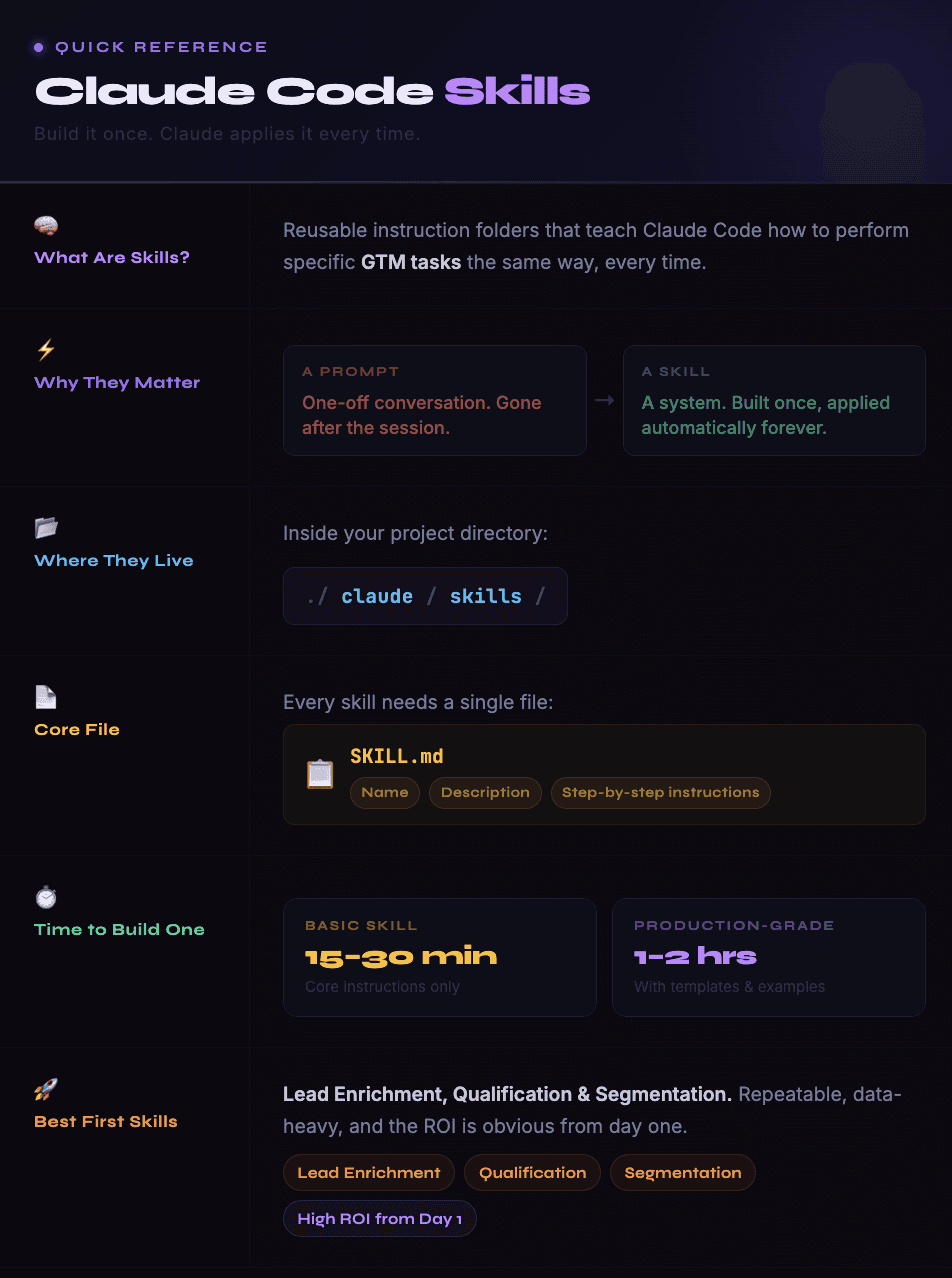
1. A Prompt Is a Conversation. A Skill Is a System.
Every time you type a request into Claude Code, you are having a one-off conversation. You explain your ICP. You describe your data format. You specify which fields matter. You outline your outreach style. And the next time you need the same thing done, you explain it all over again.
Skills eliminate that repetition. A skill is a folder containing a SKILL.md file (the instructions Claude follows) plus optional supporting files like templates, example outputs, and reference data. When Claude Code encounters a task that matches a skill's description, it loads the instructions automatically and executes the workflow the same way every time.
The difference matters more for GTM than for engineering. An engineering skill might standardize how Claude writes tests. A GTM skill standardizes how Claude researches accounts, scores leads, writes personalized emails, or audits CRM data. Those workflows have dozens of variables that change between runs, and without a skill encoding the rules, Claude makes different decisions every time.
The practical result: a GTM team that invests two hours building five core skills gets back that time on every single campaign, every week, for as long as they use the system.

2. The Anatomy of a GTM Skill
Every skill lives in .claude/skills/your-skill-name/ and requires one file: SKILL.md. That file has two parts.
The first part is YAML frontmatter at the top of the file, wrapped between --- markers. This tells Claude when to use the skill and what tools it can access:
---
name: lead-enrichment
description: Enrich a list of company domains with firmographic, technographic, and contact data. Use when the user provides a CSV or list of companies to research.
---
The description is critical. Claude reads every skill description on startup and decides which skills are relevant to the current task based on what it sees there. A vague description means the skill never gets loaded. A specific description means it fires exactly when you need it.
The second part is the instruction body written in plain Markdown. This is where you teach Claude your GTM workflow step by step. A strong GTM skill includes these components:
→ Overview. One paragraph explaining what the skill does and when to use it.
→ Inputs. What data the skill expects: a CSV file, a list of domains, a CRM export, a prospect name. Be specific about format.
→ Steps. The numbered workflow Claude follows. Each step should be concrete enough that Claude cannot misinterpret it.
→ Output format. Exactly how the results should be structured: which columns, what order, what file format.
→ Quality rules. The guardrails that prevent bad output: minimum data thresholds, validation checks, fields that must be present before the result is considered complete.
→ Examples. One or two input/output pairs showing what good looks like. Claude performs significantly better when it can see a real example rather than just reading abstract instructions.
That structure stays the same whether you are building a lead enrichment skill, a competitive research skill, or an outreach personalization skill. The content inside each section changes. The framework does not.

3. Skill 1: Lead Enrichment
This is the highest-impact skill for most GTM teams. It takes a list of company domains or names and returns enriched records with firmographic, technographic, and contact data.
Here is the SKILL.md:
---
name: lead-enrichment
description: Enrich company and contact records with firmographic, technographic, and contact data. Use when the user provides a CSV, list of domains, or company names to research and enrich.
---
# Lead Enrichment Skill
## Overview
Take a list of companies (domains, names, or LinkedIn URLs) and produce a fully enriched prospect table ready for outreach. Use waterfall enrichment to maximize fill rates.
## Inputs
- A CSV file, pasted list, or CRM export containing company identifiers
- Minimum required: company name OR domain OR LinkedIn URL
## Steps
1. Read the input file and identify all company records
2. For each company, gather:
- Company name, domain, LinkedIn URL
- Industry, sub-industry
- Employee count range and headquarters location
- Estimated revenue range
- Tech stack (CRM, marketing automation, sales tools)
- Recent funding events (last 12 months)
- Key hiring signals (open GTM roles)
3. For each company, find 1-3 contacts matching the target persona:
- Name, title, LinkedIn URL
- Verified business email
- Direct phone number (if available)
4. Score each company on ICP fit (1-10) based on the criteria in the project's CLAUDE.md
5. Flag any records where critical fields are missing
6. Output results as a structured CSV
## Output Format
| Company | Domain | Industry | Employees | Revenue | Tech Stack | Funding | Hiring Signals | Contact Name | Title | Email | Phone | ICP Score |
## Quality Rules
- Never fabricate data. If a field cannot be found, mark it as "Not Found"
- Email addresses must come from a verified source, not guessed
- ICP scores must include a one-line justification
- Flag companies with fewer than 4 enriched fields as "Incomplete"
## Example
Input: "databar.ai"
Output: Databar | databar.ai | Data/SaaS | 11-50 | — | HubSpot, Segment | — | Hiring: GTM roles | [Contact] | [Title] | [Email] | — | 8/10 (SaaS, growth-stage, GTM-focused)
For small batches of 10 to 50 leads, Claude Code can run this skill using web search and MCP connections to data providers. For larger volumes, the skill's output becomes the enrichment specification that feeds into a dedicated platform. Waterfall enrichment tools handle the parallel processing and multi-provider cascading that Claude Code cannot do sequentially at scale.

4. Skill 2: ICP Research
This skill turns a vague idea of your target customer into a structured, data-backed ICP definition. Most teams skip this step or do it once and never revisit it. A skill makes it repeatable.
The core instructions:
---
name: icp-research
description: Analyze CRM data or a list of closed-won customers to define or refine the Ideal Customer Profile. Use when the user mentions ICP, ideal customer, target market, or customer segmentation.
---
# ICP Research Skill
## Overview
Analyze provided customer data to identify patterns in closed-won accounts and produce a structured ICP definition.
## Steps
1. Read the customer data (CRM export, CSV, or described list)
2. Identify the top 20% of customers by deal size or lifetime value
3. Analyze common attributes across top customers:
- Company size (employees and revenue)
- Industry and sub-industry
- Tech stack patterns
- Geographic concentration
- Buying triggers that preceded the deal
4. Identify negative patterns: attributes shared by churned or lost deals
5. Produce an ICP document with three tiers:
- Tier 1: Perfect fit (matches 5+ positive attributes, 0 negative)
- Tier 2: Good fit (matches 3-4 positive attributes)
- Tier 3: Worth testing (matches 2 positive, new segment)
6. Include recommended enrichment fields for scoring future prospects
## Output Format
Structured markdown document with tier definitions, attribute tables, and scoring criteria.
The "recommended enrichment fields" step in this skill is where it connects directly to your enrichment workflow. Once the ICP research skill defines which attributes matter, those attributes become the columns your lead enrichment tools need to fill. The two skills feed each other.
5. Skill 3: Competitive Intelligence
Every outbound campaign performs better when the messaging accounts for what competitors are saying. This skill automates the research.
---
name: competitive-intel
description: Research a competitor's positioning, pricing, features, and recent activity. Use when the user mentions a competitor name, competitive analysis, or battle cards.
---
# Competitive Intelligence Skill
## Overview
Produce a structured competitive brief for a named competitor.
## Steps
1. Visit the competitor's website and analyze their homepage, pricing page, and product pages
2. Check their recent blog posts and press releases (last 90 days)
3. Search for recent reviews on G2 and Capterra
4. Analyze their job postings for product direction signals
5. Produce a structured brief with:
- Positioning statement (how they describe themselves)
- Target audience (who they sell to based on website copy)
- Pricing structure (if public)
- Top 3 strengths based on user reviews
- Top 3 weaknesses based on user reviews
- Recent product changes or announcements
- Recommended counter-positioning angles
## Quality Rules
- All claims must be sourced from publicly available information
- Include URLs for key findings
- Date-stamp all information so the brief can be refreshed
When you pair this skill with a web search MCP server, Claude Code handles the entire research cycle. The output goes into your project's context files so every future outreach skill has competitive awareness baked in.
6. Skill 4: Outreach Personalization
The final skill in the core GTM set. It takes enriched prospect data and produces personalized outreach copy.
---
name: outreach-personalization
description: Generate personalized outreach messages based on enriched prospect data. Use when the user has enriched records and needs email copy, LinkedIn messages, or cold call scripts.
---
# Outreach Personalization Skill
## Overview
Turn enriched prospect data into personalized, multi-channel outreach copy.
## Inputs
- Enriched prospect records (from the lead-enrichment skill or a CRM export)
- Campaign brief: target persona, value proposition, desired CTA
## Steps
1. Read the enriched data for each prospect
2. Identify the strongest personalization angle per prospect:
- Recent company news or funding
- Hiring signals relevant to your solution
- Tech stack gaps your product fills
- Competitive displacement opportunity
3. Draft the outreach message using the angle:
- Subject line (email) or hook (LinkedIn)
- Opening line referencing the personalization signal
- Value statement connecting their situation to your solution
- Specific, low-friction CTA
4. Adapt the message for the requested channel (email, LinkedIn, phone script)
5. Flag any prospects where personalization data is too thin for quality outreach
## Quality Rules
- Never reference data that cannot be verified publicly
- Opening lines must be specific to THIS prospect, not generic
- Messages under 100 words for email, under 300 characters for LinkedIn connection requests
- Every message must pass the "would I reply to this?" test
This skill relies heavily on the data quality from your enrichment step. If the enrichment is thin, the personalization is generic. If the enrichment is rich (tech stack, recent signals, hiring activity), the personalization is specific and compelling. That dependency is exactly why CRM enrichment matters so much for outbound performance.
7. How Skills Work Together as a System
Individual skills are useful. Skills that reference each other become a system.
The four skills above form a natural chain:
→ ICP Research defines what your ideal customer looks like and which data points matter
→ Lead Enrichment fills those data points for a list of prospects
→ Competitive Intelligence provides the positioning context for messaging
→ Outreach Personalization takes the enriched data and competitive context and produces copy
Each skill's output becomes the next skill's input. The ICP research skill tells the enrichment skill which fields to prioritize. The enrichment skill feeds data to the personalization skill. The competitive intelligence skill gives the personalization skill counter-positioning angles.
You do not need to run them manually in sequence. Once all four skills are installed, you can give Claude Code a high-level instruction like "research and build an outreach campaign for 20 fintech companies with 100 to 500 employees" and it will invoke the skills in order, passing context between them automatically.
That is the difference between using Claude Code as a chatbot and using it as an autonomous GTM system. The skills are the knowledge layer. The context files are the memory. Together, they let Claude Code operate like a junior GTM analyst who never forgets your process and gets faster every time.
8. Installation and Testing
Getting these skills running takes about ten minutes.
Step 1: Create the skill directories inside your project:
.claude/skills/lead-enrichment/SKILL.md
.claude/skills/icp-research/SKILL.md
.claude/skills/competitive-intel/SKILL.md
.claude/skills/outreach-personalization/SKILL.md
Step 2: Paste the SKILL.md content from the templates above into each file. Customize the ICP criteria, output formats, and quality rules to match your specific business.
Step 3: Add your company context to the project's CLAUDE.md file. Skills reference this file for ICP definitions, brand voice, and competitive positioning. The more detail you put here, the better every skill performs.
Step 4: Test each skill individually before chaining them. Start with the lead enrichment skill on a list of 5 known companies. Check every field in the output. If something is wrong, the skill instructions need more specificity.
Step 5: Once individual skills work correctly, test the chain. Give Claude Code a campaign brief and let it invoke skills in sequence. Review the final outreach copy against what you would have written manually. The gap between the two tells you where your skills or context files need refinement.
For enrichment-heavy workflows where you need to process hundreds or thousands of records, connect Databar as your data enrichment layer. Your skills define the logic. Databar handles the volume. Claude Code orchestrates the whole thing.
9. Common Mistakes and How to Avoid Them
After building and testing GTM skills across multiple projects, a few patterns consistently cause problems.
Vague descriptions. If the SKILL.md description says "helps with sales stuff," Claude will never load it at the right time. Descriptions need specific trigger words: "enrichment," "ICP," "competitive analysis," "outreach copy." Claude matches tasks to skills based on these descriptions. Be precise.
Missing examples. Claude performs measurably better when a skill includes one or two concrete input/output examples. Without examples, it guesses at the output format. With examples, it follows the pattern exactly. Always include at least one.
Too much in one skill. A skill that tries to do ICP research, enrichment, competitive analysis, and outreach all in one SKILL.md will produce mediocre output across the board. Split complex workflows into separate skills that chain together. Each skill should do one thing well.
No quality rules. Without explicit guardrails, Claude will fill in blanks with plausible-sounding data. The quality rules section is where you tell it to mark missing data as "Not Found" instead of guessing. This is especially important for contact data like emails and phone numbers, where fabricated data wastes time and damages sender reputation.
Ignoring the context file. Skills are powerful, but they operate within the context of your project's CLAUDE.md. If that file is empty or outdated, skills have no foundation to build on. Your CLAUDE.md should contain your ICP definition, messaging guidelines, CRM field mapping, and any business rules that apply across all workflows.
FAQ
What is a Claude Code skill?
A skill is a folder inside your .claude/skills/ directory containing a SKILL.md file with instructions that teach Claude Code how to perform a specific task. Unlike a one-off prompt, a skill persists across sessions. Claude reads the skill description on startup, matches it to relevant tasks, and loads the full instructions when needed. For GTM teams, skills encode repeatable workflows like lead enrichment, ICP analysis, competitive research, and outreach personalization.
Do I need to know how to code to build skills?
No. Skills are written in plain Markdown. The SKILL.md file is just structured text: a YAML header with the skill name and description, followed by step-by-step instructions. If you can write a standard operating procedure in a Google Doc, you can write a skill. Some advanced skills include scripts or API configurations, but the core skill format requires zero coding knowledge.
How many skills should a GTM team start with?
Four to five covers most GTM workflows: lead enrichment, ICP research, competitive intelligence, outreach personalization, and optionally CRM data cleanup. Start with the one that addresses your biggest time sink. For most teams, that is lead enrichment. Build it, test it, refine it, and then move to the next skill. Trying to build all five simultaneously usually means none of them get tested properly.
Can skills connect to external data providers?
Yes. When Claude Code has MCP server connections (web search, data APIs, CRM access), skills can reference those connections in their instructions. For example, a lead enrichment skill can instruct Claude to query a web search MCP for company data. For high-volume enrichment across multiple providers, connecting to a platform like Databar gives you access to 100+ data sources through a single integration rather than configuring each API separately.
How do skills differ from the CLAUDE.md file?
The CLAUDE.md file is your project's persistent context: ICP definitions, brand voice, CRM field names, and business rules that apply to every task. Skills are task-specific workflows that reference and build on that context. Think of CLAUDE.md as the knowledge base and skills as the playbooks. Claude reads the knowledge base every session. It loads specific playbooks only when the task matches.
Can I share skills across team members?
Yes. Skills are just files in your project directory. If your project lives in a Git repository, every team member who pulls the repo gets the same skills automatically. This is one of the biggest advantages over individual prompting. When one person improves a skill, the whole team benefits on their next session.
Related articles
See all





