Your CRM doesn't know a lead just submitted a form. Not immediately, anyway. If you're relying on batch syncs or scheduled imports, there's a gap, sometimes minutes, sometimes hours, between when something happens and when your systems react to it.
Webhooks eliminate that gap.
Instead of your systems constantly asking "did anything change?", webhooks push updates the moment events occur. A lead submits a form, and within seconds your enrichment workflow triggers, data appends to the record, and the enriched contact routes to the right rep. No polling, no delays, no manual intervention.
This guide covers how webhook CRM integration works, when to use webhooks versus APIs, and how to set up real-time data sync for enrichment workflows - including a practical architecture for sending leads through an enrichment layer before they hit your CRM.

What Are Webhooks? Definition and How They Work
A webhook is an HTTP callback - a way for one application to notify another when something happens. Instead of Application B repeatedly checking Application A for updates (polling), Application A sends an HTTP POST request to Application B's endpoint when an event occurs.
Think of it this way: polling is like constantly refreshing your email. Webhooks are like getting push notifications.
How webhook CRM integration works:
Event occurs in source system (form submission, record update, stage change)
Webhook fires automatically, sending an HTTP POST to a destination URL
Payload delivered containing event data (contact details, changed fields, metadata)
Receiving system processes the data and responds with success/failure
Action triggers based on the received data (enrichment, routing, notification)
Most CRMs (like HubSpot, Salesforce, Pipedrive, Zoho) support both sending and receiving webhooks. This bi-directional capability is what makes real-time sync possible.
Webhooks vs. APIs: When to Use Each
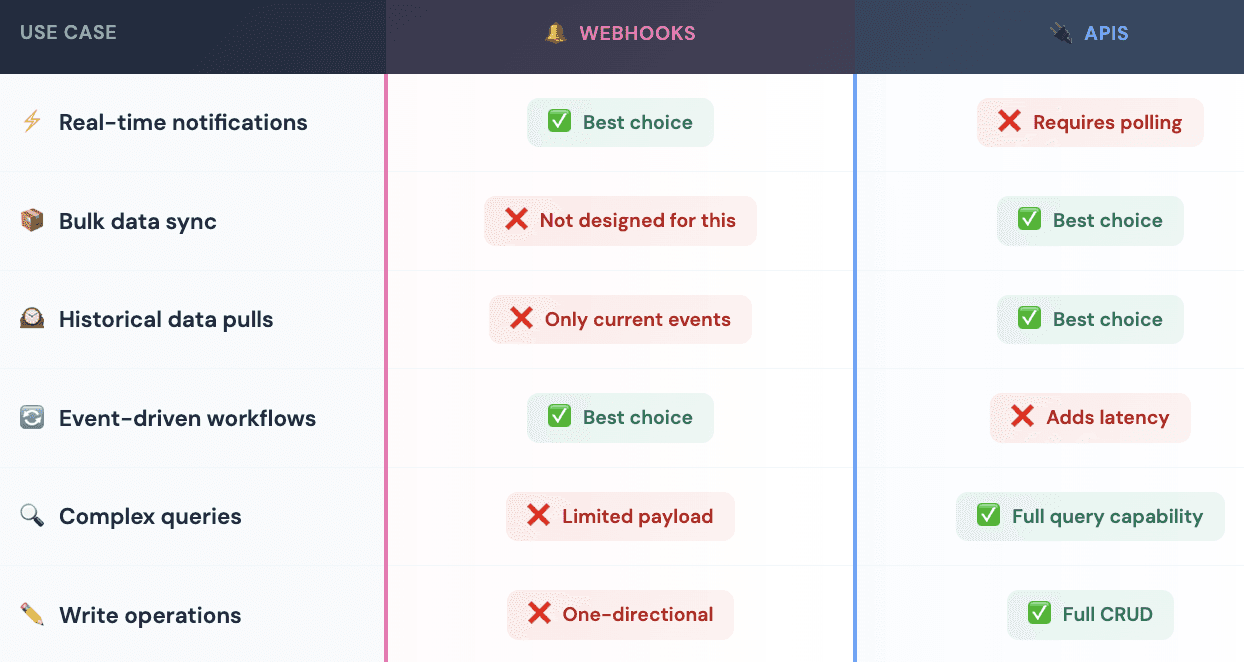
Webhooks and APIs serve different purposes, and most production integrations use both.
Use webhooks when:
You need instant notification of changes
Speed matters (lead response time, real-time routing)
You want to trigger workflows based on events
You're building event-driven architectures
Use APIs when:
You need to query or filter data
You're doing bulk operations or historical syncs
You need to write data back to a system
The source system doesn't support webhooks
Most enrichment workflows use both: Webhooks trigger the workflow when something changes, then APIs fetch additional data and write enriched data back.

CRM Webhook Architecture for Enrichment
Here's a practical architecture for real-time lead enrichment using webhooks.
The Flow
Lead submits form → CRM webhook fires → Enrichment service receives data → APIs called to multiple data providers → Enriched data returned → CRM updated
Step-by-Step Breakdown
1. Trigger Event: When a new lead enters your CRM (form submission, import, manual entry), configure your CRM to fire a webhook containing the lead's information, at minimum, email and company name.
2. Webhook Endpoint: Your enrichment service receives the webhook payload at a dedicated HTTPS endpoint. The endpoint validates the request (authentication, payload structure) and queues it for processing.
3. Enrichment Processing: The enrichment service calls data providers to append firmographic, contact, technographic, and intent data. This might involve multiple API calls in sequence (waterfall enrichment) to maximize coverage.
4. Data Return: Once enrichment completes, the service calls your CRM's API to update the original record with enriched fields - employee count, industry, phone number, tech stack, lead score, etc.
5. Next Actions Trigger: With the record now enriched, downstream workflows activate - lead scoring recalculates, routing rules apply, notifications fire to the assigned rep.
Why This Architecture Works
Speed: The entire process completes in seconds, not hours
Reliability: Webhook retry mechanisms handle temporary failures
Scalability: Queue-based processing handles volume spikes
Flexibility: Easy to add/remove enrichment providers without changing CRM config

Setting Up Webhook CRM Integration
Here's how to configure webhooks in major CRMs for enrichment workflows.
HubSpot Webhook Setup
HubSpot offers workflows with "Send a webhook" actions (requires Operations Hub Professional or Enterprise).
Configuration steps:
Navigate to Automation > Workflows
Create a workflow triggered by contact creation or property change
Add action: "Send a webhook"
Set method to POST
Enter your enrichment endpoint URL (must be HTTPS)
Configure authentication (request signature or API key)
Select contact properties to include in payload
Payload customization: You can specify which contact and company properties to send. Include at minimum: email, company name, and record ID for the callback.
Salesforce Webhook Setup
Salesforce requires either Apex triggers or Flow Builder for webhook functionality.
Flow Builder approach:
Create a Record-Triggered Flow on Lead object
Trigger on record creation (and optionally update)
Add an HTTP Callout action
Configure the callout with your enrichment endpoint
Map Lead fields to the request body
Handle the response to update Lead fields
Important: Salesforce requires named credentials and remote site settings for callouts. Configure these in Setup before building the flow.
Zoho CRM Webhook Setup
Zoho supports webhooks through workflow rules.
Configuration steps:
Go to Setup > Automation > Workflow Rules
Create a new rule for Leads (or desired module)
Set trigger condition (e.g., Lead Created)
Add Instant Action: Webhook
Configure URL, method, and field mappings
Associate webhook with the workflow rule
Limitation: Zoho allows data transfer for up to 10 CRM fields per webhook. Plan your payload carefully.

Real-Time Enrichment with Databar
For teams wanting to implement this architecture without building custom infrastructure, Databar provides a ready-made solution.
How the webhook-to-enrichment flow works with Databar:
Webhook Receiver: Configure your CRM to send webhooks to Databar when new leads arrive
Enrichment Layer: Databar processes the lead through 160+ data providers using waterfall logic - if one provider doesn't have the data, it automatically tries others
Scoring and Segmentation: Before data returns to your CRM, Databar can apply lead scoring rules and segmentation based on enriched attributes
CRM Sync: Enriched, scored, and segmented data syncs back to your CRM via native integrations (HubSpot, Salesforce, Pipedrive) or API
This approach means you're not building and maintaining enrichment infrastructure yourself. The webhook triggers the workflow, Databar handles the enrichment logic, and your CRM receives complete, scored records ready for sales engagement.
The native CRM integrations also handle field mapping, so enriched data lands in the right CRM fields without manual configuration for each field.
Best Practices for Webhook CRM Sync
Security
Always use HTTPS: Webhook payloads often contain PII. Unencrypted transmission is a security and compliance risk.
Authenticate requests: Use HMAC signatures, API keys, or bearer tokens to verify webhook sources. Don't accept payloads from unknown senders.
Validate payloads: Check that required fields exist and data types match expectations before processing.
Reliability
Return fast: Acknowledge receipt immediately (HTTP 200), then process asynchronously. Long-running processes cause timeouts.
Implement queuing: Use a message queue between receipt and processing. This handles bursts and prevents data loss.
Handle retries: Most CRMs retry failed webhooks. Make your processing idempotent, receiving the same webhook twice shouldn't create duplicate records.
Monitoring
Log everything: Webhook payloads, processing times, errors, API responses. You'll need this for debugging.
Set up alerts: Monitor for failed webhooks, slow processing, and error rates. Catch problems before they become backlogs.
Track latency: Measure time from webhook receipt to CRM update completion. This is your real-time sync performance.
Error Handling
Graceful degradation: If enrichment fails, don't block the entire workflow. Create the CRM record with available data and flag for retry.
Retry logic: Implement exponential backoff for transient failures (API rate limits, temporary outages).
Dead letter queues: Capture persistently failing records for manual review rather than losing them.
Common Mistakes to Avoid
1. Synchronous processing of large payloads. Webhook endpoints should respond quickly and process later. Trying to enrich a lead synchronously while the webhook waits causes timeouts.
2. No authentication. An exposed webhook URL can receive malicious payloads. Always verify the source before processing.
3. Missing idempotency. Webhooks can fire multiple times for the same event (retries, duplicate triggers). Your processing must handle this gracefully.
4. Ignoring rate limits. If your enrichment triggers burst API calls to data providers, you'll hit rate limits. Implement queuing and throttling.
5. No fallback for failures. When enrichment fails, leads shouldn't disappear. Build fallback paths that preserve data and flag records for retry.
6. Over-reliance on webhooks. Webhooks handle real-time events, but you still need scheduled reconciliation. Occasionally sync via API to catch anything webhooks missed.
FAQ
What is webhook CRM integration?
Webhook CRM integration connects your CRM with external systems using event-driven HTTP callbacks. When something happens in your CRM (new lead, deal stage change, contact update), a webhook automatically sends that data to another system in real time, no polling or manual sync required.
How do CRM webhooks work?
When you configure a webhook in your CRM, you specify a trigger event and a destination URL. When that event occurs, the CRM sends an HTTP POST request to your URL containing data about the event. Your receiving system processes the payload and responds with a success or failure status.
What's the difference between webhooks and API polling?
Webhooks push data when events occur - instant, efficient, event-driven. API polling pulls data on a schedule - checking repeatedly whether anything changed. Webhooks eliminate latency and reduce unnecessary API calls, but they only work for real-time events, not historical queries.
Which CRMs support webhooks?
Most modern CRMs support webhooks, including HubSpot, Salesforce, Pipedrive, Zoho, and Microsoft Dynamics 365. Capabilities vary, some offer native webhook actions in workflow builders, others require custom development or third-party tools.
Can I use webhooks for bi-directional sync?
Webhooks themselves are one-directional (push from source to destination). For bi-directional sync, you typically combine webhooks with API calls, webhooks notify you of changes, then you use APIs to write data back to the source system.
Related articles
See all