
The average GTM agency spends two to three weeks onboarding a new client before any campaign work begins. That time goes into discovery calls, competitive research, ICP documentation, messaging frameworks, and translating everything into whatever tool the agency uses to execute. By the time the first outreach sequence hits an inbox, a month has passed and the client is already asking where the pipeline is.
Agencies running their operations through Claude Code are compressing that timeline to days. Not because the work itself changes, but because the onboarding output goes directly into a system that can act on it. Instead of a Google Doc that someone later translates into table rows or CRM fields, the onboarding produces a structured context file that Claude Code reads, understands, and uses to execute every subsequent campaign task for that client.

The concept behind this is called context engineering, and it is becoming the core skill that separates agencies producing mediocre AI-assisted output from those producing work that actually converts. Many GTM leaders report little to no impact from AI, while only a minority are seeing real returns. The difference is not the model. Everyone has access to the same LLMs. The difference is structural: whether you are having one-off conversations with a chatbot or building a persistent context system that accumulates intelligence over time.
This article walks through how to build that system specifically for the multi-client reality of agency life, where you need distinct context for each client, shared SOPs across all of them, and a folder structure that keeps everything clean as you scale from three clients to thirty.
The Multi-Client Problem Nobody Talks About
Every guide on Claude Code context engineering assumes you are one company setting up Claude Code for your own use. The Anthropic documentation covers CLAUDE.md for a single project. Blog posts explain how to structure skills and subagents for one codebase. That is fine if you are a SaaS company building your own product. It breaks down immediately for agencies.

An agency running client onboarding for GTM campaigns has a fundamentally different problem. You need Claude Code to understand Client A's ICP, messaging, competitive landscape, and CRM structure while simultaneously knowing Client B's completely different industry, buyer persona, and tech stack. You need SOPs that standardize your methodology across all clients while allowing the tactical details to be client-specific. And you need a way to prevent context from bleeding between clients so that a session working on Client A does not accidentally pull in assumptions from Client B.
The solution is a folder architecture that mirrors how agencies operate: a shared methodology layer that defines how you do things plus individual client environments that define who you are doing them for.
The Folder Structure
Here is the directory layout that works for multi-client agency operations. Every agency will customize the specifics, but this skeleton addresses the core organizational challenge.
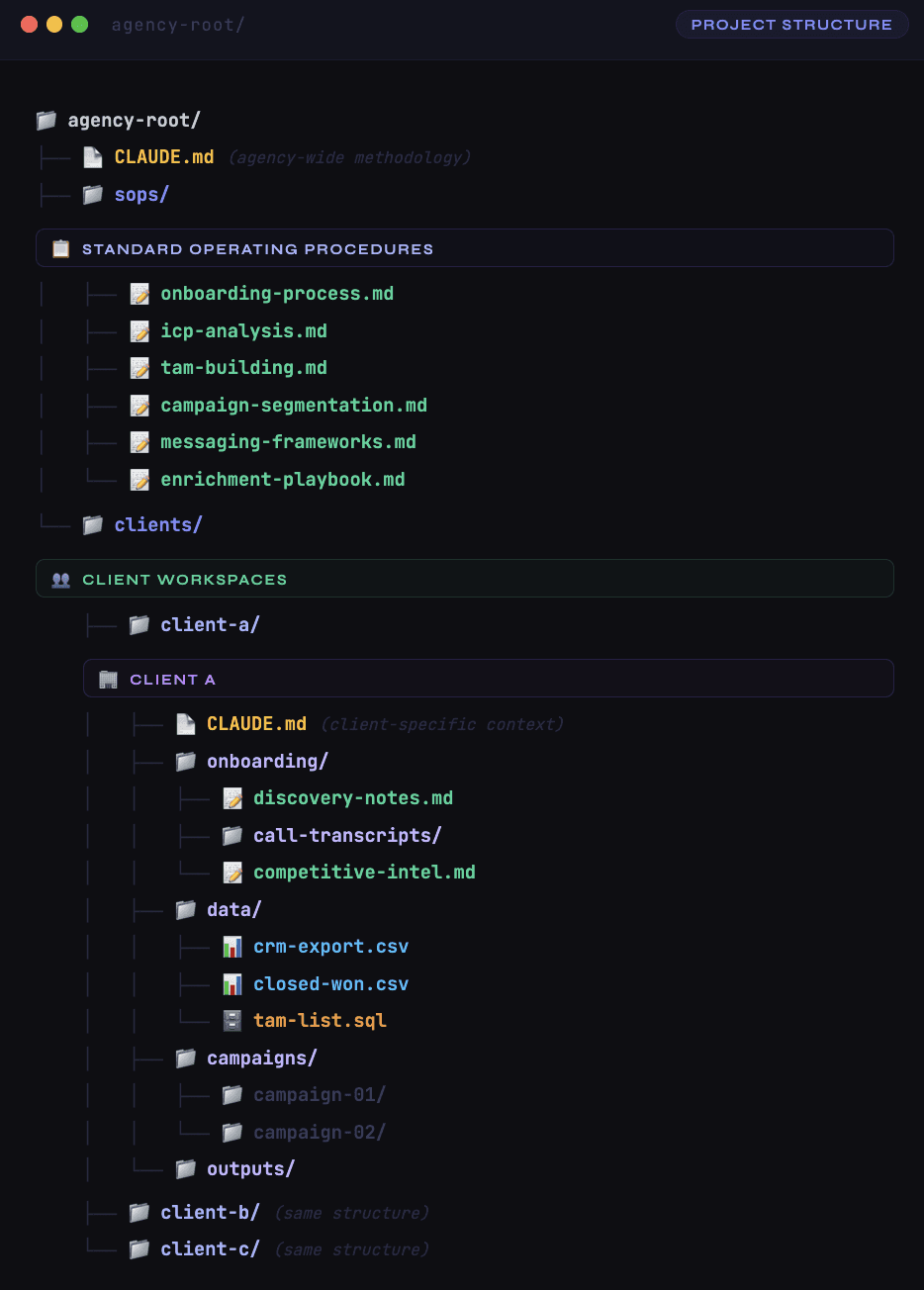
Two things to notice. First, there are two levels of CLAUDE.md. The root-level file defines your agency's methodology, your standard approach to GTM, and the rules Claude Code should follow regardless of which client it is working on. Each client folder has its own CLAUDE.md that contains everything specific to that engagement. When you open Claude Code inside a client folder, it reads both files automatically, layering the client-specific context on top of the agency-wide methodology.
Second, the SOP folder sits at the agency root, not inside any individual client. These are your playbooks, the documented step-by-step processes for how you do ICP analysis, how you build TAM lists, how you structure campaigns, how you write outreach sequences. They represent your accumulated expertise as an agency. Claude Code can reference them from any client context, which means every client benefits from your full methodology without you having to rewrite instructions each time.

The Agency-Level CLAUDE.md
This is the file that encodes your identity as a GTM agency. It tells Claude Code who you are, how you think, and what standards to apply across every client engagement. Here is what belongs in it.
Agency identity and positioning: A brief statement of what your agency does, which industries you specialize in, and what your core offerings are. If you focus on B2B SaaS pipeline generation, say that. If you combine LinkedIn content with outbound, say that. This prevents Claude Code from making assumptions that do not match your actual business.
Standard operating procedures index: A reference list pointing to each SOP file with a one-line description of when it applies. Claude Code uses this to know which playbook to follow for which task. When you tell it to build a TAM list for a new client, it reads the tam-building.md SOP to know your specific approach rather than improvising from general knowledge.
Quality standards and output formats: How should deliverables look? What level of detail do your campaign briefs include? How do you format segment definitions? What does a completed ICP analysis contain? These standards prevent Claude Code from producing output that looks different for every client.
Tool integrations and preferences: Which enrichment providers do you prefer and why? How do you handle CRM pushes? What is your position on data quality, specifically which fields are mandatory before a lead enters a client's CRM? If you work with specific data enrichment tools and have preferences about waterfall enrichment order, document them here.
Rules and guardrails: What should Claude Code never do? Maybe it should never push data to a client's CRM without explicit human confirmation. Maybe it should never send enrichment requests for more than 100 records at a time during testing phases. These guardrails prevent expensive mistakes.
A good agency-level CLAUDE.md is typically 100 to 150 lines. Long enough to be comprehensive but short enough that it does not consume excessive context window space. Think of it as the onboarding document you would give a senior hire on their first day, covering your philosophy and standards without getting into the details of any specific client.
The Client-Level CLAUDE.md
This is where the magic of client onboarding happens. Every piece of information you gather during the discovery and onboarding process feeds into this file. When done well, it gives Claude Code the equivalent of having sat through every discovery call, read every email thread, and studied every competitive analysis for that client.
Company overview: What the client does, their product or service, their market position, their stage (seed, Series A, growth, enterprise), and their revenue model. Include specifics that matter for outbound: average deal size, typical sales cycle length, and whether they sell to SMB, mid-market, or enterprise.
ICP definition: This is the most important section. Industry verticals, company size ranges, geographic focus, technology requirements, and any other firmographic or behavioral criteria that define their ideal customer. Be specific. "B2B SaaS companies" is too broad. "B2B SaaS companies in the DACH region with 50 to 200 employees that sell to financial services and have recently hired a VP of Sales" is actionable.
Buyer personas: Who are the decision-makers at target companies? What titles do they hold? What do they care about? What language do they use to describe their problems? Include any insights from discovery calls about how the client's existing customers talk about the product.
Competitive landscape: Who are the main competitors? What are the client's differentiators? Where does the client win against competition and where does it lose? This context prevents Claude Code from producing generic messaging that could apply to any vendor in the space.
Previous campaign data: If the client has run outbound before, include the results. What worked? What did not? Which segments converted? Which messaging fell flat? If they have CRM data from previous efforts, reference the export files in the data folder.
CRM and tech stack details: Which CRM does the client use? How is it configured? What are the custom fields? What are the integration requirements? If there are fields that should never be overwritten (like manually entered executive relationship notes or product usage data), document them explicitly.
Active campaign context: As campaigns launch, add brief summaries of what is running, what segments are being targeted, and any preliminary results. This section evolves over the engagement and keeps Claude Code current on where things stand.
Translating Discovery Calls into Context
The onboarding process typically starts with one or two discovery calls where the client explains their business, their market, their challenges, and their goals. These calls contain a massive amount of context that usually gets lost in someone's notes or a recording that nobody rewatches.
The better approach is to transcribe the calls and feed them directly into Claude Code with instructions to extract structured information. Drop the transcript into the client's onboarding folder and ask Claude Code to produce a structured summary organized around the sections of the client-level CLAUDE.md. It will pull out the ICP details mentioned conversationally, the competitive names that came up, the specific pain points the client described their customers facing, and the historical campaign context that was shared anecdotally.
This extracted summary becomes the draft of the client CLAUDE.md. Review it, correct anything that was misinterpreted, add the specifics that come from CRM exports and campaign data, and you have a context file that is far more complete than what any team member could write from memory after a call.
The same applies to competitive research. Ask Claude Code to analyze competitor websites, compare positioning, and document where the client has genuine differentiation. This competitive intelligence goes into the competitive-intel.md file in the onboarding folder and gets referenced by the client CLAUDE.md.
Building the SOP Layer
Your SOPs are what make the methodology repeatable across clients. Without them, Claude Code improvises differently each time, and the output quality varies depending on how well you prompt it in the moment. With them, every client gets the benefit of your best thinking, applied consistently.
Each SOP should be a standalone markdown file that describes a specific process step by step. Here are the SOPs that most GTM agencies need.
ICP analysis. Your methodology for defining and refining an ideal customer profile. What data do you examine? What questions do you ask? How do you validate assumptions against actual closed-won data? What output format does the final ICP definition take?
TAM building. How you construct a total addressable market list. What sources do you pull from? How do you apply the ICP filters? How do you handle overlapping segments? What does a clean, segmented TAM database look like when it is done? Which prospecting tools do you use for sourcing and how?
Campaign segmentation. How you take a large TAM and break it into campaign-sized segments. What criteria do you segment on? How do you prioritize segments? How do you size segments to match outreach capacity?
Messaging frameworks. How you develop outreach copy for different segments. What structure do your email sequences follow? How do you customize messaging per segment versus per individual? What testing methodology do you use?
Enrichment playbook. Your standard approach to enriching prospect lists. Which data providers do you use in which order? What is your waterfall enrichment strategy? What email verification standards do you apply before adding contacts to outreach sequences? How do you handle missing data?
When Claude Code is working on a client campaign and you ask it to build a TAM list, it reads the SOP, reads the client context, and produces output that follows your methodology but is customized for that specific client's ICP. That is the power of the two-layer system.
Converting Lists to Queryable Databases
One workflow that significantly improves the back and forth between analysis and execution is converting your flat CSV exports into SQL databases inside the Claude Code environment. When you have a client's TAM as a CSV file, Claude Code can read it, but asking complex analytical questions about it is slow and awkward. CSV parsing on every question wastes tokens and time.
Converting the same data to a SQLite database changes the interaction entirely. You can ask Claude Code to show you the distribution of companies by region, compare segments side by side, filter by multiple criteria simultaneously, and calculate conversion metrics across different slices of the data. All of it runs as SQL queries, which are fast, precise, and do not consume context window space the way repeatedly scanning a CSV does.
The workflow looks like this: export the TAM or CRM data as CSV, drop it in the client's data folder, ask Claude Code to import it into SQLite, and then interact with it conversationally. "Which state has the most companies in our target segment?" "How do companies with the headcount between 50 to 100 employees compare to companies with a headcount between 100 to 200?" "Give me the top 50 companies by estimated revenue that match our ICP and have not been contacted yet."
This becomes especially powerful when you are iterating on segmentation strategy with a client. Instead of rebuilding spreadsheets and running formulas, you have a conversation with the data.
The Execution Handoff
At some point, the strategic work in Claude Code needs to produce something that reaches prospects. This is where the analysis-to-execution handoff happens, and it is the part that agencies are still figuring out in early 2026.
For smaller campaigns involving a few hundred accounts, you can run enrichment directly from Claude Code using API integrations and SDKs that connect to data providers. The agent selects companies from your TAM, finds the right contacts, enriches their information through waterfall providers, and produces a finished prospect list. Everything stays in one workflow.
For larger campaigns involving thousands or tens of thousands of companies, the execution moves to a dedicated platform with better visibility, error handling, and progress tracking. Claude Code produces the campaign brief, the segment definitions, the enrichment requirements, and the messaging frameworks. Then the agency applies those specifications in a platform like Databar or whichever enrichment tool they prefer, where they can monitor progress, spot errors, and share results with clients.
The key insight is that the CLAUDE.md and SOPs define the strategy. The execution tool is interchangeable. Some agencies use different tools for different clients depending on CRM integration requirements or budget constraints. The context engineering layer in Claude Code stays consistent regardless of which execution path you take downstream.
Scaling from Three Clients to Thirty
The folder structure and two-layer context system described above scales naturally. Adding a new client means creating a new folder, building the client CLAUDE.md from discovery calls and data exports, and linking to the same SOPs. The time investment per new client drops dramatically after the first few engagements because the methodology layer is already built.
There are a few things to watch as you scale.
Context isolation. Always open Claude Code sessions from within a specific client's directory. This way the agent loads that client's CLAUDE.md and the agency root CLAUDE.md, but does not inadvertently load context from other clients. If you are working on two clients in the same afternoon, start separate sessions from each client's folder.
SOP evolution. Your SOPs should improve over time as you learn from each engagement. When a campaign for Client D reveals a better approach to segmentation than what your current SOP describes, update the SOP. Every future client benefits automatically. This is how agency expertise compounds: the methodology gets better with every engagement, and every engagement gets the latest version of the methodology.
Template clients. For agencies that serve similar types of clients (e.g., B2B SaaS in the same stage and market), you can maintain template client folders with pre-filled CLAUDE.md sections for the common elements. This accelerates onboarding for new clients that fit the template, requiring you to only customize the sections that differ.
Compacting conversations. Long Claude Code sessions accumulate context that can slow down performance and increase token usage. For multi-hour analysis sessions, use the compact command periodically to summarize earlier conversation history and free up context window space. This keeps the agent sharp for the current task without losing awareness of what was discussed previously.
What This Means for Agency Economics
The traditional agency model bills for time. More clients means more people means more overhead. Context engineering in Claude Code changes that equation in a measurable way.
The onboarding phase, which typically requires a senior strategist spending 20 to 40 hours on research, analysis, and documentation, compresses to 4 to 8 hours. The strategic quality does not decrease because the same research happens, just faster. Discovery call insights still come from human conversations. Competitive analysis still happens. ICP definitions still get refined against real data. The difference is that the output feeds directly into a system that can act on it rather than sitting in a document that someone must later interpret and re-enter into execution tools.
Campaign iteration speed also improves. When a segment underperforms and needs adjustment, you are not starting from scratch. Claude Code already has the full client context, the campaign history, and the SOP methodology. Adjusting the approach is a conversation, not a project.
Build your client onboarding system in Claude Code with the agency-level methodology first, then add clients one at a time. The SOPs get better with each engagement. The client context files get more precise with each iteration. And the time between signing a new client and launching their first campaign shrinks from weeks to days.
FAQ
Do I need the max Claude subscription for this to work?
For serious agency work, yes. The standard subscription has usage limits that will cap you mid-session when processing large CRM exports or running extended analysis. The Max subscription gives you the context window size and message throughput needed to work through full onboarding workflows without interruption. Several agencies we have spoken with consider it a non-negotiable operating cost.
Can multiple team members work on the same client folder?
Yes, if you store the folder structure in a shared repository (Git works well for this). Team members can pull the latest client context, run their own Claude Code sessions, and push updates back. The CLAUDE.md and SOP files act as shared institutional knowledge. Just coordinate to avoid conflicting edits to the same files.
How do I handle sensitive client data?
Client data stays on your local machine or your agency's secure infrastructure. Claude Code processes files locally. You should still follow your standard data handling policies and any contractual obligations with clients regarding their CRM data and contact information. Some agencies create a sanitized version of client data for analysis that strips personally identifiable fields while keeping the analytical dimensions intact.
What if my client uses a CRM I am not familiar with?
The context engineering approach is CRM-agnostic. Export the deal data and contact records as CSV regardless of whether the client uses HubSpot, Salesforce, Pipedrive, or something else. The analysis and segmentation happen inside Claude Code on the exported data. The CRM-specific parts (field mapping, push logic, integration details) go into the client CLAUDE.md and only matter when you reach the execution phase.
How long does it take to build the initial SOP library?
If your agency already has documented processes, converting them to Claude Code-friendly markdown takes a day or two. If your processes exist only in people's heads, expect a week to document the core five or six SOPs properly. This is a one-time investment that pays off with every subsequent client engagement. Most agencies start with ICP analysis and enrichment playbook SOPs, then add the others as they encounter the need.
Should I use skills, subagents, or just the CLAUDE.md?
For most GTM agency work, CLAUDE.md files and SOPs are sufficient. Skills are useful if you have recurring analytical tasks that benefit from auto-loading specific instructions (e.g., a skill that activates whenever you mention "TAM building"). Subagents become valuable when you need to run parallel analysis that would clutter the main conversation context, like researching five competitors simultaneously. Start simple with the folder structure and CLAUDE.md approach, then layer in skills and subagents as you identify specific bottlenecks.
Related articles
See all