
Seventy-three percent of sales managers say they spend less than 5% of their time coaching. That number has been cited across multiple industry reports, and if you manage a sales team, it probably feels generous. The reality for most frontline managers is that coaching gets squeezed out by internal meetings, CRM administration, forecast calls, pipeline reviews, and all the operational overhead that comes with running a team.
The irony is brutal. Coaching is the single highest-impact activity a sales manager can perform. Gartner's research shows effective coaching produces an 8% improvement in sales performance. Companies with formal coaching processes see 91.2% quota attainment versus 84.7% for teams without structured coaching. And McKinsey's research on sales productivity found that managers spend 60 to 70% of their time on tactical activities like call reviews rather than strategic work.
So the bottleneck is not that sales managers do not want to coach. It is that the prep work for good coaching, pulling deal data, reviewing transcripts, identifying patterns, comparing rep performance, takes so long that it eats the time that should go toward the actual coaching conversations.
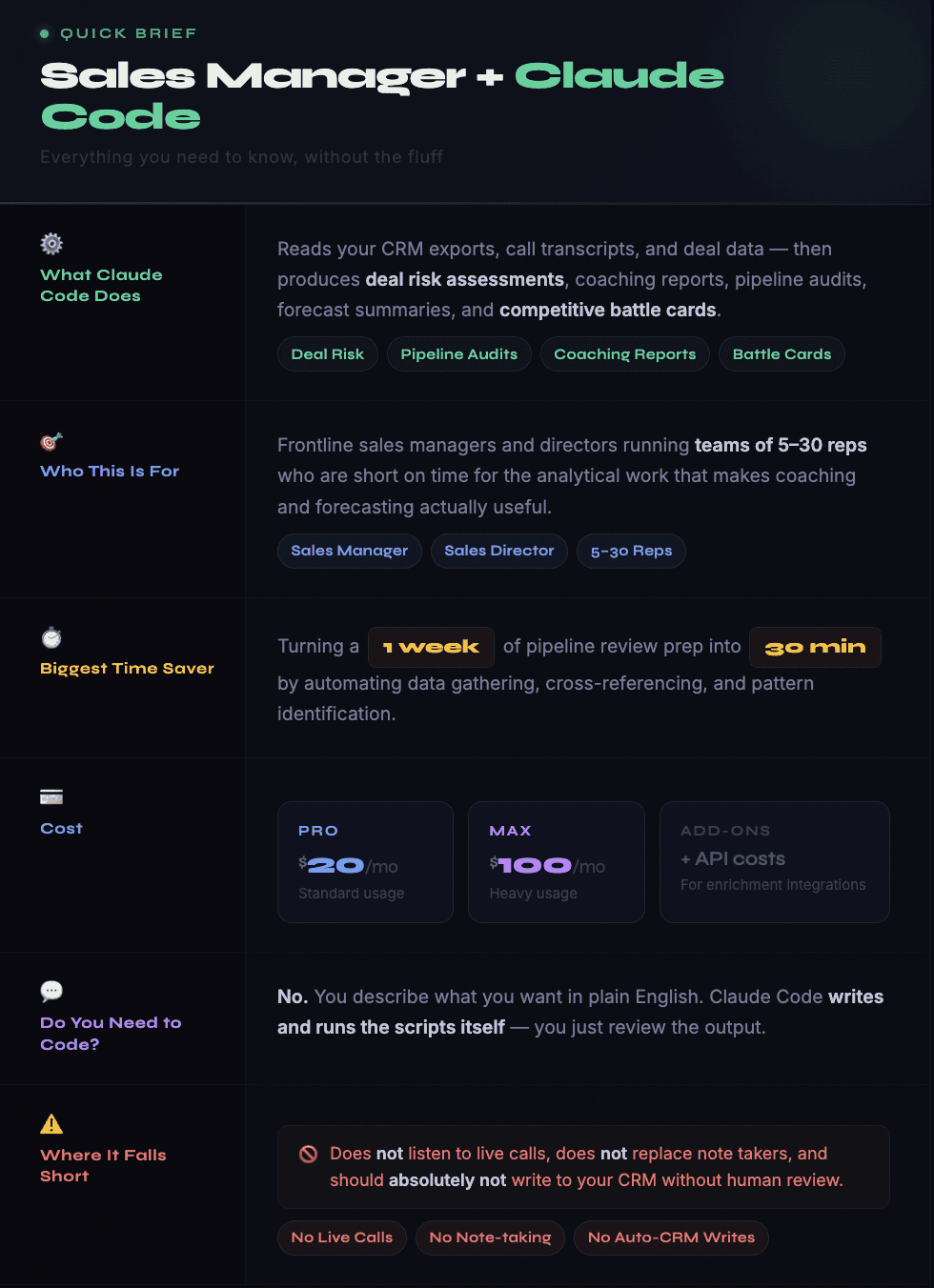
Claude Code removes that bottleneck. Not by coaching for you, because that is and should remain a human activity (at least to a certain degree), but by doing the analytical prep work that makes coaching sessions specific, data-driven, and worth every minute. It reads your CRM exports, processes your call transcripts, identifies deal risks, flags pipeline anomalies, and produces structured summaries that you can walk into a one-on-one with and immediately use.
This guide covers how sales managers are using Claude Code for the work that consumes their time: deal reviews, rep coaching prep, pipeline inspection, forecast preparation, competitive intelligence, and pre-call research. We also cover how it connects to data enrichment tools for account research, where the practical limits sit, and what the first week looks like.

The Sales Manager's Actual Problem (and Why Chat AI Does Not Solve It)
You have probably tried using ChatGPT or a similar tool for sales-related tasks. And you probably found it useful for generating email drafts or brainstorming objection responses, but not much else. That is because chat-based AI tools have a fundamental limitation for sales managers: they start every session from zero.
You paste in some context, get a response, and then next time you open a new chat and have to re-explain everything. Your deal stages, your qualification criteria, your team's strengths and weaknesses, your ICP, your sales methodology. All of that context disappears between sessions.
Claude Code operates differently. It runs locally with access to your file system. You can drop your CRM exports, call transcripts, pipeline reports, and sales playbook into a project folder, and Claude Code reads all of it. When you ask it to analyze a deal, it already knows your MEDDICC criteria, your average deal cycle by segment, and what your top performer's close rate looks like. That persistent context is what makes it useful for real managerial work rather than just one-off text generation.
The second difference is that Claude Code actually does things. It writes scripts, processes data, produces files, and generates structured output. When you ask it to audit your pipeline for deals that have been stuck in the same stage for 30+ days, it does not just explain how you could do that analysis. It reads the data, runs the analysis, and hands you the report.
For a sales manager whose calendar is already packed, that distinction between "here's how you could do it" and "here's the report" is the entire value proposition.
Deal Reviews: From Gut Feel to Data-Backed Assessment
Most deal reviews happen in one of two ways. Either the rep talks through the deal for five minutes and the manager asks a few questions, or the manager pulls up the CRM record and tries to piece together what is actually happening from incomplete fields and scattered activity logs.
Neither approach is great. The first relies entirely on the rep's narrative, which is naturally biased toward optimism. The second gives you data but not insight. Knowing that a deal has been in "Negotiation" for 45 days tells you it is stuck, but not why.
Claude Code adds a third option. Feed it the deal data alongside the call transcripts, email threads, and any enrichment data you have on the account. Ask it to assess the deal against your qualification framework.
Here is what that looks like in practice. You export your open pipeline as a CSV. You drop in the transcripts from the last three calls on a specific deal. You tell Claude Code something like:
"Review this deal against our MEDDICC criteria. Based on the transcripts, assess whether we have identified the economic buyer, whether there is a documented decision process, and whether we have metrics that quantify the prospect's pain. Flag anything that is unclear or contradicted between the CRM data and what was discussed on the calls."
The output is a structured assessment with specific references to the transcript. Not generic advice, but observations like "The call on January 14 discussed budget approval, but the CRM still shows no economic buyer identified. Either the CRM is not updated or the budget conversation did not reach the actual decision maker."
That specificity is what makes deal reviews productive. Instead of asking the rep "So, where are we on this deal?" you can say "I see the prospect mentioned in the January call that the CFO needs to approve anything over $50K, but our CRM shows no CFO contact. What happened there?"
Sales managers who have adopted this approach describe it as getting back the preparation time they used to spend before deal reviews. One practitioner reported cutting deal review prep from two hours per week to about 20 minutes, with better quality output because the analysis covered all deals rather than just the ones the manager had time to review manually.

Coaching Prep: Making One-on-Ones Useful
The difference between a productive one-on-one and a wasted 30 minutes usually comes down to preparation. Managers who walk in with specific observations coach better. Managers who wing it end up having a status update conversation instead.
Claude Code can build a coaching brief for each rep before your one-on-one. The inputs: that rep's pipeline data, their recent call transcripts, their activity metrics, and their historical close rates. The output: a document highlighting what is going well, what is not, and specific moments from recent calls that are worth discussing.
Here is how this plays out across different coaching scenarios:
→ Discovery call struggles: Claude Code analyzes the rep's last 10 discovery transcripts and surfaces patterns. Maybe they ask surface-level questions but never get to the business impact. Maybe they talk for 70% of the call. Maybe they skip the budget conversation every single time. One or two calls will not reveal this, but 10 calls processed together make the pattern obvious.
→ Late-stage losses: The analysis shifts to proposal-stage transcripts and CRM deal history. Claude Code can compare the rep's behavior against your top closer. Are they sending proposals without confirmed next steps? Missing competitor objections that came up earlier? Taking twice as long in negotiation as the team average?
→ New hire ramp: Claude Code produces a weekly progress brief that tracks the new rep's activity metrics, pipeline build, and call quality against what historically successful reps looked like at the same tenure point. Instead of guessing whether a new hire is on track, you have a baseline comparison.
The key insight from managers using this approach: the coaching conversation itself does not change. You still need to sit with the rep, listen, ask questions, role-play, and provide guidance. That is human work and always will be. What changes is that you walk in knowing exactly what to focus on, with specific examples to reference, rather than starting from a vague sense that "something seems off."

Pipeline Inspection Without the Spreadsheet Marathon
Monday morning pipeline reviews are a ritual in most sales orgs. They are also one of the biggest time sinks. The manager pulls reports from the CRM, exports to a spreadsheet, applies conditional formatting to flag anomalies, cross-references with last week's numbers, and then spends two hours trying to figure out what changed and why.
Claude Code automates most of that sequence. Export your pipeline data (deal name, stage, amount, close date, last activity date, owner, and any custom fields you track). Drop it in the project folder. Ask Claude Code to produce your Monday pipeline report.
Because the CLAUDE.md file contains your pipeline rules and stage definitions, the analysis is tailored to your team. A typical output includes:
Deals with close dates in the current month that have had no logged activity in two or more weeks
Deals where the amount jumped more than 20% since last week, which warrants a check on whether the increase is real or the rep is inflating to hit coverage targets
Deals that moved backward in stage, such as dropping from "Verbal Commit" to "Negotiation," which almost always signals a problem
Total pipeline coverage by segment compared to your 3x rule or whatever coverage ratio you use
New deals added this week versus deals that fell out, along with net pipeline change by rep
The beauty of doing this in Claude Code rather than a BI tool is the narrative layer. BI dashboards show you numbers. Claude Code explains what the numbers mean in the context of your specific pipeline and team. Something like: "Pipeline coverage for the enterprise segment dropped from 3.2x to 2.1x this week, primarily because Deal X ($180K) was pushed to next quarter. Without Deal X, the segment is significantly under-covered for Q2."
That narrative context is what you really need for a productive pipeline review meeting. A concise explanation of what changed and what to do about it.
For teams that want to go deeper, you can connect your pipeline data to enrichment sources. Knowing that a prospect company just announced layoffs, for instance, is critical context for assessing a deal's likelihood to close. Databar's integration with 100+ enrichment providers can pull company signals like funding events, leadership changes, and hiring patterns that directly affect deal probability. Claude Code can cross-reference those signals with your pipeline data and flag deals where external events might impact the outcome.

Forecast Prep: Reducing Guesswork
Forecasting is one of those activities where the quality of the output depends entirely on the quality of the inputs. And for most sales managers, the inputs are messy. Reps have different levels of CRM hygiene. Stage definitions are interpreted inconsistently. Close dates are aspirational rather than realistic.
Claude Code does not fix the human behavior problems that create forecasting noise. But it can help you identify and account for them.
The practical workflow starts with your historical deal data. Export closed-won and closed-lost deals from the past 12 months along with stage history data showing how long each deal spent in each stage. Claude Code analyzes the patterns: your actual stage-by-stage conversion rates, average cycle times by segment and deal size, seasonal trends, and the gap between forecasted close dates and actual close dates.
That historical baseline becomes the foundation for assessing your current pipeline. Instead of taking each rep's forecast at face value, Claude Code can apply your historical conversion rates to the current pipeline and produce a probability-weighted forecast. If your enterprise deals have a 35% win rate from "Proposal Sent" and you have $2M in that stage, the math says $700K is the realistic number regardless of what the reps are calling it.
This is not a replacement for conversation-based forecasting. You still need to review key deals with your reps and make judgment calls based on qualitative factors. But having the data-driven baseline means you can spot where rep confidence diverges significantly from historical patterns and ask better questions about why.
One thing Claude Code handles particularly well is the "close date accuracy" analysis. By comparing historical forecasted close dates against actual close dates for each rep, you can quantify how optimistic or pessimistic each person tends to be. If Rep A consistently closes deals 3 weeks later than forecasted, you can apply that adjustment to their current pipeline and produce a more realistic forecast.
Competitive Intelligence on Demand
Sales managers get pulled into competitive situations constantly. A rep calls from the parking lot: "The prospect just told me they're also looking at [Competitor X]. What should I say?"
In that moment, you need current, specific intelligence. Not a battle card that was last updated six months ago. Claude Code, connected to web search through an MCP server, can produce real-time competitive briefs.
Set up a project folder for competitive intelligence. In your CLAUDE.md, list your main competitors and the key differentiators. When a competitive situation arises, ask Claude Code to research the competitor's recent activity: pricing changes, new feature launches, customer reviews, leadership changes, funding events. Within minutes, you have a brief that includes what the competitor is saying publicly, what their customers are saying on review sites, and how to position against them based on your actual strengths.
For more systematic competitive monitoring, Claude Code can run a weekly scan and produce a digest. What did each competitor announce this week? What are customers saying on G2 and Capterra? Are there new job postings that signal product direction changes? That digest, delivered every Monday morning alongside your pipeline report, gives you and your reps a significant information advantage.
The enrichment angle matters here too. If you need deeper company intelligence on a specific competitor's customers or on accounts your reps are pursuing, prospecting tools integrated through Databar can pull firmographic data, tech stack information, and hiring signals that inform your competitive positioning.
Pre-Call Research for Your Reps (At Scale)
One of the most impactful things a sales manager can do is improve the quality of preparation before customer-facing meetings. Reps who walk into calls with specific, relevant context outperform reps who are winging it. But good pre-call research takes time, and most reps either skip it entirely or spend five minutes on LinkedIn and call it done.
Claude Code can generate pre-call briefs at scale. The workflow: export your team's upcoming meetings for the week. For each meeting, Claude Code pulls the CRM record, any previous call transcripts, the company's public information (website, news, social), and enrichment data. It produces a one-page brief for each meeting.
What goes into a good brief depends on where the deal is. For a first meeting, the brief focuses on company context, the prospect's likely pain points based on their industry and size, and conversation starters drawn from recent company news. For a late-stage negotiation, the brief summarizes everything discussed in previous calls, flags unresolved objections, and highlights competitive risks.
The scale is what matters. Producing one pre-call brief manually takes 15 to 30 minutes. Producing 20 for your team's meetings next week takes Claude Code maybe an hour, depending on how many enrichment sources you are pulling from. That is a significant productivity multiplier.
Some managers have taken this further by building a "pre-call research" slash command in Claude Code that standardizes the brief format. The rep or manager types a command, provides the account name, and Claude Code produces a brief in a consistent layout the team learns to scan quickly. Consistency matters here because reps should not have to hunt for information, they should know exactly where each data point lives in the brief.

Building Your Sales Manager CLAUDE.md
The configuration file for a sales manager looks different from what a RevOps lead or a GTM engineer would build. Here is what to include.
Your qualification framework: Whether you use MEDDICC, BANT, SPICED, or a custom methodology, document the criteria in detail. What does each letter or element mean in your org? What constitutes "champion identified" versus "champion confirmed"? The more specific you are, the more useful Claude Code's deal assessments become.
Team roster and performance context: List your reps with their tenure, quota, year-to-date attainment, and specific coaching focus areas. This lets Claude Code produce tailored coaching briefs without you re-explaining each person's situation every session.
Pipeline stage definitions: Your stages, the entry and exit criteria for each, and expected activity at each stage. This is what powers pipeline inspection, because Claude Code needs to know your rules before it can flag violations.
Competitive landscape: Your top five competitors with brief positioning notes: what they win on, where they are weak, and your elevator pitch against each. This context fuels the competitive intelligence workflow.
Forecasting parameters: Target coverage ratio, historical stage-by-stage conversion rates, average cycle times by segment. Claude Code uses these to build probability-weighted forecasts and to flag deals deviating from normal patterns.
Coaching principles: Optional but useful. If you have a coaching philosophy, like focusing on one skill per session or always ending with a practice exercise, documenting it helps Claude Code format briefs that match how you actually run your one-on-ones.
What Claude Code Cannot Do for Sales Managers
Being honest about limitations saves you from frustration.
It does not replace conversation intelligence. Claude Code does not listen to live calls, detect sentiment in real-time, or track talk-to-listen ratios during a meeting. Gong, Chorus, and similar tools still own that space. What Claude Code does is process the transcripts those tools produce and extract coaching insights at scale.
It does not write to your CRM. Or rather, it can, but it should not without a human checkpoint. Every experienced practitioner recommends read-only CRM access. The output should always be a report, a brief, or a CSV that someone reviews before anything gets pushed back.
It does not replace your judgment. Claude Code can tell you that a deal looks risky based on data patterns. It cannot tell you that the rep has a strong personal relationship with the champion that is not captured anywhere in the CRM. The AI provides analytical input. You make the call.
It does not run in real-time. You cannot have Claude Code analyzing a call while you are on it. It is session-based. You start it, give it tasks, review the output. The value is in preparation and analysis, not live assistance during meetings.
Getting Started: Your First Five Days
Day 1: Install and explore. Install Node.js, run the Claude Code installer, create a project folder. Spend 30 minutes just asking it questions and getting comfortable with the terminal.
Day 2: Build your CLAUDE.md. This is the most important step. Fill in your qualification criteria, stage definitions, team roster, competitive landscape, and forecasting parameters. Budget an hour.
Day 3: Run your first pipeline analysis. Export your current pipeline as a CSV. Ask Claude Code to audit it for stuck deals, missing close dates, coverage ratios, and deals moving backward. Review the output and refine your instructions.
Day 4: Process your first batch of transcripts. Take three to five recent call transcripts from a rep you are actively coaching. Ask Claude Code to assess the calls against your methodology and produce a coaching brief. Compare its observations to your own impressions.
Day 5: Connect web search. Set up the Brave Search MCP server, which is free and takes about five minutes. Now Claude Code can research companies, pull competitive intelligence, and generate pre-call briefs with current public information. Run a competitive brief on your top competitor and evaluate the output.
After the first week, expand gradually. Add more reps' transcripts. Build your forecast model. Start producing weekly pipeline reports. The managers who get the most value use Claude Code daily for small tasks, and that daily use is what builds the context that compounds over time.
FAQ
Is Claude Code a replacement for Gong or Chorus?
No. Those tools capture calls, provide real-time analysis, and track conversation metrics like talk ratios and monologue length. Claude Code processes the transcripts those tools produce and extracts patterns across many calls at once. They are complementary. Gong captures. Claude Code analyzes at scale.
Can my reps use Claude Code too, or is it just for managers?
Both. Reps can use it for pre-call research, competitive intelligence, and email drafting. Managers use it for coaching prep, pipeline analysis, and forecasting. The CLAUDE.md file will be different for each use case, so it makes sense to maintain separate project folders for individual rep workflows versus managerial analysis.
How much time does it actually save per week?
Sales managers who have adopted it report saving 5 to 8 hours per week on analytical tasks like pipeline review prep, deal assessment, coaching prep, and forecast assembly. The exact number depends on team size and how much manual analysis you currently do. The time saved goes back into coaching, customer interactions, and strategic planning.
What about data security with call transcripts?
Claude Code runs locally on your machine. The transcripts are processed on your computer, not sent to a cloud service for training. That said, always check with your IT and compliance teams before processing sensitive customer conversation data through any AI tool. It is better to get clearance upfront than to ask forgiveness later.
Does this work with MEDDICC, Challenger, SPIN, Sandler, or other methodologies?
Yes. You define your methodology in the CLAUDE.md file, and Claude Code applies it to every analysis. The tool is methodology-agnostic, so whatever framework your team uses, deal assessments and call reviews will be measured against those specific criteria.
What if my team's CRM data is a mess?
Start with whatever data you have. Even imperfect CRM data reveals patterns when processed at scale. Claude Code can actually help identify the data quality problems, such as missing fields, inconsistent stage usage, and stale records, and produce a cleanup plan. For enrichment gaps, platforms like Databar with 100+ providers can fill in missing firmographic data and contact details. Clean data makes everything better, but messy data is still more useful than no analysis at all.
Related articles
See all