Only 11% of RevOps professionals rate their customer and prospect data as "excellent." That finding comes from the 2025 State of RevOps Survey conducted by Openprise and RevOps Co-op, which polled over 150 operations professionals. Among teams with poor data quality, 70% reported difficulty making strategic decisions. And 71% of all companies surveyed said bad data actively hurts their go-to-market execution.
Those numbers sit at the center of a frustrating loop. RevOps knows the data is broken. Leadership knows the data is broken. But the cleanup work is so tedious, so manual, and so repetitive that it perpetually sits in the "we'll get to it next quarter" pile. Meanwhile, AI investments stall because the agents and automations being deployed are consuming garbage data and producing confidently wrong outputs at scale.
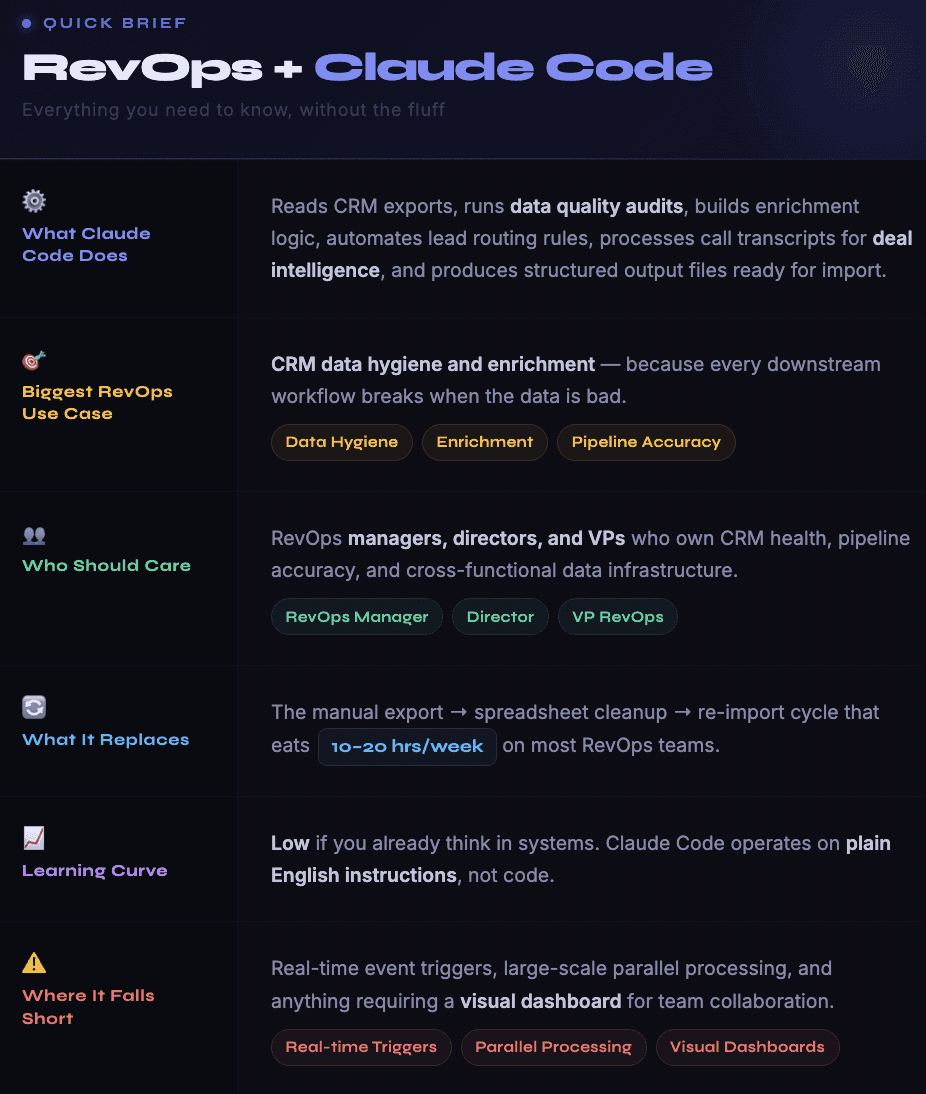
Claude Code breaks that loop. Not because it is a better CRM or a smarter dashboard, but because it can sit inside a RevOps team's actual workflow and do the unglamorous work: audit 30,000 records for missing fields, cross-reference enrichment sources to fill gaps, standardize job titles across three different naming conventions, flag duplicates with fuzzy matching logic, and produce clean import-ready files. All of that from a terminal window using plain English instructions.
This guide covers how RevOps teams are practically using Claude Code in 2026 for the work that matters most: data quality, pipeline operations, lead routing, forecasting support, and system architecture.
We also cover where it does not work, what the setup looks like, and how it fits alongside dedicated CRM enrichment tools that handle the heavy lifting at volume.

Why RevOps Is a Perfect Fit for Claude Code (and Why Most AI Tools Are Not)
Most AI tools marketed to revenue teams focus on one thing: generating output. Write an email. Summarize a call. Score a lead. That is useful, but it misses what RevOps actually does.
RevOps is a systems discipline. The job is not about producing content. It is about making sure data flows correctly between platforms, that records are clean and consistent, that processes work without manual intervention, and that every team in the revenue org is operating from the same source of truth. It is infrastructure work.
The typical AI chatbot fails at this because it has no persistent context. You cannot paste 30,000 CRM records into ChatGPT and ask it to find the duplicates. You cannot give it your HubSpot field mapping, your enrichment rules, your routing logic, and your data quality standards all at once. The context window is not big enough, and even if it were, the tool has no ability to write code, run scripts, or produce files.
Claude Code can do all of that. It runs locally on your machine with access to your file system. You drop a CRM export in a folder, describe your data quality rules, and Claude Code writes a Python script to audit every record, flag exceptions, and produce a cleaned output file. It does not just tell you what to do. It does the work.
For a function that spends a disproportionate amount of time on manual data manipulation, that distinction matters.

The CRM Data Quality Workflow
This is the single highest-impact use case we see RevOps teams running in Claude Code. Here is why it matters and exactly how it works.
The problem everyone knows but nobody fixes. CRM data decays at roughly 30% per year. People change jobs. Companies get acquired. Phone numbers go stale. Email addresses bounce. And that is before accounting for the records that were entered incorrectly in the first place, with misspelled company names, inconsistent industry categories, and job titles that mean different things in different CRM instances.
Forrester's 2025 State of RevOps survey found that 58% of B2B companies cite process misalignment as their primary barrier to growth. Bad data is not the only cause of that misalignment, but it is the foundation on which misalignment grows. When marketing and sales disagree about lead quality, the disagreement usually traces back to inconsistent data definitions, missing enrichment fields, or records that were never properly qualified.
How Claude Code handles it. The workflow starts with a CRM export. Most teams pull their full contact and company databases as CSVs from HubSpot, Salesforce, or whatever CRM they use. Drop those files into a Claude Code project folder.
Then you describe your data quality rules in plain English. Something like:
"Audit this contact list. Flag any record where the email is missing, the phone number has fewer than 10 digits, the company name is blank, or the job title does not match our standard categories. Also find likely duplicates based on similar names at the same company domain. Produce a summary report and a cleaned CSV with the issues resolved where possible."
Claude Code reads the files, writes a script, runs it, troubleshoots any errors, and produces the output. The first time you do this, it takes maybe 15 minutes of back and forth. After that, you save the script and the instructions in your project folder, so the next audit takes seconds to kick off.
Where enrichment fits in. Data quality and data enrichment are two sides of the same coin. Auditing tells you what is missing. Enrichment fills the gaps.
For small batches, you can connect enrichment APIs directly through MCP servers in Claude Code. For anything above a few hundred records, a dedicated enrichment platform like Databar handles the parallel processing, rate limiting, and multi-provider waterfall logic that Claude Code cannot efficiently manage on its own. The pattern most RevOps teams settle on: Claude Code defines what needs enriching and builds the rules, then platforms like Databar with 100+ enrichment providers handle the actual data retrieval at scale.

Lead Routing and Scoring Logic
RevOps teams own lead routing, and lead routing is one of those processes that looks simple until you actually try to build it properly.
A basic round-robin is easy. But real routing logic involves territory assignments, account ownership rules, segment-based qualifications, capacity balancing, SLA requirements, and exception handling for named accounts. Most CRMs offer native routing capabilities, but the rules get complex fast, and debugging them when something goes wrong is painful.
Claude Code is useful here in two ways.
First, it can audit your existing routing logic. Export your CRM's routing rules (most platforms let you export workflow configurations) and feed them to Claude Code along with a sample of recent leads. Ask it to trace each lead through the routing logic and identify where rules conflict, where edge cases fall through the cracks, and where leads are getting stuck.
Second, it can help you design new routing logic. Describe your territories, your segments, your SLA requirements, and your exception rules. Claude Code produces the logic as a structured specification that your CRM admin can implement, or in some cases, it can generate the API calls or workflow configurations directly.
One approach that several RevOps teams have adopted is building a scoring model inside Claude Code. The process works like this: export your closed-won and closed-lost deals along with whatever enrichment data you have. Ask Claude Code to identify which attributes correlate most strongly with wins. The output is a weighted scoring model based on your actual data, not a generic template you downloaded from a blog post.
The scoring model then feeds back into routing. High-scoring leads get fast-tracked. Low-scoring leads enter nurture sequences. Mid-range leads get routed based on segment fit. Claude Code can produce the entire specification as a document your team reviews and implements.
Pipeline Hygiene and Deal Inspection
If CRM data quality is the foundation, pipeline hygiene is the floor you build on top of it.
Most revenue leaders will tell you they do not fully trust their pipeline numbers. Deals sit in stages too long without activity. Reps forget to update close dates. Opportunities that should have been marked as closed-lost three months ago are still sitting in "Negotiation" because nobody cleaned them up.
Claude Code cannot fix the cultural problem of reps not updating their CRM. But it can automate the detection and reporting.
Export your pipeline data, including stage history, activity logs, and close date changes. Feed it to Claude Code with your hygiene rules, and it flags everything worth investigating:
→ Stale deals: Any opportunity sitting in the same stage for more than 30 days with zero logged activity. These are either dead deals nobody marked as lost, or active deals where the rep forgot to log what is happening.
→ Serial pushers: Deals where the close date has been pushed more than twice. A single push happens. Two or more pushes usually means the timeline was never real or something fundamental changed in the buying process.
→ Missing stakeholders: Enterprise deals over $50K with no executive contact associated in the CRM. If you are selling a six-figure deal and the only contact is a mid-level manager, something is off with the deal strategy or the CRM is just not updated.
→ Stage regression. Opportunities that moved backward, from "Verbal Commit" back to "Negotiation" or from "Proposal Sent" back to "Discovery." These regressions often signal a competitor entering late, a new stakeholder raising objections, or a budget getting pulled.
That analysis used to require a RevOps analyst spending half a day building Salesforce reports or writing SQL queries. Claude Code produces it in minutes.
The more advanced version involves feeding call transcripts alongside pipeline data. If your team uses Gong, Chorus, or a similar tool, you can export transcripts and ask Claude Code to cross-reference what was discussed on calls with what is recorded in the CRM.
- Did the rep mark the deal as "Champion Identified" even though no champion was mentioned in the last three calls?
- Did a competitor come up in conversation but not get logged?
These discrepancies surface insights that pipeline reports alone cannot show.
For teams running this kind of analysis across hundreds of deals, Claude Code's sub-agent architecture becomes important. The main agent dispatches smaller tasks (reading individual transcripts, for example) to sub-agents that work in parallel and report back. This keeps the primary context window clean for strategic analysis while the data processing happens separately.
There is a subtlety here worth noting. Pipeline hygiene is not just about catching problems. It is also about identifying patterns that inform process improvements. When Claude Code surfaces that 40% of your deals stall in the "Proposal Sent" stage, the question is not just "which deals are stuck" but "what about our proposal process is causing deals to stall." That kind of pattern recognition across hundreds of deals is where Claude Code adds value beyond what a standard CRM report can show, because it can cross-reference stage duration data with call transcript themes, rep activity patterns, and deal characteristics simultaneously.
Building a CLAUDE.md for RevOps
The CLAUDE.md file is what separates casual Claude Code users from people who get compounding value out of it over time. It is a configuration file that lives in your project folder and gets loaded automatically every time you start a session.
For RevOps, the CLAUDE.md should cover several domains that are different from what a GTM engineer or marketer would include.
Data quality standards. Define what "clean" means for your organization. Which fields are required on every contact record? Which fields are required on company records? What are your standard values for industry, job title seniority, and company size? What constitutes a duplicate? Putting these rules in the CLAUDE.md means you never have to re-explain them.
CRM schema. List the objects, fields, and relationships in your CRM. When you ask Claude Code to analyze data, it needs to know how your system is structured. Include custom field names and what they mean, because "Lead Source Detail" might mean something specific in your org that the generic label does not convey.
Enrichment hierarchy. If you use multiple data providers, specify the priority order. For example: "For company firmographics, use Owler first. If Owler returns no result, fall back to Diffbot. For phone numbers, run waterfall enrichment through all available providers" This mirrors how mature RevOps teams already think about data sourcing, and embedding it in the CLAUDE.md makes the logic persistent.
Process documentation. Include your lead routing rules, your SLA definitions, your pipeline stage criteria, and your handoff procedures between marketing and sales. When Claude Code has this context, it can audit processes against the documented standard rather than just identifying generic anomalies.
No-go zones. Explicitly tell Claude Code what not to do. "Never write directly to the CRM. Never modify production data. Always produce output as a CSV or report file for human review." These guardrails prevent the kind of accidents that make operations teams lose sleep.
The first time you build this file, it takes one to two hours. After that, you update it incrementally as your processes change. The payoff is that every future Claude Code session starts with full context about your RevOps environment instead of starting from scratch.

Forecasting Support and Revenue Analysis
Claude Code is not a forecasting tool. It does not replace Clari, or Gong's forecast features, or your CRM's built-in projections. But it is an excellent analytical assistant for the work that feeds into those forecasts.
The typical forecasting workflow involves pulling data from multiple sources: CRM pipeline data, historical win rates by segment, average deal cycle lengths, seasonal patterns, and activity metrics. RevOps teams usually assemble this in spreadsheets or BI tools, then present the analysis to leadership.
Claude Code can accelerate the assembly and analysis phase. Feed it your historical deal data and ask for pattern identification: which segments close fastest, which deal sizes have the highest win rates, whether there are seasonal trends in close rates, and how current pipeline composition compares to the same period last year.
The output is not a forecast. It is the analytical foundation that makes your forecast more defensible. Instead of presenting a number to your CRO and hoping they trust it, you can present the data patterns that support the number, with specific segment breakdowns and historical comparisons.
For teams that want to get more sophisticated, Claude Code can build simple regression models on your deal data and produce probability-weighted pipeline projections. These are not production-grade forecasting models, but they are useful for sanity-checking whatever your primary forecasting tool produces.
Tech Stack Auditing and Integration Mapping
RevOps owns the tech stack. Or at least RevOps is supposed to. In practice, tools get added by individual teams, integrations get built and forgotten, and nobody has a complete map of what connects to what.
Claude Code can help with the documentation side of this problem. Export your integration logs, API connection records, and workflow automation configurations. Ask Claude Code to produce a comprehensive integration map, and the output typically covers:
Which tools have active API connections to your CRM and when each was last used
What data flows between each system, including field-level mapping where available
Redundant connections where two or more tools are pulling or pushing the same data type
Dormant integrations that were set up months ago but have not processed any records recently
Missing connections where data is being moved manually between tools that could be automated
This is particularly useful during tech stack consolidation, which is a priority for many RevOps teams heading into 2026 as budgets tighten and tool sprawl becomes unsustainable. Before you can cut tools, you need to know what they do and what depends on them. Claude Code produces that documentation faster than any manual audit.
It can also help evaluate new tools. Describe your requirements, and Claude Code can research vendors, compare feature sets against your criteria, and produce a structured evaluation matrix. It will not make the decision for you, but it can do the research legwork that usually takes weeks.
What Claude Code Cannot Do for RevOps (Use These Instead)
Being clear about limitations saves time and prevents frustration.
Real-time triggers and event-driven automation: If you need a workflow that fires when a new lead enters the CRM or when a deal stage changes, that is still the domain of your CRM's native automation, Zapier, Make, or n8n. Claude Code is session-based. You start it, it does work, you review the output. It does not watch for events and react.
High-volume parallel enrichment: Enriching 20,000 contacts across multiple data sources simultaneously requires dedicated infrastructure for rate limiting, error handling, retry logic, and progress tracking. Databar handles this natively with waterfall enrichment across 100+ providers. Claude Code can define the enrichment rules and process small batches, but it processes sequentially, which is impractical at high volumes.
Team collaboration and visual workflows: Claude Code runs in a terminal. There is no shared workspace, no visual pipeline view, no drag-and-drop workflow builder. For team-based operations where multiple people need to see the same data and collaborate on the same processes, you still need tools with proper interfaces.
CRM write operations at production scale: Can Claude Code write to HubSpot or Salesforce through API calls? Yes. Should it write to production data without a human checkpoint? Absolutely not. The risk of unintended modifications, especially at scale, is too high for any responsible RevOps team to accept.

The Practical Setup: Getting Started in 48 Hours
You do not need to be super technical to use Claude Code for RevOps. Here is a concrete starting path.
Day one, morning: Install and orient. Install Node.js. Run npm install -g @anthropic-ai/claude-code in your terminal. Create a folder called something like revops-workspace. Navigate to that folder and type claude. You now have a working session. Spend 30 minutes just asking it questions and getting comfortable with the interface.
Day one, afternoon: Build your CLAUDE.md. Take the framework from the section above and fill it in with your organization's specifics. Your CRM schema, your data quality rules, your enrichment priorities, your process documentation. This is the most important step and worth taking the time to do well.
Day two, morning: Run your first data audit. Export a sample of your CRM data. Start small, maybe 500 to 1,000 records. Ask Claude Code to audit it against your data quality rules. Review the output. Refine the rules based on what you see.
Day two, afternoon: Connect your first MCP server. Set up Brave Search for web research capabilities. This gives Claude Code the ability to look up company information, verify details, and supplement your CRM data with public information. After Brave, consider connecting your CRM for read-only access so Claude Code can pull data directly without manual exports.
From there, expand gradually. Add more complex workflows as you get comfortable. The teams that see the most value treat Claude Code as a tool they use daily for small tasks, not something they only break out for big projects. The daily use is what builds the context files and foundational documents that compound over time.
The Agency Angle: RevOps Across Multiple Client CRMs
If you run RevOps for an agency managing multiple client HubSpot or Salesforce instances, Claude Code solves a problem that most tools ignore entirely.
Each client has different field structures. Different naming conventions. Different data quality standards. Different enrichment requirements. What counts as a "qualified lead" for one client might be completely different for another. Multiply that by 10 or 15 clients and the complexity becomes unmanageable through manual processes.
One agency operator described the core pain point this way: manual data cleanup projects destroy profitability on client onboarding. A fixed-price engagement that should take 40 hours balloons to 80 when the client's CRM turns out to be a mess of duplicates, missing fields, and inconsistent formatting.
Claude Code addresses this by letting you create client-specific project folders, each with its own CLAUDE.md containing that client's CRM schema, data quality rules, and enrichment priorities. When you switch between clients, you switch folders, and Claude Code automatically loads the right context. No re-explaining, no copy-pasting configuration.
The practical agency onboarding workflow compresses from a week of analyst time down to one or two days:
→ Export and audit: Pull the new client's CRM data, run an initial quality audit in Claude Code using your standard ruleset, and produce a gap analysis showing exactly what is broken and what is missing.
→ Build the enrichment spec: Based on the audit results, Claude Code produces a structured enrichment specification: which fields need filling, which providers to use for each data type, and what the expected coverage rate looks like. That spec gets executed through Databar or a similar multi-provider platform for the actual data retrieval.
→ Create the client CLAUDE.md: Document the client's CRM schema, their specific data quality standards, and any custom routing or scoring rules. This file becomes the persistent context for all future work on that account.
For agencies managing ongoing enrichment and data hygiene across multiple clients, the scaling benefit is significant. The foundational documents and scripts you build for one client's data cleanup become templates for the next. Not identical templates, because every client's data is different, but starting points that get you 70% of the way there before you customize.
How This Fits with the Emerging GTM Engineering Role
We wrote recently about RevOps predictions for 2026, and one of the biggest shifts we identified is the emergence of GTM Engineering as a core RevOps discipline.
Claude Code is a big part of why that shift is happening. Traditional RevOps skills (CRM administration, reporting, process documentation) are necessary but no longer sufficient. The teams pulling ahead are the ones that can build automation, not just configure it.
GTM Engineers use Claude Code to build the signal-based workflows, enrichment pipelines, and technical infrastructure that RevOps has historically outsourced to engineering teams and then waited months for delivery. The RevOps professional who can export a dataset, build an analysis in Claude Code, produce a scoring model, and deliver an enrichment specification in a single afternoon has a fundamentally different capability profile from someone limited to native CRM configuration.
This does not mean every RevOps person needs to become a full-time Claude Code user. But having at least one person on the team who can operate in this mode significantly expands what RevOps can deliver, and how fast.
FAQ
Can Claude Code replace our CRM?
No, and it should not try to. Your CRM (HubSpot, Salesforce, Pipedrive, whatever you use) remains the system of record. Claude Code is an analytical and automation layer that works with your CRM data. It reads exports, produces cleaned files, builds scoring models, and generates reports. The CRM is where the data lives. Claude Code is where the analysis happens.
How is this different from using Claude Code for GTM engineering or sales?
The use cases overlap but the focus is different. GTM engineers and sales teams typically use Claude Code for outbound campaign building, ICP research, and messaging development. RevOps uses it for systems-level work: data quality, pipeline hygiene, routing logic, forecasting analysis, and tech stack management. The CLAUDE.md configuration will be different too, with more emphasis on CRM schemas, process rules, and data standards rather than ICP definitions and sales methodologies.
What size team benefits most?
Teams with 5,000 or more CRM records see the most immediate impact, because that is where manual data management becomes unsustainable. But even smaller teams benefit from the analytical capabilities. If you are a solo RevOps person supporting a 50-person sales org, Claude Code effectively gives you the output of a junior analyst for the data-heavy tasks that consume your time.
Is it safe to connect Claude Code to our CRM?
Safe with the right precautions. Use read-only API access for your CRM connection. Have Claude Code produce output files that a human reviews before any data gets written back. Never grant write permissions to production data without a review checkpoint. These are the same data governance principles you already follow; Claude Code does not change them.
What about sensitive customer data?
Claude Code runs locally on your machine. Your data is processed on your computer, not uploaded to a cloud service. That said, check with your security and compliance teams before processing customer PII. Some organizations have specific policies about AI tools interacting with customer data, and it is better to get approval upfront than to ask forgiveness later.
Does Claude Code work with HubSpot, Salesforce, and other CRMs?
Yes. Both HubSpot and Salesforce have MCP servers available that give Claude Code API access. Most other CRMs with REST APIs can be connected as well. The most common setup is read-only CRM access through an MCP server, combined with CSV exports for larger datasets.
Related articles
See all