
Pipedrive does one thing really well: it keeps your deals organized and moving forward. The visual pipeline, the activity tracking, the simplicity - there's a reason SMBs love it.
But here's the problem nobody talks about when they sign up: your pipeline is only as good as the data behind it.
A lead comes in with just a name and email. Maybe a company name if you're lucky. Now your rep has to spend 10 minutes on LinkedIn and Google before they can even figure out if this person is worth calling. Multiply that by 50 leads a week, and you've burned hours on research that could have been automated.
Pipedrive enrichment solves this by automatically filling in the missing details: job titles, phone numbers, company size, industry, so your team can skip the research and start selling.
This guide covers how to set up data enrichment for Pipedrive, which tools actually work for SMB budgets, and how to build automation workflows that keep your CRM clean without manual effort.

What Pipedrive's Native Enrichment Offers
Good news: Pipedrive finally has built-in enrichment. As of 2024, their Data Enrichment feature is part of the Pulse toolkit on Premium and Ultimate plans.
Here's how it works. When you're looking at a contact or organization in Pipedrive, you'll see an "Enrich data" option if there are fields that can be populated. Click it, and Pipedrive pulls publicly available information based on the email domain, website, or LinkedIn profile.
What you can enrich:
For organizations, it fills in employee count, revenue estimates, industry, headquarters location, and sometimes phone numbers.
For people, it adds job titles, seniority, direct phone numbers (though this costs more credits), and LinkedIn URLs.
The credit system:
Pipedrive uses a monthly credit allowance. Email enrichment costs 2 credits per record. Phone number enrichment costs 5 credits. Credits refresh monthly based on your plan tier, and unused credits don't roll over.
What's useful about native enrichment:
You never leave Pipedrive. The enrichment happens inline while you're working a deal. Existing data doesn't get overwritten - only empty fields get filled. And for quick one-off enrichments, it's genuinely convenient.
Where it falls short:
Coverage depends on publicly available data. If the company or person isn't well-documented online, you won't get much back. There's no waterfall logic, it queries one source, and if that source doesn't have the data, you're out of luck. And for teams processing high volumes, the credit limits can become a real constraint.
For many SMBs, native enrichment handles the basics. But if you're doing serious outbound or need reliable phone numbers and technographic data, you'll likely need to supplement with third-party tools.

Third-Party Enrichment Tools for Pipedrive
The Pipedrive marketplace has grown significantly, with several enrichment integrations that go beyond what native features offer.
Aggregation Platforms
Here's where things get interesting for teams that have tried single providers and hit coverage walls.
Databar connects to 160+ data providers and runs waterfall enrichment - meaning if Provider A doesn't have the data, it automatically tries Provider B, then C, and so on. For Pipedrive users, this solves the coverage problem without managing multiple tool subscriptions.
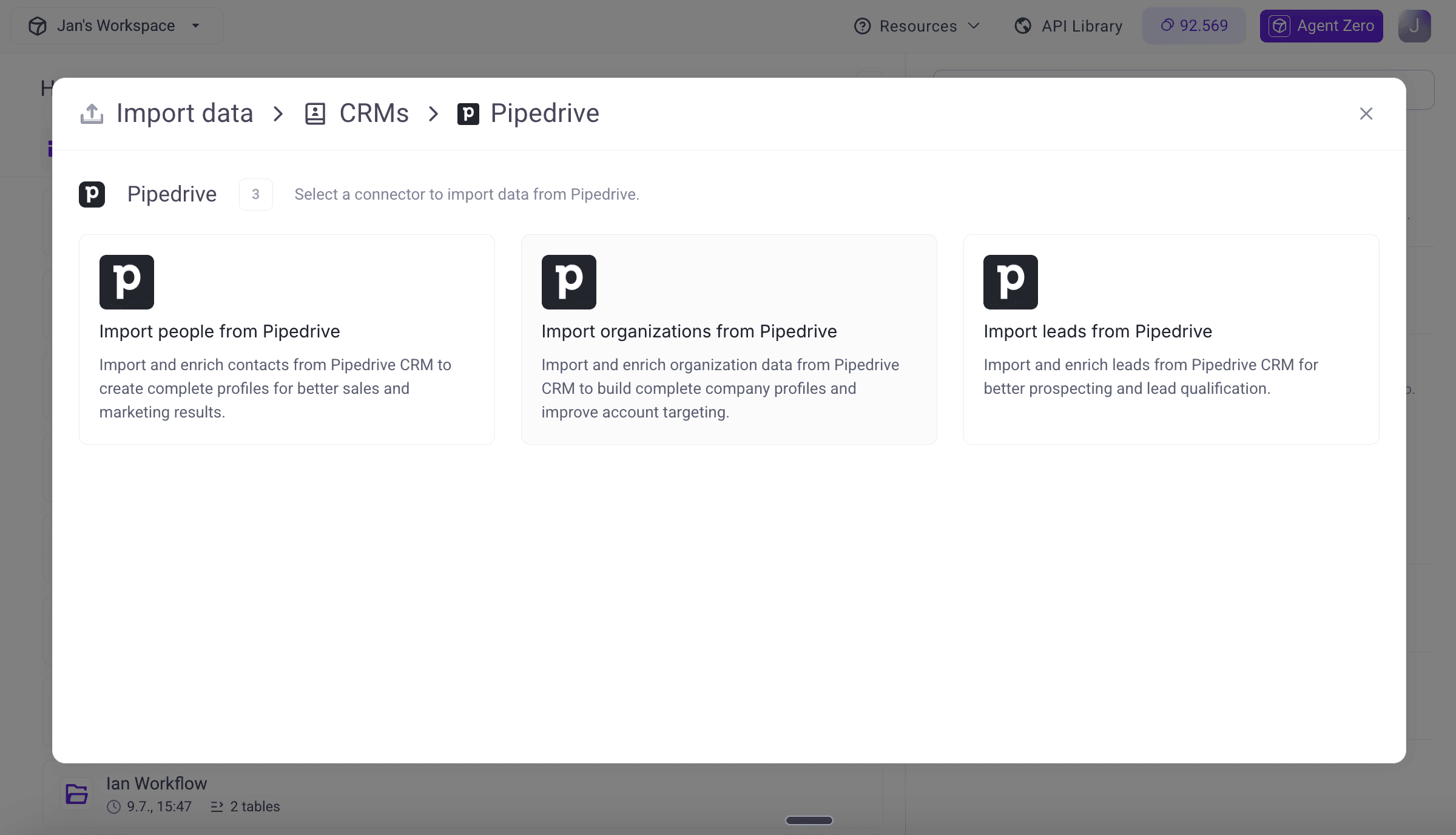
The platform works through a spreadsheet interface and can push enriched data to your CRM. It has a native Pipedrive integration that allows you to send data directly from Pipedrive into the platform, enrich it, and then send the enriched data back to the CRM. Particularly useful for teams that need multiple data types (firmographics, technographics, contact info, signals) from different specialized sources.
Building Enrichment Automation
Manual enrichment is fine for a handful of leads. But if you want consistent Pipedrive data quality without babysitting the process, you need automation.
Native Pipedrive Automations
Pipedrive's built-in automation feature (available on Advanced plans and above) lets you trigger actions based on deal or contact changes. The limitation? You can't trigger external API calls directly from native automations.
What you can do:
Automatically create follow-up activities when deals hit certain stages. Move deals between pipelines based on field values. Send internal notifications when high-value leads come in.
These keep your workflow tight but don't solve enrichment automation directly.
Zapier Workflows
This is where most Pipedrive users land for enrichment automation. Zapier connects Pipedrive to almost anything, and setting up enrichment workflows is straightforward.
Example: Enrich new contacts automatically
Trigger: New Person created in Pipedrive
Action: Send email to Databar (or your enrichment tool of choice)
Action: Update Person in Pipedrive with returned data
You can get more sophisticated. Maybe you only want to enrich leads that come from certain sources, or you want to route high-value companies to senior reps after enrichment:
Trigger: New Person in Pipedrive
Filter: Lead source equals "Webinar"
Action: Enrich via Clearbit API
Filter: Company size > 100 employees
Action: Assign to Enterprise rep
Action: Create follow-up task for same day
Zapier's filter steps prevent wasted API calls on contacts that don't matter.
n8n
n8n offers similar functionality to Zapier with more complex logic options. Some teams prefer it for multi-step workflows where you need conditional branching based on enrichment results.
The learning curve is steeper, but you get more control over error handling and data transformation.
Webhooks for Real-Time Enrichment
If you need enrichment to happen instantly, like when a lead submits a form and you want their record fully populated before the sales notification even fires, webhooks are the way.
Pipedrive supports outbound webhooks that fire on record creation or update. You can point these at your enrichment platform's API, receive the response, and update Pipedrive via their REST API.
This requires some technical setup but delivers the fastest enrichment possible.

Data Quality Beyond Enrichment
Enrichment fills gaps. But Pipedrive data quality also requires preventing bad data from accumulating in the first place.
Duplicate Prevention
Pipedrive doesn't have robust native deduplication. If you're importing leads from multiple sources or have reps manually creating contacts, duplicates will happen.
Third-party tools integrate with Pipedrive to find and merge duplicate records. Run it periodically, monthly at minimum, to keep your database clean.
Field Standardization
"Tech industry" vs "Technology" vs "IT" vs "Software" all mean roughly the same thing. But they break your segmentation and reporting.
Establish a controlled vocabulary for key fields like Industry, Company Size ranges, and Lead Source. Use Pipedrive's required fields feature to enforce consistency at data entry.
Decay Monitoring
Contact data goes stale faster than most teams realize. Job changes, company acquisitions, email bounces - the data you enriched six months ago may already be outdated.
Set up a simple process: quarterly, pull a sample of 50 enriched records and manually verify accuracy. If your bounce rate is climbing or reps are reporting wrong numbers, increase your re-enrichment frequency.
Comparing Pipedrive to Salesforce and HubSpot
If you're evaluating CRM platforms or considering migration, here's how enrichment capabilities stack up:
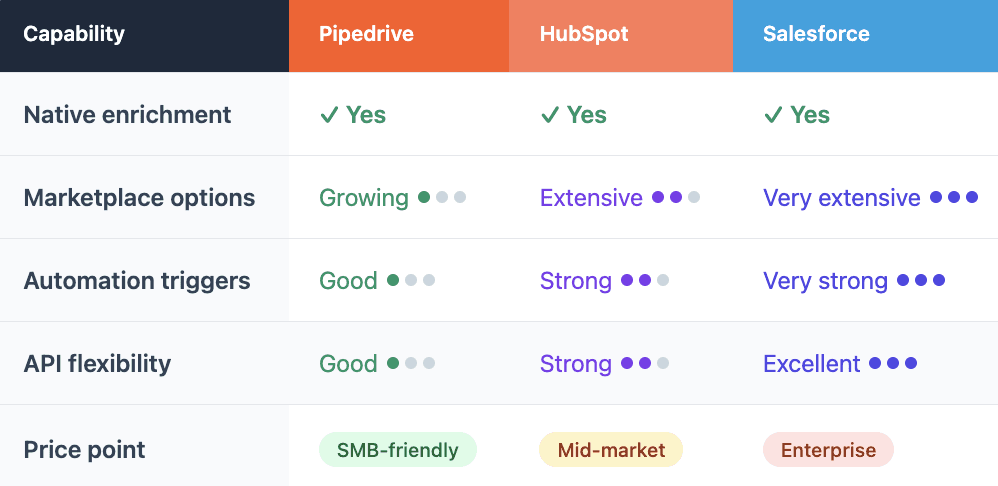
Pipedrive wins on simplicity and price. HubSpot offers more marketing integration. Salesforce provides the most customization but at significantly higher cost and complexity.
For SMBs focused on sales execution, Pipedrive with the right enrichment stack often beats an expensive all-in-one platform that's overkill for your current stage.

FAQ
Does Pipedrive have built-in data enrichment?
Yes. Pipedrive's Data Enrichment feature is available on Premium, Ultimate, and Enterprise plans. It pulls publicly available information to fill in missing contact and company fields. Person enrichment on Premium requires an additional add-on. The feature uses a credit system that refreshes monthly.
What's the best enrichment tool for Pipedrive?
It depends on your sales motion and target market. For maximum coverage across diverse accounts, aggregation platforms like Databar that query multiple providers tend to fill more gaps. Test match rates against your actual data before committing.
How do I automate enrichment in Pipedrive?
The most common approach uses Zapier. Create a Zap triggered by new Person or Organization creation in Pipedrive, send the contact data to your enrichment provider's API, then update the Pipedrive record with the returned information. You can add filter steps to only enrich contacts that meet certain criteria.
How often should I re-enrich Pipedrive data?
For active deals and target accounts, quarterly re-enrichment catches most job changes and company updates. For your full database, annual refreshes are typically sufficient. If you're noticing high email bounce rates or reps reporting outdated information, increase the frequency. The goal is maintaining accuracy without burning credits on dormant records.
Related articles
See all