25% of marketing-generated leads get routed to the wrong rep! That's one in four leads landing in the wrong queue, assigned to someone who doesn't know the territory, doesn't understand the use case, or is already at capacity. And once a lead gets misrouted, the damage compounds: delayed response, confused prospects, lost deals.
What Is Lead Routing (And Why Most Teams Get It Wrong)
Lead routing is the process of automatically assigning incoming leads to sales representatives based on predefined rules. When a prospect fills out a form, the routing system determines which rep should work that lead - based on territory, company size, product interest, rep capacity, or any combination of factors.
Simple in theory. Difficult in practice.
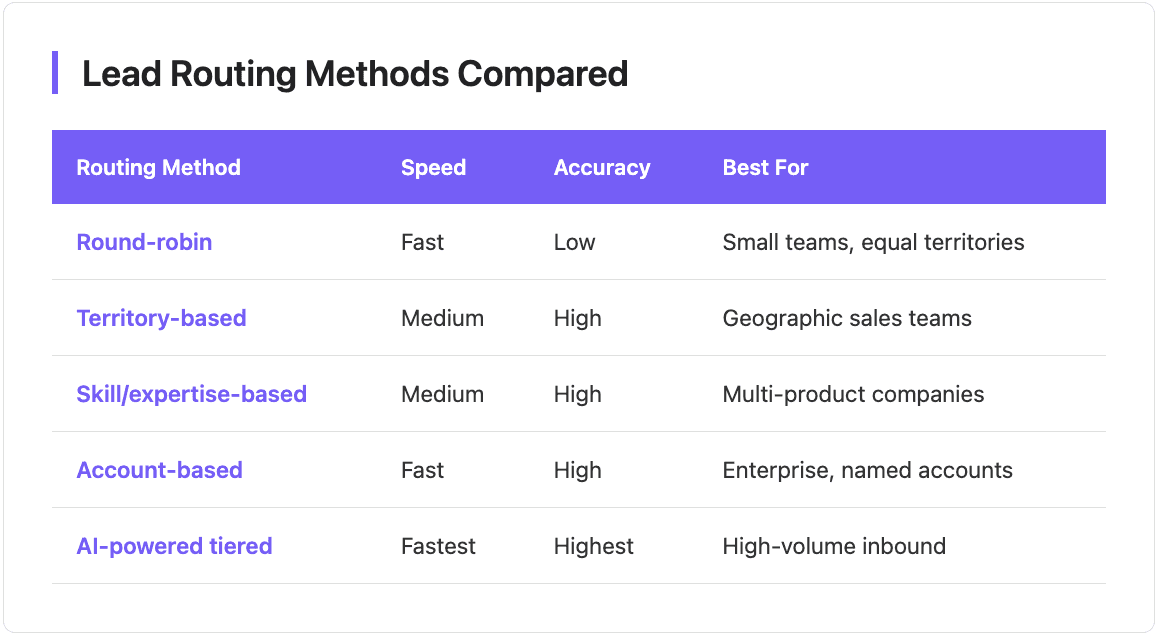
Most teams start with basic round-robin: leads distribute evenly, everyone gets their fair share. But round-robin ignores everything that actually matters for conversion. A Fortune 500 lead might land with a junior SDR who's never sold to enterprise. A healthcare company might go to a rep with zero vertical expertise. A prospect in Germany might get assigned to someone who only speaks English.
The result? According to research, over 60% of marketing-qualified leads never get contacted at all. Not because reps are lazy, because the leads land in queues where they don't fit, get deprioritized, and eventually go cold.
Intelligent routing fixes this by making assignment decisions based on data, not luck.

Lead Routing Best Practices That Move the Needle
1. Route Based on Data, Not Just Distribution
Basic routing distributes leads. Intelligent routing matches leads to reps based on the characteristics that predict successful outcomes.
This requires enriched data at the moment of routing, not data you hope to collect later. When a lead hits your CRM with only an email address, you can't route by company size because you don't know company size. You can't route by industry because the field is blank.
The fix: Enrich leads in real-time before routing decisions happen. A webhook triggers enrichment the instant a form submits, appending firmographic and contact data within seconds. Now your routing rules have something to work with.
Companies using enrichment-powered routing see 4x increases in lead-to-opportunity conversion compared to traditional methods. The data makes the difference.
2. Match Leads to Rep Expertise, Not Just Availability
Round-robin optimizes for one thing: fairness. Every rep gets the same number of leads. But fairness and effectiveness aren't the same thing.
Skill-based routing assigns leads based on rep expertise:
Healthcare leads go to reps with healthcare experience
Enterprise leads go to reps who've closed enterprise deals
Technical products go to reps with technical backgrounds
This matters more than most teams realize. A rep who understands the prospect's industry can speak their language, reference relevant case studies, and navigate industry-specific objections. A rep who doesn't understand the industry sounds generic, and generic loses to specific every time.
Implementation tip: Create rep profiles in your CRM with skill tags (industries, company sizes, use cases). Build routing rules that match lead properties to rep skills. Start simple, one or two criteria, then add complexity as you validate.
3. Speed Still Matters (A Lot)
Research from Harvard Business Review found companies that respond within 5 minutes are 400% more likely to qualify a lead than those who wait 10 minutes. Responding in the first minute can boost conversions by 391%.
Yet the average B2B response time is 42 hours. Two full business days while the prospect evaluates competitors.
Fast routing is non-negotiable. But here's what teams miss: speed without accuracy creates different problems. Routing a lead in 30 seconds to the wrong rep doesn't help, it just means the wrong person responds faster.
The balance: Automate routing completely so leads never sit in a queue waiting for manual assignment. But make sure your routing rules are good enough that automation sends leads to the right place. Speed AND accuracy, not speed OR accuracy.

4. Build Escalation Paths for Unworked Leads
Even with perfect routing, leads fall through cracks. Reps get sick. Inboxes overflow. Priorities shift. A lead that sat untouched for 24 hours is worth significantly less than the same lead worked in 5 minutes.
Escalation rules catch these drops:
If no activity in 2 hours → reassign to next available rep
If no activity in 4 hours → alert sales manager
If no activity in 24 hours → flag for immediate intervention
Implementing rerouting rules when leads aren't followed up within a reasonable timeframe is crucial for maintaining response times and holding reps accountable.
Build escalation into your routing workflow from day one. Don't wait until you notice leads slipping through.
5. Tier Your Leads Before Routing
Not all leads deserve the same treatment. A demo request from a Fortune 500 company warrants a different response than a blog subscriber from a 5-person startup.
Tiered routing prioritizes high-value opportunities:
Tier 1 (High Priority): Strong ICP fit, decision-maker title, high-intent action (pricing page, demo request). Route immediately to your best closers. Enable instant calendar booking.
Tier 2 (Standard): Good ICP fit, relevant persona, moderate intent. Route via round-robin to qualified reps. Standard follow-up sequence.
Tier 3 (Nurture): Weak ICP fit or low intent signals. Route to marketing for nurture sequences. Don't waste sales time.
Organizations implementing intent-based lead routing see qualified leads converting at 30-40% compared to 10-15% for traditional methods. Tiering concentrates your best resources on your best opportunities.

HubSpot Lead Routing: A Practical Setup
HubSpot lead routing runs through the Workflows tool (available on Professional and Enterprise tiers). Here's how to set it up:
Step 1: Define your routing criteria
Before building workflows, document your routing rules:
What properties determine assignment? (Region, company size, product interest)
Who handles each segment?
What happens if properties are missing?
Step 2: Create the workflow
Navigate to Automation → Workflows → Create workflow → Contact-based → From scratch
Set your enrollment trigger (typically form submission or lifecycle stage change).
Step 3: Add routing logic
Use If/Then branches to check properties and route accordingly:
If Country = United States AND Company Size > 500 → Assign to Enterprise Team
If Country = Germany → Assign to EMEA Team
Else → Round-robin to General Queue
Step 4: Add notifications
Configure Slack alerts or email notifications so reps know immediately when leads land in their queue.
Step 5: Build escalation
Add delay actions with re-routing logic: "If Contact Owner Activity = None after 4 hours, reassign to Manager."
Common HubSpot limitations to watch:
No native weighted round-robin (all reps get equal distribution)
Workflows can get complex with multiple if/then branches
Changes to routing rules require editing multiple workflows
For high-volume teams, dedicated lead routing software like LeanData, Chili Piper, or Default can handle more sophisticated rules with less maintenance overhead.
AI for Lead Routing in Sales Teams
AI for lead routing in sales teams goes beyond rule-based assignment. Instead of "if company size > 500, route to enterprise," AI models analyze patterns across thousands of past conversions to predict which rep is most likely to close each specific lead.
According to studies, AI models can predict sales-ready leads 77% more accurately than manual scoring methods. That prediction accuracy translates directly to better routing decisions.
Where AI adds value:
Predictive scoring that determines lead priority before routing
Capacity balancing that accounts for rep workload, not just fairness
Pattern recognition that identifies non-obvious lead-rep matches
Continuous learning that improves routing over time
Caveat: AI isn't magic. It requires training data and well-structured inputs. If your CRM data is messy, AI models won't perform well. Start with solid rule-based routing. Layer in AI when you have the data quality to support it.
Lead Routing Software: When Native CRM Isn't Enough
For teams processing 50+ leads per day across multiple territories or specializations, native CRM routing often breaks down. Workflows get unwieldy. Changes require hours of maintenance.
Dedicated lead routing software solves this.
The investment makes sense when routing complexity exceeds what native tools can handle - or when misrouted leads cost more than dedicated software.
Common Lead Routing Mistakes to Avoid
Over-engineering early: Start with 2-3 routing criteria. Add complexity only when basics work.
Ignoring data quality: Routing rules only work if the data exists. If 40% of leads are missing "Country," geographic routing fails 40% of the time. Enrichment solves this.
No fallback rules: What happens when a lead doesn't match any criteria? Always build default paths.
Set and forget: Territories shift. Reps join and leave. Review routing rules quarterly at minimum.
Optimizing for fairness over outcomes: Equal distribution sounds fair, but fairness doesn't close deals. Route for conversion, not equality.
Getting Started with Lead Routing
If you're routing manually today, start here:
Step 1: Document current lead flow. Where do leads come from? Who handles them? What's average response time?
Step 2: Define routing criteria. Pick 2-3 properties that should determine assignment.
Step 3: Build basic automation. Create workflows that route based on your criteria. Include notifications and escalation.
Step 4: Measure and iterate. Track response time and conversion by routing path. Adjust rules based on data.
The goal isn't perfect routing on day one. The goal is automated routing that improves over time. Every lead that routes automatically is a lead that doesn't wait for manual assignment, and in a world where 5 minutes changes conversion by 400%, that matters.
FAQ
What is lead routing?
Lead routing is the process of automatically assigning incoming leads to sales representatives based on predefined rules. Routing criteria can include territory, company size, industry, product interest, rep expertise, or lead score. The goal is getting the right lead to the right rep as quickly as possible.
What is the best lead routing method?
The best method depends on your team structure and sales motion. Round-robin works for small teams with equal territories. Territory or skill-based routing works for specialized teams. AI-powered tiered routing works best for high-volume inbound with diverse lead types. Most mature teams combine multiple methods.
How do I set up lead routing in HubSpot?
In HubSpot, navigate to Automation → Workflows → Create workflow → Contact-based. Set enrollment triggers (form submission, lifecycle change). Use If/Then branches to check properties and assign contact owners accordingly. Add notifications and escalation rules for unworked leads. Requires Professional or Enterprise tier.
What is lead routing software?
Lead routing software are specialized tools that handle lead assignment beyond what native CRM features support. Options like LeanData, Chili Piper, and Default offer more sophisticated routing rules, better round-robin customization, instant scheduling integration, and detailed routing analytics.
How does AI improve lead routing?
AI-powered routing uses machine learning to predict which rep is most likely to convert each specific lead—based on historical patterns, rep performance, and lead characteristics. AI can also balance capacity, identify optimal timing, and continuously improve routing decisions based on outcomes.
What's a good lead response time?
Research shows responding within 5 minutes makes you 400% more likely to qualify the lead compared to waiting 10 minutes. Responding within 1 minute can increase conversions by 391%. Yet average B2B response time is 42 hours. Fast, accurate routing is the key to closing this gap.
Related articles
See all