A lead fills out your demo request form. Name, email, company. That's it.
Your sales rep now has a choice: call blind, or spend ten minutes on LinkedIn trying to figure out if this is a real opportunity. Most do the research. By the time they've pieced together company size, the prospect's actual title, and whether the company is even a fit, the lead has gone cold. Or worse, a competitor got there first.
Inbound lead enrichment fixes this. The moment someone converts, enrichment tools automatically pull firmographic data, technographic signals, verified contact info, and more. What was a three-field form submission becomes a complete prospect profile. That profile feeds your scoring, triggers intelligent routing, and gives reps everything they need to pick up the phone immediately.
This guide covers the full workflow: why the traditional approach breaks down, how real-time enrichment works, smarter form strategies, automatic scoring that doesn't suck, routing that makes sense, and the metrics that tell you if it's working.

The Inbound Lead Problem
Every B2B company deals with the same mess. Leads show up with almost no data. They get scored wrong (or never scored at all). They route to whoever happens to be next in the queue. And then they sit there, for hours, sometimes days, while reps figure out what to do with them.
Let's break down where things go wrong.
You're Working with Incomplete Data
Your form captures name, email, company, maybe job title if you're lucky. But qualifying a lead requires knowing a lot more than that.
You need company size and revenue to know if they can afford you. Industry matters for positioning. Tech stack tells you whether they're using a competitor or something you integrate with. Seniority determines whether this person can actually make a buying decision. And budget and timeline? Good luck getting that from a form.
Without this context, qualification becomes guesswork. Reps either waste hours researching manually or skip it entirely and treat every lead the same way.
Response Time Kills You
Here's what actually happens: Lead comes in. Sits in a queue. Someone eventually reviews it. If it looks decent, they route it manually. The assigned rep finally sees it and reaches out.
Each step adds time. And in inbound, time is everything. The difference between responding in five minutes versus an hour is massive - your odds of qualifying the lead drop dramatically with every minute that passes. By the time most companies respond, prospects have either moved on or already talked to someone else.
Scoring Doesn't Work Without Data
Lead scoring is supposed to surface your best opportunities. But when scores are based on incomplete information, they're basically useless.
A VP at a Fortune 500 company gets the same score as an intern at a 10-person startup - because all you have is name and email. High-intent behavior like pricing page visits gets missed entirely if you're not tracking it. And scores stay static even when new information comes in.
The result? Sales chases bad leads while good ones slip through the cracks.
Leads End Up in the Wrong Hands
Without complete data, routing breaks down in predictable ways. Enterprise leads land with SMB reps who don't know how to handle them. Leads in California route to reps covering the Northeast. Existing customers get treated like strangers. High-value opportunities sit in a generic queue because nothing flagged them as special.
Every misroute wastes time and frustrates both the prospect and your team.

What Is Inbound Lead Enrichment?
Inbound lead enrichment means automatically enriching lead records with additional data the moment someone converts. Instead of capturing minimal form data and figuring out the rest later, enrichment tools append information in real-time - before the lead even touches your CRM.
Here's what the workflow looks like:
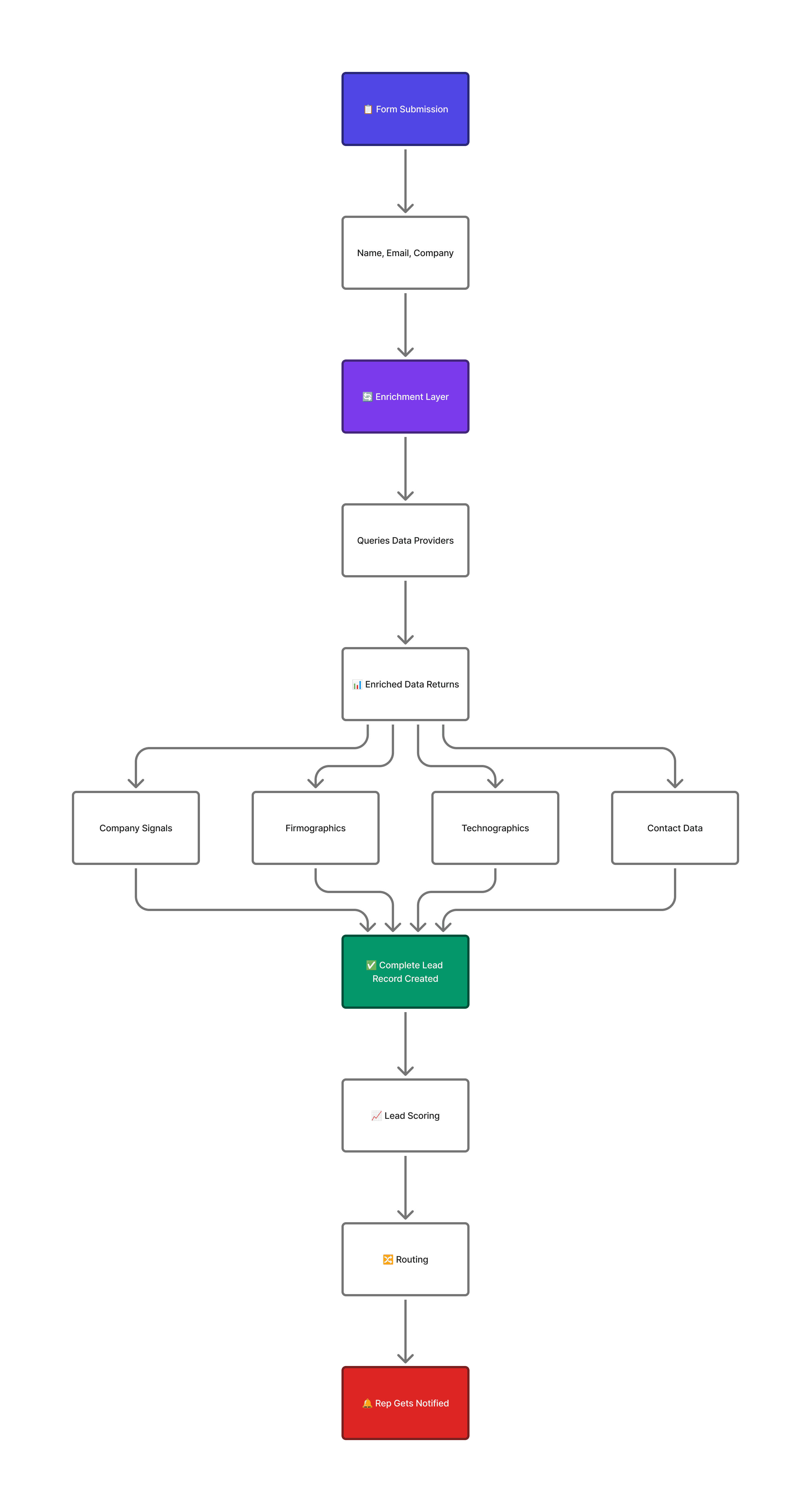
The enrichment layer sits between your form and everything downstream. It intercepts the raw submission, hits enrichment providers, appends the results, and passes a complete profile to your CRM, scoring engine, and routing logic.
What Actually Gets Enriched
At the company level, you're getting employee count, revenue range, industry classification, headquarters location. Also company type (public, private, subsidiary), funding stage if it's a startup, and growth signals like recent hiring or expansion.
At the contact level, enrichment validates job title, determines seniority (is this an IC or a VP?), and often pulls direct phone numbers and LinkedIn URLs. Some providers can map reporting structure too.
Technographic data shows what's in their tech stack: CRM, marketing automation, sales tools. This tells you whether they use a competitor, whether you integrate with their existing tools, or whether they're technically sophisticated enough for your product.
Intent and behavioral data rounds it out: Are they researching topics related to your solution? Visiting competitor sites? What content have they consumed on your site?
Building a Real-Time Enrichment Workflow
The best inbound operations enrich immediately within seconds of form submission, before the lead hits the CRM or triggers any downstream process.
Step 1: Capture the Form Data
Someone submits your form with minimal fields. Name, email, company. This raw data kicks off everything else.
Keep forms short. Seriously. Ask only for what enrichment can't provide. Many teams find that email alone is enough to trigger enrichment - everything else gets appended automatically. More on form strategy later.
Step 2: Process Through Enrichment
Your enrichment layer receives the form data and starts querying providers.
There are a few ways to approach this:
Single provider means you query one source (Apollo, ZoomInfo, whatever) and use what they return. Simple, but you'll have gaps.
Waterfall enrichment queries multiple providers in sequence. If the first one doesn't have data, try the second. Then the third. Better coverage, more complexity to manage.
Aggregated enrichment queries multiple providers at once and combines the best data from each. Maximum coverage but requires orchestration.
For most teams, waterfall or aggregation is worth the effort - especially for international leads, smaller companies, and contacts that don't show up in every database.
This is where platforms like Databar come in. Instead of building and maintaining integrations with a dozen enrichment APIs, you configure one workflow. Databar connects to 160+ providers, handles the waterfall logic, normalizes the data formats, and returns a complete profile. You get multi-provider coverage without the integration headaches.
Step 3: Create the Lead Record
Enriched data populates your CRM. The record now contains everything: original form fields plus company firmographics, verified contact data, tech stack info, and timestamps.
This complete record becomes the input for scoring and routing.
Step 4: Score Automatically
Your scoring model evaluates the enriched lead against your ideal customer profile.
Fit scoring asks: Does this company match who you sell to? You're looking at company size (are they in your sweet spot?), industry (target vertical or not?), seniority of the contact (can they actually buy?), and tech stack (do they use tools you integrate with?).
Intent scoring asks: Is this person ready to engage? Consider what form they filled out (demo request vs. newsletter signup), prior website activity (multiple visits? pricing page?), and third-party signals (researching your category elsewhere?).
Combine both to get a score that actually means something.
Step 5: Route Intelligently
Based on enriched data and score, leads flow to the right destination automatically.
High-scoring enterprise leads go to your enterprise AEs. Mid-market leads route by territory. Lower scores hit the SDR team for qualification. Really low scores go into nurture. Existing customers route to their account manager.
The routing rules use enriched fields: company size, industry, location, account matching to make decisions that raw form data couldn't support.
Step 6: Hand Off to Sales
The assigned rep gets the lead with full context: complete prospect profile, score breakdown, engagement history, and recommended next steps. They get notified via Slack, email, or CRM alert.
Total time from form fill to sales-ready handoff: under five minutes.

Form Strategy: Ask Less, Know More
Traditional thinking says more form fields equals more information. This is backwards.
Every field you add kills conversion rates. And when enrichment can provide most of what you need automatically, asking prospects to type it is just friction.
Why Shorter Forms Win
The data on this is clear. Forms with 3-5 fields convert significantly better than longer ones. Once you get past 7-8 fields, abandonment spikes. And at 10+ fields? You're losing a ton of potential leads.
Here's the thing: self-reported data is often wrong anyway. People don't know their exact company headcount. They use inconsistent job titles. They guess at industry classification. Enrichment data is typically more accurate than what prospects would type themselves.
What to Ask vs. What to Enrich
Ask for email. You need it for enrichment matching and follow-up.
Ask for name. Personal identifier, can't get this from enrichment.
Company is optional. Often derivable from email domain anyway.
Enrich job title. Self-reported titles are all over the place; enrichment normalizes them.
Enrich company size, industry, revenue. Prospects don't know exact numbers, and enrichment is more accurate.
Enrich phone. Reduces friction on the form; enrichment often provides direct lines.
Ask for use case or specific needs. Only the prospect knows this.
Ask for budget if appropriate. Same, only they can tell you.
The principle: ask for what only the prospect can provide. Enrich everything else.
Dynamic Form Shortening
Some enrichment tools support real-time form shortening. Here's how it works: prospect enters their email, enrichment runs immediately, and the form hides fields that already got filled by enrichment.
So instead of seeing 8 fields, the prospect might see 3. The rest got handled behind the scenes. Higher conversion, better data.
Progressive Profiling
For leads who return multiple times, progressive profiling collects information across visits instead of all at once.
First visit: just name and email. Second visit: company size and role. Third visit: budget and timeline.
Each form shows only questions that haven't been answered yet. Combined with enrichment, you build comprehensive profiles without lengthy forms that scare people off.

Scoring That Works
Lead scoring should tell you which leads deserve immediate attention. With enriched data, it can.
Building Your Model
Good scoring combines fit (does this company match your ICP?) with intent (is this person ready to buy?).
For fit, you're scoring attributes like:
Company size in your target range? +20 points. Outside it? +0.
Target industry? +15.
VP or C-level? +25. Director? +15. Manager? +10.
Uses tools you integrate with? +10.
Currently using a competitor? +20 (high potential for displacement).
For intent, you're scoring behaviors:
Demo request form? +30. Content download? +10. Newsletter? +5.
Visited pricing page? +20.
Multiple sessions in the past week? +15.
Third-party intent data showing category research? +25.
The specific points matter less than the relative weighting. Your best-fit, highest-intent leads should clearly separate from the rest.
What Scores Mean
Define actions for different score ranges:
80+ (sales-qualified): Route directly to an AE. These are your hot leads.
60-79 (marketing-qualified): Route to SDRs for quick qualification. Promising but needs a conversation to confirm.
40-59 (prospect): Add to nurture sequence. Not ready yet, but worth staying in touch.
Below 40 (low fit): Monitor only. Don't waste rep time.
Keep Scores Fresh
Scores shouldn't freeze at the moment of form submission. As leads engage, visiting your site, opening emails, attending webinars, scores should update in real time.
Set up triggers: new website visit, email click, content download, meeting scheduled. Each recalculates the score so leads surface to sales at the right moment, not days after they showed buying intent.
Smart Routing with Enriched Data
Routing determines who gets each lead. With enriched data, you can match leads to the right reps based on segment, territory, expertise, and capacity.
Common Routing Approaches
Round-robin distributes evenly across a team. Simple but ignores specialization.
Territory-based uses company location from enrichment. Good for field sales coverage.
Segment-based routes by company size, industry, or expected deal value. Matches leads with specialized reps.
Account-based checks if the lead belongs to an existing account. Routes to the account owner.
Availability-based considers who's online or has capacity. Maximizes speed.
Most teams layer multiple approaches:
If existing customer → account manager
Else if 1,000+ employees → enterprise team (round-robin)
Else if healthcare industry → vertical specialist
Else → general pool (round-robin)
Lead-to-Account Matching
For companies running account-based motions, inbound leads should match to existing CRM accounts.
New lead arrives. Enrichment normalizes the company data. System checks for matching accounts. If found, route to the account owner and associate the lead with the account. If not, create a new account and route per standard rules.
This prevents duplicates and ensures existing relationships get respected.
Best Practices
Enrich in real-time, not batches. Batch enrichment adds latency that kills speed-to-lead. Process immediately.
Use multiple data sources. No single provider covers everyone. Waterfall or aggregate to maximize coverage.
Start simple with scoring. Begin with obvious fit criteria. Add complexity only after you see what actually predicts conversion.
Set response SLAs. Define target times for each lead tier. Measure and hold people accountable.
Plan for failures. What happens when enrichment returns nothing? Build workflows that handle incomplete data gracefully.
Keep humans involved. Automation handles routine cases. Create escalation paths for exceptions that need judgment.
Re-enrich periodically. People change jobs. Companies evolve. Schedule refreshes to keep data current.
Watch the metrics. Enrichment quality drifts over time. Monitor continuously and investigate anomalies.
FAQ
What is inbound lead enrichment?
Inbound lead enrichment automatically appends firmographic, technographic, and contact data to leads at the moment they convert. Instead of asking for extensive form data or researching afterward, enrichment tools query data providers in real-time and populate complete profiles before leads even hit your CRM.
How does real-time lead scoring work with enrichment?
Enriched data feeds your scoring model directly. When someone submits a form, enrichment adds company size, industry, seniority, tech stack - all the attributes you need. The scoring engine evaluates these against your ICP criteria to generate a fit score. Combined with intent signals, you get an accurate score immediately rather than hours later after manual research.
What are best practices for real-time lead scoring?
Start with clear fit criteria (company size, industry, seniority) and keep it simple initially. Weight high-intent actions heavily (demo requests should score much higher than newsletter signups). Update scores in real-time as engagement data comes in. Set clear thresholds that trigger specific actions. Review quarterly and adjust weights based on what actually predicts conversion.
How do I enrich inbound leads in HubSpot?
HubSpot offers native enrichment through Clearbit (which they acquired). You can also connect third-party enrichment tools via workflows or integrations. When a form submits, trigger an enrichment workflow that queries your provider and updates the contact and company records before routing or scoring kicks in.
How does form shortening work with enrichment?
When a prospect enters their email, enrichment runs immediately and returns company data, title, phone, and other fields. The form then hides fields that enrichment already provided, so instead of 8 fields, the prospect might only see 3. Less friction, higher conversion, better data quality.
Related articles
See all