
Every new B2B client starts the same way. You sit down, open a dozen tabs, and begin the work that nobody talks about on LinkedIn: figuring out who this company should actually sell to. You pull CRM exports. You read through closed-won deal notes. You scan competitor websites. You dig through job postings and funding announcements trying to piece together which companies look like the ones already buying. Then you do it all over again for the next client.
For agencies and consultants building GTM systems for multiple startups, this research phase eats weeks. Not because any single task is hard, but because there are dozens of them, and each one requires context from the others. Your ICP analysis depends on understanding the closed-won patterns. Your TAM mapping depends on the ICP. Your competitor landscape depends on knowing who else serves the same TAM. And your lookalike modeling depends on all three.
Claude Code collapses this entire chain into something that runs in hours instead of weeks. Not by cutting corners on the research, but by giving an AI agent access to your files, your data sources, and your frameworks, then letting it work through the full sequence without losing context between steps. The result is a complete GTM research package, from raw data analysis through finished playbook, built on the same depth of insight that used to require a senior strategist spending two to three weeks per engagement.
This guide walks through how to set up that workflow, what each phase produces, and where the output connects to enrichment tools like Databar for execution at scale.

What GTM Research Involves (And Why It Takes So Long)
Most articles about "automating sales research" focus on the narrow task of looking up information about individual prospects. That is useful but it is not GTM research. GTM research is the strategic layer that comes before any prospecting happens. It answers the fundamental questions:
Who should we sell to, why would they buy, what signals indicate they are ready, and how do we find more companies that look like our best customers?
Here is what that work looks like in practice for an agency onboarding a new B2B SaaS client. You need to analyze their existing customer base to identify patterns in who buys and who does not. You review deal data, including win rates by segment, average deal size by industry, and time-to-close by company size. You read through sales call transcripts to understand what objections come up and what value propositions land. You examine their previous outreach campaigns to see what messaging worked. You study their competitor landscape to understand positioning and identify gaps. Then you synthesize all of that into an ICP definition, a TAM estimate, a competitor map, and a list of companies to target.
Each of these tasks requires the output of the previous one. That sequential dependency is what makes the work slow. A human strategist cannot parallelize it because every conclusion builds on what came before. But an AI agent with a large enough context window can hold all the inputs simultaneously and work through the chain without the back-and-forth that eats human hours.

The Five Phases of Automated GTM Research
The workflow breaks into five distinct phases, each producing a specific deliverable that feeds the next. This framework mirrors how agencies running GTM for multiple clients are structuring their Claude Code workflows right now.
Phase 1: Load the Context Window
The first step is giving Claude Code access to everything the client has. This includes CRM exports (deals, contacts, companies), sales call transcripts or notes, any existing ICP documents or buyer personas, previous outreach campaigns with performance data, the company's website and product documentation, and competitive materials if they exist.
Claude Code's advantage over chat-based AI is that it reads files directly from your local machine. You do not need to copy-paste anything. Drop the exports into a project folder, and Claude Code can process all of it in a single session.
The key here is structuring your project folder so the agent knows what it is looking at. A simple structure works:
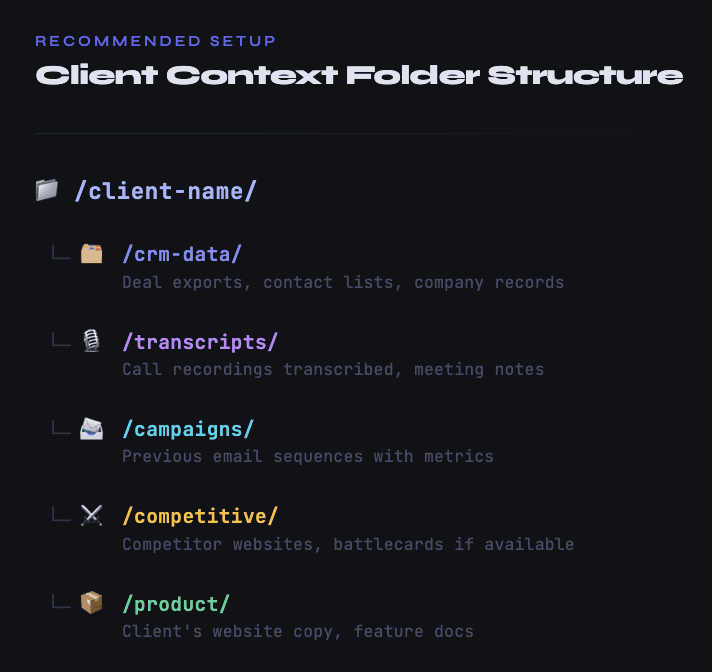
Then your initial prompt provides the framing: what the company sells, what their current pricing looks like, what market they believe they serve, and what specific questions you want answered. The more context you front-load, the better every downstream analysis will be.
Phase 2: Analyze What Is Already Working
This is where most automation guides skip straight to "find leads." That is a mistake. The most valuable part of GTM research is understanding what already works before trying to find more of it.
You ask Claude Code to analyze the CRM data and identify patterns. Specifically:
Which industries have the highest win rates? Not just where deals closed, but where the close rate is disproportionately high relative to the number of opportunities. A client might think they sell to "tech companies" broadly, but the data might show that developer tools companies close at 40% while general SaaS closes at 12%.
What company characteristics correlate with larger deal sizes or faster sales cycles? Employee count, revenue range, funding stage, tech stack, geographic concentration. All of these can reveal patterns that are invisible when you look at deals one at a time but obvious when you analyze them in aggregate.
What do the lost deals have in common? This is often more instructive than analyzing wins. If deals consistently stall at companies above 500 employees, that tells you something important about where the product fits today versus where it aspires to fit.
What language do buyers use when they are ready to purchase? Sales transcripts contain gold here. Claude Code can pull out the specific phrases, pain points, and trigger events that prospects mentioned right before moving forward. These become the signals you look for when building the outbound strategy later.
The output of this phase is a data-backed ICP definition that goes far beyond the typical "VP of Marketing at a 200-person SaaS company" description. It includes the specific attributes that predict conversion, the language that resonates, and the signals that indicate timing.

Phase 3: Map the Total Addressable Market
With a refined ICP in hand, the next phase is estimating how many companies actually fit. This is where Claude Code's ability to connect to external data sources through MCP servers becomes critical.
MCP, or Model Context Protocol, gives Claude Code "hands" to interact with external tools. Instead of being limited to whatever files you dropped in the folder, the agent can query live databases, search the web, pull company information from APIs, and cross-reference across multiple sources. Think of it as giving the agent a browser, a database connection, and a research assistant's toolkit all at once.
For TAM mapping, you typically want Claude Code connected to a search API (like Brave Search) at minimum, and ideally to company data providers. The agent takes your ICP criteria and systematically searches for companies matching those attributes. It pulls from LinkedIn company data. It cross-references with databases like Diffbot or Crunchbase. It checks industry classifications. It validates that companies are actually operational and within your target parameters.
What makes this phase distinct from simply "finding leads" is the nuanced filtering that Claude Code can apply. If your ICP analysis revealed that companies using a specific combination of technologies close at 3x the normal rate, Claude Code can visit company websites, analyze their tech stacks, and flag matches or access data providers like BuiltWith. That kind of compound filtering is nearly impossible in a standard database export but straightforward for an AI agent.
What you get at the end is a raw universe of companies, typically in the range of several thousand to tens of thousands, that match your ICP criteria. But raw volume is not the point. The value is that each company has been evaluated against the nuanced criteria from Phase 2, not just standard firmographic filters.
Phase 4: Map the Competitor Landscape and Find Lookalikes
Competitor analysis and lookalike modeling are closely related, and Claude Code handles them in a single pass.
For the competitor landscape, the agent identifies direct competitors (companies selling similar products to the same ICP), adjacent competitors (companies that solve the same underlying problem differently), and emerging competitors (startups that may not be well-known yet but are targeting the same space). It pulls their positioning, pricing signals from their websites, recent product announcements, hiring patterns that indicate where they are investing, and the customer segments they appear to target.
This matters for outreach strategy because your messaging needs to account for what prospects have already seen from competitors. If every competitor leads with "save time on X," you need a different angle. If competitors are all targeting enterprise while your client serves mid-market, that positioning gap becomes your opening.
The lookalike modeling takes your best existing customers and finds companies with similar characteristics. But instead of relying on basic industry and size matching, Claude Code can look for deeper similarities. Companies with similar tech stacks. Companies whose job postings suggest similar internal challenges. Companies that engage with similar content or show up in similar online communities. Even companies whose websites use similar language about their own customers, which often signals a shared go-to-market approach.
A range of data sources are useful here. Lookalike tools like Ocean.io, PandaMatch, and DiscoLike can surface initial lists. Claude Code's role is then to validate and rank those results against the nuanced ICP from Phase 2, filtering out the false positives that simple lookalike algorithms tend to produce.
Phase 5: Build the GTM Playbook
This is where everything comes together. Claude Code takes the ICP definition, the TAM universe, the competitor landscape, and the lookalike list, and produces a complete GTM playbook. This playbook specifies who to target (prioritized account tiers), what messaging to use for each segment, which signals to monitor for timing, what data points are needed to personalize outreach, and which channels to prioritize based on where the ICP is most reachable.
The playbook is not a vague strategy document. It is an operational blueprint that tells you exactly what enrichment data to collect and what workflows to build. If the analysis revealed that prospects who recently posted job listings for sales development roles convert at a higher rate, the playbook specifies "monitor for SDR/BDR job postings" as a trigger event, defines the messaging angle for that trigger, and identifies the data provider needed to capture that signal.
This is the output that goes to the execution layer. Whether you build your enrichment workflows in Databar, or another platform, the playbook tells you precisely what data points to pull, what filters to apply, and what messaging to attach to each segment.
Setting Up Claude Code for This Workflow
The practical setup requires two things: a well-structured CLAUDE.md file and the right MCP connections.
The CLAUDE.md File
CLAUDE.md is a markdown file in your project root that Claude Code reads automatically at the start of every session. It functions as a persistent instruction set. For GTM research, yours should include your agency's research methodology and frameworks, your standard ICP analysis template, definitions for your scoring criteria (how you evaluate market fit, deal likelihood, etc.), the output formats you want (CSV for data, markdown for narrative analysis), and any client-specific constraints or preferences.
A well-written CLAUDE.md means you do not need to re-explain your process for each new client. You change the input data, and the agent applies your proven methodology consistently. This is a significant advantage over manual research, where methodology tends to drift from project to project based on who is doing the work and how much time they have.
MCP Connections
At minimum, connect a web search MCP (Brave Search is free and works well) so Claude Code can look up companies, check websites, and find recent news. Beyond that, the most useful connections for GTM research include company data APIs for firmographic and technographic information, job posting APIs for hiring signal detection, and news or event monitoring for trigger identification.
One practical note from agencies doing this at scale: if you connect too many MCP servers simultaneously, the context window fills up with tool descriptions and the agent's performance degrades. A better approach is selecting the right MCPs for each phase rather than loading everything at once. During the CRM analysis phase, you do not need web search at all. During TAM mapping, you need search and company data but not the news monitoring tools. Being deliberate about which tools are active for each phase produces better results.
From Playbook to Execution at Scale
Here is where an important gap still exists in the current tooling landscape, and being honest about it matters more than pretending everything is solved. The good news is that the gap is shrinking fast, and there are already solid options depending on the size of your campaign.
Claude Code is excellent at the research and analysis phase. It can process complex, multi-source information, draw nuanced conclusions, and produce detailed strategic outputs. The question is what happens when you need to move from the playbook to actually enriching and activating the companies it identified.
For smaller-scale campaigns, you can stay entirely inside Claude Code. Databar's SDK lets you access all 100+ data providers directly from Claude Code without switching tools. That means you can run your ICP analysis, identify target companies, and then immediately enrich those companies with firmographic data, find decision-makers, verify email addresses, and pull technographic signals, all within the same Claude Code session. For a targeted campaign of a few hundred accounts, this works well. The agent handles everything end to end, and the results land in a clean output file you can push to your CRM or email sequencing tool.
Where this approach hits its limits is at true scale. Running waterfall enrichment workflows across 10,000 or 20,000 companies directly in Claude Code introduces real challenges. Context windows have limits. Processing timeouts exist. There is no built-in progress tracking, so if an API rate limit triggers at row 3,000, you may not realize it until the session ends. And critically, there is no client-facing interface. If you are an agency, your customers need to see what is happening, which rows have been processed, which ones errored, and what the results look like as they come in. Claude Code does not provide that visibility.
This is where Databar's full platform becomes essential. The playbook Claude Code produces specifies exactly what data you need. Databar then executes that at scale, pulling from those same 100+ data providers through a visual interface with progress tracking, error handling, and automatic retries. You can run LinkedIn company searches with specific filters, enrich with firmographic data from Owler or Diffbot, find decision-makers at each company, run waterfall email verification across multiple providers for maximum coverage, and layer on technographic data from BuiltWith. Everything is visible, auditable, and accessible to your clients.
The workflow pattern that agencies are converging on looks like this: Claude Code handles the strategy (phases 1 through 5 above), the SDK handles smaller executions directly inside Claude Code when you want speed and simplicity, and the full platform handles large-scale execution when you need reliability, visibility, and a proper interface that clients can follow along with. The playbook becomes the bridge between research and action, regardless of which execution path you take.
This layered approach makes practical sense. You want an AI agent's analytical capabilities for the research, where nuance and context matter most. You want the SDK when you are iterating fast on a small campaign and do not want to leave your terminal. And you want the full platform when you are running production workflows at volume where transparency and reliability matter most.
What This Means for Agency Economics
The financial impact is significant. Before this workflow existed, the research phase for a new B2B client typically consumed 40 to 80 hours of a senior strategist's time. At agency billing rates, that represents $6,000 to $16,000 of effort before a single outreach message gets sent. The work was valuable but it was also the phase most vulnerable to scope creep, rushed timelines, and inconsistent quality across team members.
With Claude Code handling the bulk of the analysis, that same phase now takes closer to 4 to 8 hours of human time (setting up the project, reviewing outputs, and making strategic adjustments). The raw analysis, pattern identification, and data synthesis happen in the background. The human strategist's role shifts from doing the work to directing and quality-checking it.
For agencies managing multiple clients simultaneously, this is the difference between being capacity-constrained and being able to take on new engagements. It also means the quality floor rises. Your third or fourth concurrent client engagement gets the same depth of research as your first, because the methodology is encoded in the CLAUDE.md rather than living in a senior person's head.
Practical Starting Point
If you want to try this workflow, start small. Take one existing client where you already know the ICP well. Load their recent CRM data and a handful of sales transcripts into a Claude Code project. Ask it to analyze closed-won patterns and propose an ICP definition. Compare what it produces against what you already know.
You will likely find that it catches patterns you already intuitively understood but never articulated, and surfaces a few you genuinely missed. That experience builds confidence for running the full five-phase workflow on your next new client engagement, where the research work and time savings are most substantial.
Companies that move fastest here will have a significant competitive advantage in 2026. Not because the AI does the thinking for them, but because it handles the repetitive analytical work that used to gate their capacity. More clients, same quality, faster delivery. That is not a marginal improvement. It is a structural shift in how GTM consulting works.
Automate GTM research with Claude Code and the research phase stops being the bottleneck.
FAQ
Do I need to know how to code to use Claude Code for GTM research?
Not really. Claude Code operates through natural language prompts. You describe what you want analyzed and what outputs you need. The agent writes and executes any code required behind the scenes. Basic familiarity with your terminal is helpful but you do not need programming skills. That said, knowing how to structure a clear prompt with specific instructions will significantly improve your results.
How much does it cost to run this workflow?
Claude Code requires a Claude Pro ($20/month) or Max ($100/month) subscription. The Max plan is usually necessary for the volume of processing involved in full GTM research. MCP connections like Brave Search are free. Your largest variable cost will be any paid data APIs you connect for company enrichment. Total cost per client engagement typically runs between $50 and $200 depending on TAM size and data sources used.
Can Claude Code replace a GTM strategist entirely?
No. It replaces the analytical grunt work, not the strategic judgment. A skilled GTM strategist still needs to frame the right questions, evaluate whether the AI's conclusions make business sense, adjust the methodology for unusual client situations, and make the final calls on positioning and messaging strategy. Think of Claude Code as a very fast, very thorough junior analyst, not a replacement for the person directing the analysis.
What if my client does not have much CRM data?
Start with whatever they have. Even 20 to 30 closed deals provide enough signal for basic pattern identification. If the client is pre-revenue or very early stage, shift the emphasis to Phase 3 and 4 (TAM mapping and competitive analysis) and use the enrichment tools available through data platforms to build the market picture from external data rather than internal deal history.
Is this workflow only useful for agencies, or can in-house teams use it too?
Both. Agencies benefit most from the multi-client efficiency gains, but in-house RevOps or growth teams can use the same workflow when entering new markets, launching new products, or doing quarterly ICP refinement. The five-phase structure works regardless of whether you are doing this for your own company or someone else's.
Related articles
See all