Your SDR sends 200 cold emails from your company domain. 18 bounce. Now your customer success emails hit spam. Your transactional messages get blocked. Your CEO's investor outreach lands in junk folders.
That 9% bounce rate didn't just waste those 10 sends, it damaged every email your company will send for the near future. This is why smart teams use dedicated sending domains for cold outreach. But even with separate domains, bounces hurt your outbound motion's effectiveness.
Email enrichment prevents this by validating, verifying, and completing email data before it ever enters your CRM or outreach sequence. It's the difference between hoping your emails land and knowing they will.

What Is Email Enrichment?
Email enrichment combines two related processes: verification (confirming an email address is real and deliverable) and enrichment (adding missing contact data based on an email address).
Verification checks whether an email will actually reach an inbox. This includes syntax validation, domain verification, mailbox existence checks, and spam trap detection. The goal: eliminate bounces before they happen.
Enrichment uses a verified email as the starting point to append additional data - name, job title, company, phone number, LinkedIn profile, and firmographic details. One valid email becomes a complete contact record.
Most teams need both. Verification protects your sender reputation. Enrichment makes every contact actionable. Running them together means your CRM fills with complete, accurate, deliverable records instead of partial data and dead ends.
Why Email Validation Matters More Than Ever
Email deliverability has become harder. Spam filters are smarter. Providers like Google and Microsoft have tightened rules. And bounce rates directly impact your ability to reach inboxes.
The Bounce Rate Problem
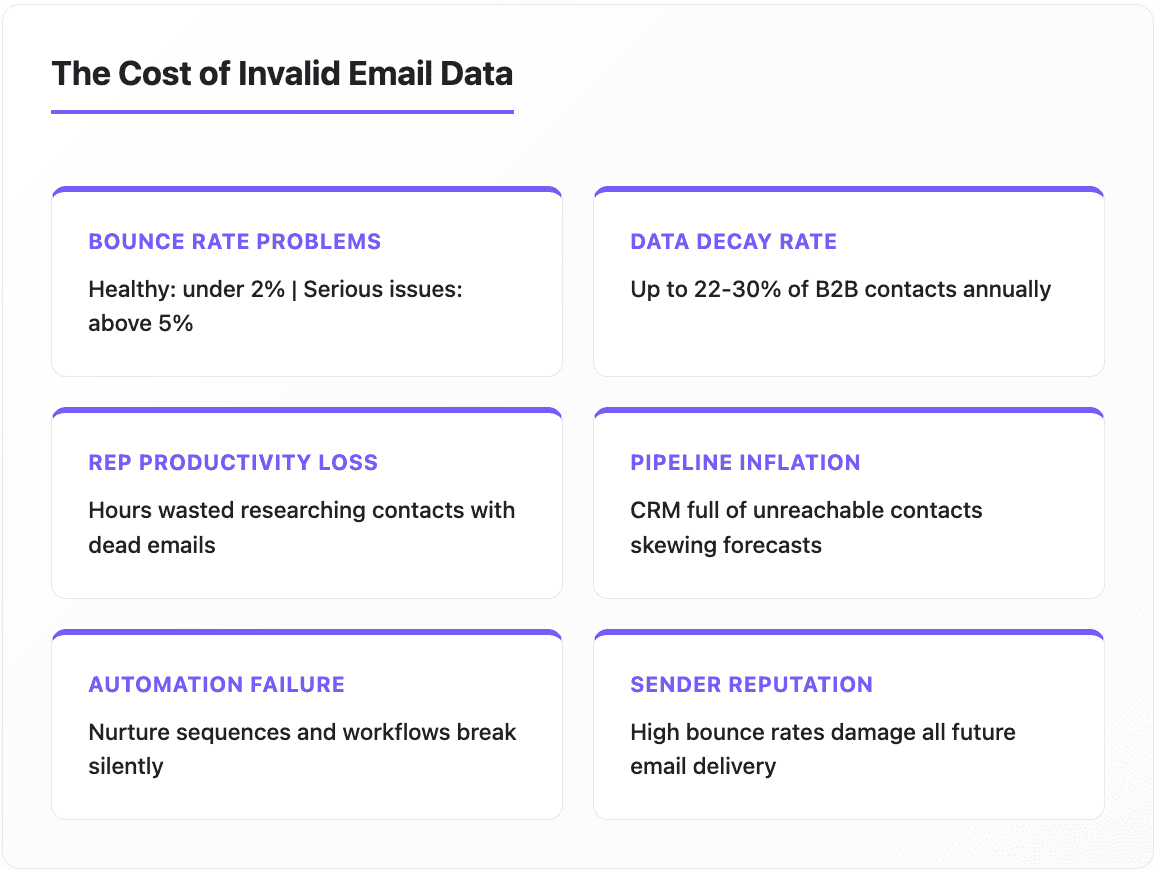
A healthy bounce rate is under 2% for permission-based email lists. Anything above 5% signals serious deliverability problems that need immediate attention.
The math is brutal: B2B contact data decays at roughly 22-30% per year. People change jobs, companies get acquired, domains expire. That pristine list you built six months ago? A significant chunk of it has already gone bad.
Without regular verification, bounce rates creep up. And once your sender reputation suffers, even your emails to valid addresses start hitting spam folders. It's a compounding problem.
The Cost of Bad Email Data
Beyond bounces, invalid email data wastes resources in ways that don't show up in deliverability reports:
Rep productivity. Sales reps spend hours researching contacts, only to find the email doesn't work when they finally reach out. That's time that could've gone to actual selling.
Pipeline inflation. Your CRM looks full of opportunities, but some percentage are unreachable. Forecasts get skewed. Reports become unreliable.
Automation failure. Nurture sequences, onboarding flows, and re-engagement campaigns all depend on valid emails. Bad data breaks automated workflows silently.
How Email Verification Works
Email verification runs through multiple layers of checks. Each layer catches different types of invalid addresses.
Syntax Validation
The first check: does this even look like an email? Proper formatting (something@domain.com), no invalid characters, correct structure. This catches obvious typos and malformed entries.
Domain and MX Record Verification
Does the domain exist? Does it have valid mail exchange (MX) records configured to receive email? A valid-looking email means nothing if the domain can't accept mail.
Mailbox Verification
This is where verification gets sophisticated. The system connects to the mail server and checks whether the specific mailbox exists without actually sending an email. This catches addresses where the domain is valid but the specific inbox doesn't exist - like when someone leaves a company.
Risk Detection
Advanced verification identifies problematic addresses beyond simple validity:
Catch-all domains accept any email to that domain, making it impossible to verify specific addresses
Disposable emails from temporary address services (people who don't want to give their real email)
Spam traps are addresses specifically designed to catch senders using bad practices
Role-based addresses like info@ or sales@ that aren't tied to individuals
Good email verification CRM integration flags these risks so you can decide how to handle them - quarantine, exclude from cold outreach, or route to different sequences.
Finding and Validating Email Addresses at Scale
Many teams face a dual problem: they need to find email addresses for their target accounts, then verify those addresses are accurate.
Email Finding
When you have a name and company but no email, enrichment tools can find email addresses by searching databases, pattern-matching against known email formats, and cross-referencing multiple sources.
The best tools combine finding with immediate verification, no point discovering an email that bounces. Look for solutions that only charge for verified finds, not attempted lookups.
Catch-All Handling
Catch-all domains are particularly tricky. Companies configure their mail servers to accept any address @company.com, so verification can't confirm whether john.smith@company.com actually exists.
Smart enrichment handles catch-alls by checking historical deliverability patterns, cross-referencing with known valid addresses at that domain, and flagging uncertainty so you can make informed decisions about whether to send.

Enrich Email List: What Data Gets Appended
When you enrich email list data, a verified email address becomes the key to unlock additional information:
Contact data: Full name, job title, seniority level, department, LinkedIn profile URL, direct phone number, mobile number
Company data: Company name, industry, employee count, revenue range, headquarters location, website URL
Additional context: Tech stack, recent funding, hiring signals, news mentions—depending on your enrichment provider's capabilities
The enrichment happens through database matching. Your email gets compared against provider databases containing millions of business profiles. When a match is found, the associated data fields populate your record.
Different providers have different coverage. A single provider might match 60% of your emails. Using multiple providers through waterfall enrichment can push match rates to 80-90%.
Email Enrichment API: Building Automated Workflows
For teams processing significant volume, manual enrichment doesn't scale. That's where an email enrichment API comes in.
Real-Time vs. Batch Processing
Real-time API calls validate and enrich emails as they enter your system. A form submission triggers immediate enrichment before the lead hits your CRM. Response times are typically under one second.
Batch processing handles bulk operations—cleaning your existing database, processing large imports, or running regular maintenance on your contact data.
Integration Architecture
Most APIs use REST architecture with straightforward endpoints:
POST /verify - Single email verification
POST /verify/batch - Bulk verification
POST /enrich - Single email enrichment
POST /enrich/batch - Bulk enrichment
You pass an email address, the API returns verification status plus enriched data fields. SDKs in common languages (Python, JavaScript, Ruby, PHP) make integration faster.
Enterprise API Requirements
Larger organizations need more than basic endpoints:
Webhook support for asynchronous processing of large batches
Rate limiting controls to manage API costs
Data residency options for GDPR compliance
Custom field mapping to match your CRM schema
Usage analytics to track enrichment across teams
If your team is building enrichment into production systems, look for providers with dedicated SDKs, comprehensive documentation, and enterprise SLAs. The right API infrastructure means enrichment happens automatically without engineering bottlenecks.
Implementing Email Enrichment in Your CRM
Getting enrichment working requires connecting the pieces: data sources, your CRM, and the workflows that tie them together.
Native Integrations
Many enrichment providers offer direct integrations with Salesforce, HubSpot, and other major CRMs. These typically work through:
Field mapping: Enrichment data writes to standard or custom CRM fields
Trigger configuration: Define when enrichment runs (new record, field update, scheduled)
Status tracking: See which records have been enriched and which failed
Native integrations are fastest to deploy but may have limitations on customization.
Workflow Automation
More sophisticated implementations use workflow tools to orchestrate enrichment as part of larger processes:
New lead enters CRM
Email verification runs
If valid → enrichment runs
If enriched → lead scoring updates
If score meets threshold → routes to sales
If invalid → quarantine or delete
This kind of automation ensures enrichment happens consistently, every time, without manual intervention.
Hashed Email Enrichment
Some organizations can't share raw email addresses due to privacy requirements. Data enrichment with hashed emails solves this by using encrypted email identifiers instead of plain text. You hash the email on your side, send the hash, and receive enrichment data back without exposing the actual address.
This approach is particularly relevant for companies subject to strict data protection requirements or those working with sensitive customer databases.
Getting Started: Email Enrichment Checklist
Step 1: Audit Your Current State
Pull bounce rate reports from your last 90 days of email campaigns
Check what percentage of CRM contacts have complete data (name, title, company, phone)
Identify your highest-value contact segments that need priority enrichment
Document which systems need to integrate (CRM, marketing automation, sales engagement)
Step 2: Evaluate Solutions
Test verification accuracy with a sample of known-good and known-bad emails
Compare enrichment match rates for your specific ICP
Review API documentation and integration options
Assess compliance certifications
Calculate cost per record across different pricing models
Step 3: Implement and Measure
Start with real-time verification on new inbound leads
Run batch enrichment on your highest-priority existing segments
Configure CRM field mapping for enriched data
Set up reporting to track verification results and enrichment match rates
Step 4: Optimize and Expand
Review initial results: what's your new bounce rate? Match rate?
Adjust workflows based on what's working
Extend to additional data sources and use cases
Establish ongoing maintenance schedule (e.g. quarterly full database refresh)
Getting Email enrichment Right
Email enrichment isn't a one-time project. Data decays. People change jobs. Companies evolve. The teams that treat enrichment as ongoing infrastructure, not a cleanup task, maintain the data quality that drives real results.
Start with verification to protect your sender reputation. Add enrichment to make every contact actionable. Build automated workflows so it happens without manual effort. Then measure the impact: lower bounce rates, higher deliverability, more productive reps, and campaigns that actually reach the people you're trying to reach.
The difference between a 5% bounce rate and a 1% bounce rate doesn't sound dramatic until you calculate how many deals never happened because your emails didn't land.
FAQ
What is email enrichment? Email enrichment is the process of validating email addresses and appending additional contact and company data to your CRM records. It combines verification (confirming emails are deliverable) with enrichment (adding job titles, phone numbers, company information, and other data points) to create complete, accurate contact profiles.
What's the difference between email verification and email validation? The terms are often used interchangeably. Both refer to checking whether an email address is real, properly formatted, and able to receive messages. The verification process typically includes syntax checks, domain validation, and mailbox existence testing.
How does an email enrichment API work? An email enrichment API accepts email addresses via HTTP requests and returns verification status plus enriched data fields. You can call it in real-time (as leads enter your system) or batch mode (for cleaning existing databases). Most APIs use REST architecture with straightforward endpoints and return JSON responses.
How often should I verify my email list? New emails should be verified in real-time before entering your CRM. For existing contacts, quarterly verification catches decay from job changes and inactive addresses. High-volume senders or teams with fast-moving prospect databases should verify monthly. B2B contact data decays at 22-30% annually, so regular verification is essential.
Can email enrichment find missing email addresses? Yes, many enrichment tools include email finder functionality. Given a name and company, these tools search databases and pattern-match to discover email addresses, then immediately verify them. This is useful for building contact lists from target account information.
What causes emails to bounce? Hard bounces result from permanent issues: invalid addresses, non-existent domains, or blocked senders. Soft bounces come from temporary problems: full inboxes, server issues, or messages that exceed size limits. Email verification catches most hard bounce causes before you send.
Related articles
See all