
Your marketing team generated 500 leads last month. Your sales team has capacity to properly work 50. Which 50 should they prioritize?
Without a scoring system, the answer usually comes down to gut feel, whoever responds first, or alphabetical order. None of those approaches optimize for revenue. I've seen teams waste months chasing leads that were never going to close while hot prospects went cold waiting for a callback.
Research from Landbase shows that companies implementing CRM lead scoring achieve a 77% increase in lead generation ROI compared to those without it. Forrester data indicates that AI-powered scoring systems deliver 38% higher conversion rates and 28% shorter sales cycles.

The math is straightforward: when reps focus on leads most likely to buy, they close more deals in less time. When they chase every lead equally, they burn hours on prospects who were never going to convert.
In this guide, I'm going to walk you through everything you need to build, implement, and optimize a lead scoring model in your CRM - from understanding the different scoring approaches to setting up automated workflows to avoiding the mistakes that sink most implementations.
Why Lead Scoring Matters More Than Ever
The B2B buying process has fundamentally changed. According to research, 74% of B2B buyers now complete at least 57% of their buying journey online before ever talking to sales. They're doing their own research, comparing options, and forming opinions before you know they exist.
This creates both a problem and an opportunity. The problem: by the time leads raise their hands, they've already decided whether you're a serious contender. The opportunity: if you can identify which leads are actively researching and ready to buy, you can engage them at exactly the right moment.
The challenge is volume. Most B2B marketing teams generate far more leads than their sales teams can effectively work. HubSpot reports that only 27% of leads sent to sales are actually qualified. Without scoring, sales reps waste enormous time pursuing leads that were never viable.
Here's what effective lead scoring actually delivers:
30% increase in sales productivity according to Salesforce - reps focus on real opportunities instead of tire-kickers
Better sales and marketing alignment because both teams agree on what "qualified" actually means
Shorter sales cycles since you're engaging prospects when they're ready, not when it's convenient
Higher win rates because your best reps work your best leads

Understanding the Different Lead Scoring Models
Not all scoring approaches work the same way. Understanding your options helps you choose what fits your organization.
Fit Scoring (Explicit/Demographic)
This model evaluates how well a lead matches your ideal customer profile. It looks at attributes like:
Job title and seniority level
Company size and revenue
Industry vertical
Geographic location
Technology stack
A lead who matches your ICP perfectly starts with a high baseline score regardless of their behavior. A lead completely outside your target market starts low no matter how engaged they seem. This is sometimes called "explicit" scoring because the data comes directly from the lead or from enrichment.
Behavioral Scoring (Engagement/Activity)
This model measures what leads actually do:
Website visits and page views
Content downloads
Email opens and clicks
Webinar attendance
Pricing page visits
Demo requests
Behavioral scoring captures interest and intent. A lead who downloads a case study, visits your pricing page three times, and attends a product webinar shows stronger buying signals than one who passively receives your newsletter.
Combined Scoring (The Best Approach)
The most effective lead scoring models combine both dimensions. Someone might fit your ICP perfectly but show no interest, they're a good target for outreach but not ready to buy. Someone else might engage heavily with your content but work at a company far too small to afford your solution, they're interested but not qualified.
You want leads who score high on both fit and behavior.
Predictive Lead Scoring
Predictive scoring takes a different approach entirely. Instead of manually defining which attributes and behaviors matter, machine learning algorithms analyze your historical data to discover what actually predicts conversion. The models examine thousands of data points and their correlations, often surfacing patterns humans would miss.
The tradeoff is transparency, with manual scoring, you know exactly why a lead received their score. With predictive scoring, the algorithm might weight factors you wouldn't expect.

How to Create a Lead Scoring System in CRM
Building an effective scoring system requires more upfront work than most teams expect. Skip these foundational steps and you'll build a system on faulty assumptions.
Step 1: Analyze Your Best Customers
Before assigning any scores, look backward at who actually converted. Export your closed-won deals from the past 12-24 months and identify patterns:
What industries do they cluster in?
What company sizes?
What job titles made the purchasing decision?
What content did they engage with before becoming opportunities?
These patterns define your ICP in concrete terms, not theoretical ones.
Step 2: Document Behaviors That Precede Conversion
Review the activity history of deals that closed. What actions did they take in the weeks before becoming an opportunity?
Did they attend a webinar?
Visit the pricing page?
Download a specific piece of content?
Request a demo?
Talk to your sales team and ask which behaviors they've observed in leads who eventually buy versus those who don't. Their pattern recognition is valuable even if anecdotal.
Step 3: Define Your Scoring Criteria
Based on your analysis, create a list of attributes (fit criteria) and behaviors (engagement criteria) that indicate sales readiness. Most systems use a 0-100 scale.
Fit Criteria Examples:
Industry alignment: +15 points for target industries
Company size: +10-15 points for ideal employee count
Job title: +10 points for decision-maker titles
Geography: +5 points for primary markets
Behavioral Criteria Examples:
Demo request: +20 points (strongest buying signal)
Pricing page visit: +10 points per visit, cap at 20
Case study download: +10 points
Webinar attendance: +15 points
Blog post read: +2 points per post, cap at 10
Step 4: Include Negative Scoring
This is where many teams fall short. Points should subtract for disqualifying factors:
Competitor company domains: -100 points (immediate disqualification)
Student or personal email addresses: -20 points
Unsubscribing from emails: -15 points
No activity in 90+ days: -10 points
A lead who matches your ICP but hasn't engaged in six months deserves a lower score than their attributes alone would suggest.
Step 5: Set Your MQL Threshold
Decide what score constitutes a Marketing Qualified Lead that gets passed to sales. This threshold balances volume and quality:
70+ points: MQL for immediate sales follow-up
50-69 points: Accelerated nurture track
30-49 points: Standard nurturing
Below 30: Awareness-level marketing only
Start by looking at historical data - what scores did leads who converted typically reach? Use that as your initial threshold and adjust based on feedback.
Lead Scoring Model Example
Abstract frameworks only go so far. Here's how scoring might work for a B2B software company selling to mid-market organizations.
Fit Criteria (Maximum 50 points)
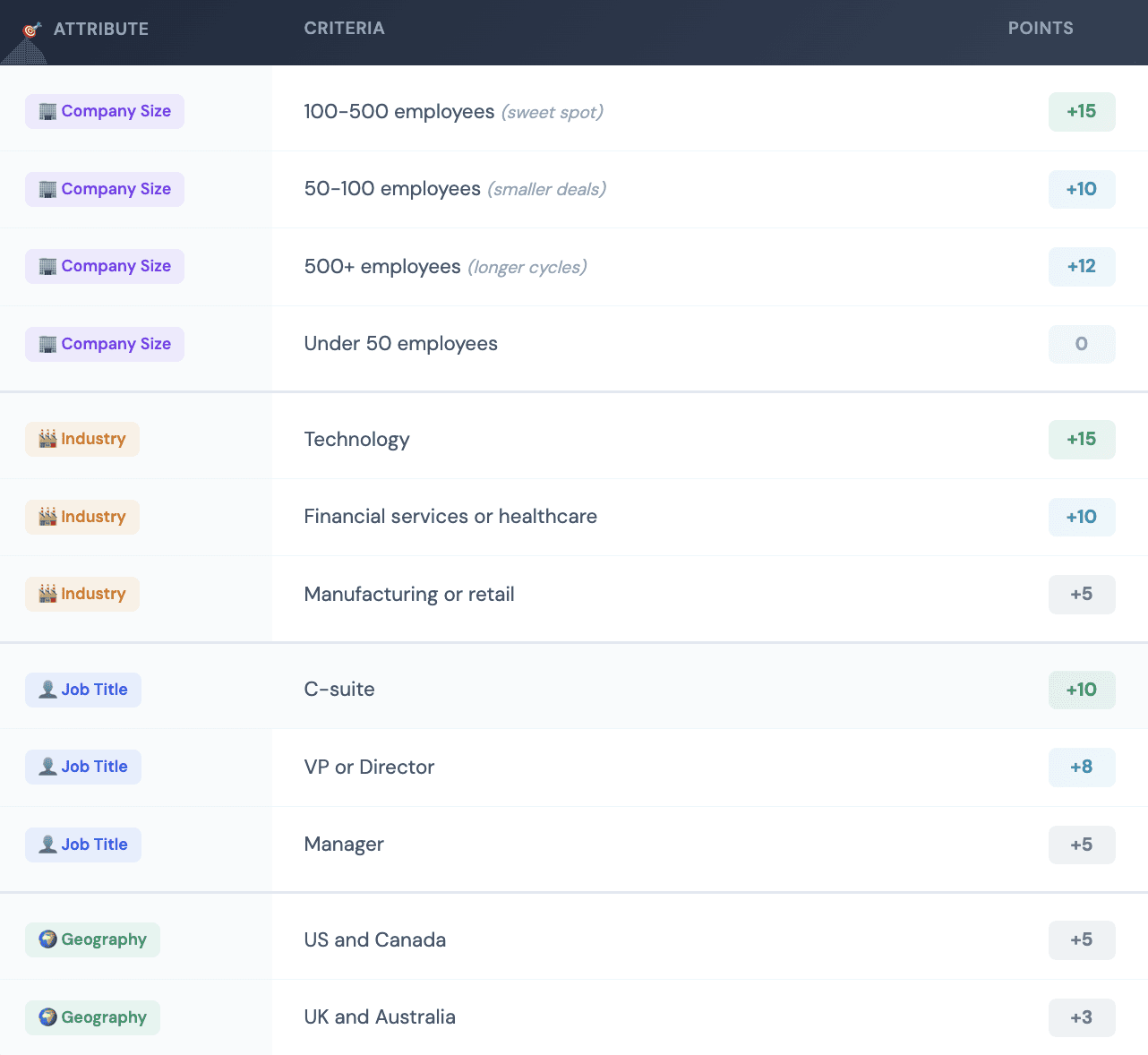
Behavioral Criteria (Maximum 50 points)
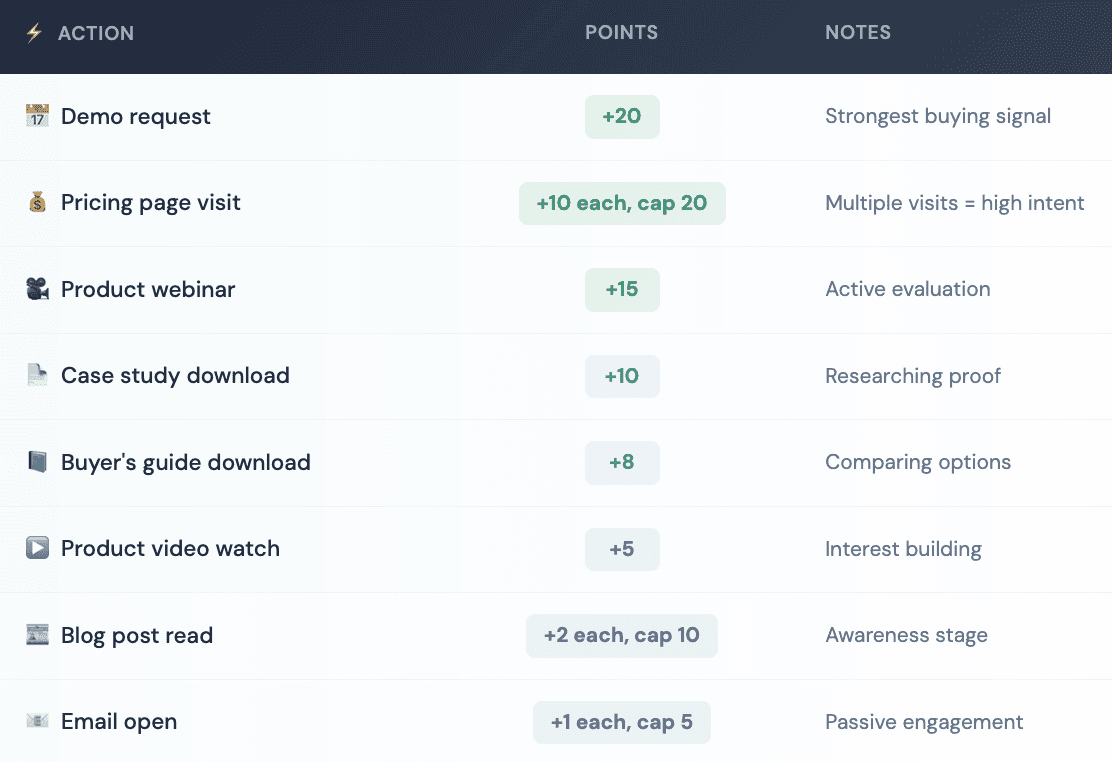
Negative Scoring
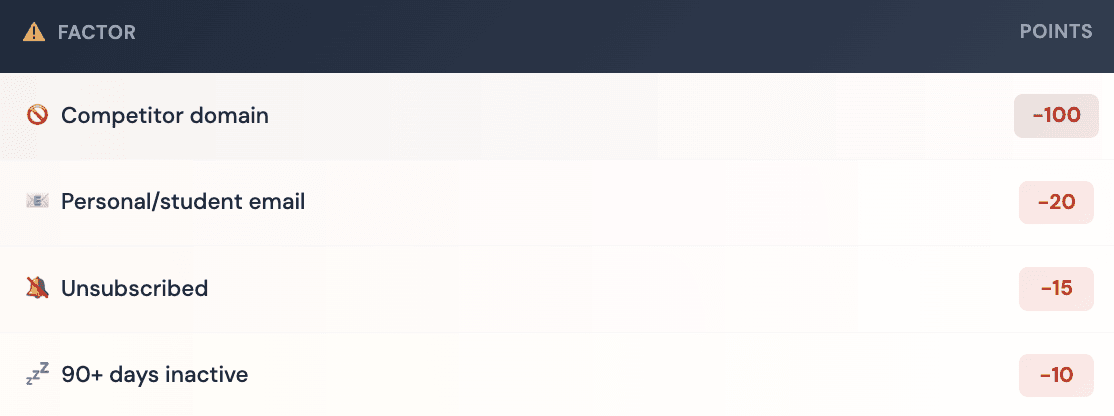
With this model, a Director at a 200-person technology company who requested a demo, visited pricing twice, and downloaded a case study would score: 8 (title) + 15 (company size) + 15 (industry) + 5 (geography) + 20 (demo) + 20 (pricing) + 10 (case study) = 93 points. That's a hot lead.
Integrating Lead Scoring with Data Enrichment
One of the biggest limitations of native CRM scoring is data incompleteness. If your forms only collect email addresses, you have no firmographic data to score against. If leads visit your site anonymously, you miss their behavioral signals.
Data enrichment platforms like Databar.ai solve this problem by automatically appending missing information to lead records:
Company size and revenue
Industry classification
Technology stack
Job titles and seniority
Contact information
When a lead enters your CRM with just an email address, enrichment can fill in the company they work for, how large that company is, what industry they operate in, and whether they match your ICP - all before any human reviews the record.
This changes what's possible with scoring. Instead of waiting for leads to provide information through progressive profiling across multiple form submissions, you have complete profiles immediately. A lead who downloads a whitepaper can be scored on fit criteria the moment they enter your system.
The integration typically works in two ways:
Real-time enrichment: Data appends the moment a lead enters your CRM, and scoring calculations happen immediately
Batch enrichment: New leads accumulate and get enriched on a schedule, with scores recalculating after enrichment completes
The best platforms combine firmographic enrichment with intent signals, giving you not just company attributes but indicators of whether they're actively researching solutions like yours.

CRM with Automated Lead Scoring and Routing
Manual scoring doesn't scale. Once you've defined your model, implementation means building automation that calculates scores continuously and routes leads appropriately.
Configure Scoring in Your CRM
Most modern CRMs (like Salesforce, HubSpot, Pipedrive, Zoho) have native lead scoring capabilities. You'll create scoring rules that match your criteria, assign point values, and define conditions.
Key setup steps:
Create scoring rules for each fit and behavioral criterion
Set point values based on your model
Define conditions for negative scoring
Configure score recalculation triggers
Test with known leads before activating
Build Routing Rules Based on Scores
CRM with automated lead scoring and routing features should assign leads automatically when they cross thresholds:
90+ points: Immediate assignment to senior reps, alert within 2 hours
70-89 points: Standard MQL routing, next-day follow-up
50-69 points: Enter accelerated nurture sequence
Below 50 points: Stay in marketing automation
The goal is ensuring every lead receives appropriate attention - not equal attention, appropriate attention.
Set Up Score Change Alerts
Scores aren't static. A lead who was moderately interested six months ago might suddenly spike in activity. Your system should alert relevant team members when:
Existing leads cross MQL threshold
Leads show unusual activity patterns
Previously cold leads re-engage
These "re-engagement" signals often indicate renewed buying interest worth pursuing immediately.
Create Feedback Loops
Sales reps are your quality control. Build easy mechanisms for them to flag when scored leads are misqualified:
High-scoring leads that turn out to be poor fits
Low-scoring leads that convert unexpectedly
Missing criteria that would improve accuracy
This feedback identifies where your model needs adjustment.
Predictive vs. Manual Scoring: Which Should You Choose?
The decision depends on your organization's maturity, data availability, and resources.
Manual Scoring Works Well When:
You have clear, well-understood ICP criteria
Your sales and marketing teams have strong intuition about what predicts conversion
You need explainability (understanding exactly why each lead scored as they did)
You're just starting with lead scoring and want to learn before automating
Your lead volume is manageable enough for imperfect prioritization
Predictive Scoring Becomes Valuable When:
You have substantial historical data (typically 1,000+ opportunities minimum)
Conversion patterns are complex or non-obvious
You want the model to improve automatically over time
Manual models have plateaued in effectiveness
Your lead volume requires highly efficient prioritization
Many organizations evolve through stages: simple manual models to establish baseline processes, more sophisticated rule-based systems as they learn what works, then predictive capabilities once they have sufficient data.
Companies using AI-powered predictive scoring see 20-30% improvements in conversion rates compared to rule-based systems. But poorly implemented AI underperforms well-designed manual models. The sophistication of the approach matters less than the quality of execution.
Common Mistakes That Sink Lead Scoring Programs
After watching many organizations implement scoring, certain failure patterns emerge consistently.
Scoring without data foundation. If your CRM data is incomplete, inconsistent, or inaccurate, your scores will be meaningless. A lead might score low on fit because you're missing their company size, not because they're a bad fit. Clean and enrich your data before implementing scoring.
Making scoring a marketing project without sales input. Lead scoring exists to help sales prioritize. If sales reps aren't involved in defining criteria, setting thresholds, and providing feedback, you'll build a system they don't trust and won't use.
Overcomplicating the initial model. Teams often try to capture every possible signal in their first implementation. Start simple. A basic model with five fit criteria and five behavioral criteria, executed well, outperforms a sophisticated model nobody understands.
Setting and forgetting. Markets change. Products evolve. Customer profiles shift. A scoring model built two years ago might be completely wrong today. Schedule quarterly reviews to analyze conversion rates by score range and adjust accordingly.
Ignoring negative scoring. Only adding points creates score inflation. Leads accumulate points over time and appear increasingly qualified even if their engagement has gone cold.
Choosing the wrong threshold. Too low floods sales with unqualified leads. Too high starves them of volume. The right balance comes from analyzing historical conversion data and adjusting based on real-world feedback.
Measuring Lead Scoring Effectiveness
How do you know if your scoring system actually works? Track these metrics over time:
Conversion rate by score range: Group leads into brackets (0-25, 26-50, 51-75, 76-100) and track what percentage of each bracket converts. Higher scores should correlate with higher conversion rates. If they don't, your model isn't predicting effectively.
Sales acceptance rate: What percentage of MQLs does sales accept as genuinely qualified? If they reject most leads, either your threshold is too low or your criteria don't reflect reality. Target at least 70% acceptance.
Time to conversion by score: High-scoring leads should close faster. If there's no correlation, scoring isn't capturing readiness signals effectively.
Score distribution over time: Monitor whether average scores are inflating (creeping upward) or deflating. Score inflation usually indicates insufficient negative scoring. Adjust your model to keep the distribution meaningful.
False positives and false negatives: Track leads who scored high but didn't convert (false positives) and leads who scored low but did convert (false negatives). High rates of either indicate model weaknesses worth investigating.
Schedule quarterly reviews to examine these metrics with both sales and marketing stakeholders. Bring specific examples of leads that the model got wrong, and use those conversations to refine your criteria and point values.
Lead Scoring for Different Business Models
Your scoring model should reflect how your specific business sells. Here's how the approach differs:
For SaaS Companies
Product usage data becomes your strongest behavioral signal. Free trial activity, feature adoption, and login frequency often predict conversion better than traditional marketing engagement. Weight product signals heavily:
Daily active usage during trial: +15 points
Key feature activation: +10 points per feature
Team member invites: +20 points
Billing page visit: +25 points
For Professional Services
Fit scoring matters more than behavioral scoring. A perfect-fit company that downloads one whitepaper is often more valuable than a poor-fit company that engages with everything. Weight firmographic criteria heavily and include:
Budget indicators (company revenue, funding stage)
Project complexity signals
Timeline urgency indicators
Decision-making authority of the contact
For E-commerce B2B
Purchase history and product interest drive scoring. Weight:
Category browsing patterns
Cart additions without purchase
Repeat site visits
Quote requests
Volume/quantity indicators
FAQ
What is CRM lead scoring?
CRM lead scoring is a methodology for ranking leads based on their likelihood to convert into customers. It assigns numerical values based on two dimensions: how well leads match your ideal customer profile (fit) and how engaged they are with your brand (behavior). Higher scores indicate leads more likely to buy.
What's the difference between lead scoring and lead grading?
Lead scoring measures engagement and interest, how actively a lead interacts with your brand. Lead grading measures fit, how well a lead matches your ICP based on attributes like company size, industry, and job title. The best systems use both dimensions together.
How do I build a lead scoring model?
Start by analyzing your best customers to identify common firmographic attributes and pre-purchase behaviors. Define fit criteria and behavioral criteria. Assign point values based on how strongly each criterion correlates with conversion. Set a threshold score for sales qualification. Test, gather feedback, and refine continuously.
What's predictive lead scoring?
Predictive lead scoring uses machine learning to analyze historical data and automatically identify which attributes and behaviors predict conversion. Unlike manual scoring where humans define the rules, predictive models discover patterns from data. Research shows predictive scoring can achieve 75% higher conversion rates than rule-based models.
How often should lead scores update?
Lead scores should update in real-time or near-real-time as new data becomes available. When a lead visits your pricing page, that should immediately influence their score. Static scores that only update periodically miss time-sensitive buying signals.
What's a good MQL threshold?
There's no universal answer - it depends on your business, deal size, sales capacity, and model design. Start by analyzing scores of leads who historically converted versus those who didn't. Most organizations begin conservatively (higher threshold) and adjust downward if sales needs more pipeline.
Related articles
See all