Sales teams waste 27.3% of their time chasing bad leads because of outdated or incorrect CRM data. That's over a quarter of every sales rep's week spent pursuing contacts who've changed jobs, emails that bounce, and phone numbers that ring nowhere.
The fix isn't doing a massive cleanup once a year and hoping for the best. It's building a CRM health score - a living metric that tells you exactly how trustworthy your data is right now, not six months ago.
What Is a CRM Health Score?
A CRM health score is a composite metric that measures the overall quality, completeness, and reliability of the data in your customer relationship management system. Think of it like a credit score for your database - a single number that tells you whether you can trust what's inside.
Unlike a one-time CRM audit (which gives you a snapshot), a health score updates continuously. It flags degradation as it happens, not months later when your campaign metrics have already tanked.
Most organizations run into the same problem: they clean up their CRM after a painful quarter of bounced emails and missed forecasts, feel good about it for a few weeks, and then watch the data rot all over again. B2B contact data decays at roughly 2.1% per month according to research, which means nearly a quarter of your database could be wrong within a year if you're not actively monitoring it.
A health score changes that dynamic. Instead of reactive cleanups, you get proactive alerts. Instead of discovering problems through failed campaigns, you spot them in dashboards before damage happens.

The Six Metrics That Drive CRM Health
Not every data field matters equally. A missing middle name won't cost you a deal. A wrong decision-maker's email absolutely will. Here's what to actually measure:
1. Completeness Rate
This is the percentage of records that have all essential fields populated. The key word is "essential" - not every field, just the ones your sales and marketing processes depend on.
For most B2B teams, essential fields include company name, industry, employee count, contact name, job title, email, and phone number. Calculate completeness as: (records with all essential fields / total records) × 100.
A healthy target sits above 80%. Below 60% means your team is constantly working around missing information instead of selling.
2. Accuracy Score
This measures whether the data you have is actually correct. Email validation services can tell you which addresses are deliverable. Phone verification APIs confirm numbers are active. Company data enrichment can cross-check firmographic details against current sources.
Accuracy scoring works best when you run periodic validation checks on a sample of your database. If 15% of emails in a random sample bounce or are flagged as risky, that's your accuracy indicator for the email field across the whole system.
3. Freshness Index
Data has a shelf life. The freshness index tracks how old your records are and flags those that haven't been updated within an acceptable window.
For contact-level data, anything over 12 months old without verification should be considered stale. Company-level firmographics can stretch to 18 months, but not much longer. Job titles and email addresses decay fastest - people change roles constantly, and that 2.1% monthly decay rate hits these fields hardest.

4. Duplicate Percentage
Duplicates cause more problems than people realize. They inflate your contact counts, split activity history across multiple records, and make it impossible to get a clear picture of account engagement.
Calculate duplicate percentage by running deduplication logic across your database and dividing identified duplicates by total records. Anything above 5% deserves immediate attention.
5. Consistency Score
Inconsistent data might technically be "complete" but still causes problems downstream. Think about variations like "IBM" vs "International Business Machines" vs "I.B.M." in the company name field. Or "VP Sales" vs "Vice President of Sales" vs "VP, Sales" for job titles.
Consistency scoring requires defining standard formats for key fields and then measuring how many records follow those standards. This is particularly important for fields used in segmentation, routing, or reporting.
6. Engagement Validity
This metric tracks whether your contacts are actually reachable and responsive, not just whether their information looks correct on paper.
Email open rates, bounce rates, and reply rates all feed into engagement validity. If a segment of your database has dramatically lower engagement than average, that's a data quality signal even if the records pass other validation checks.

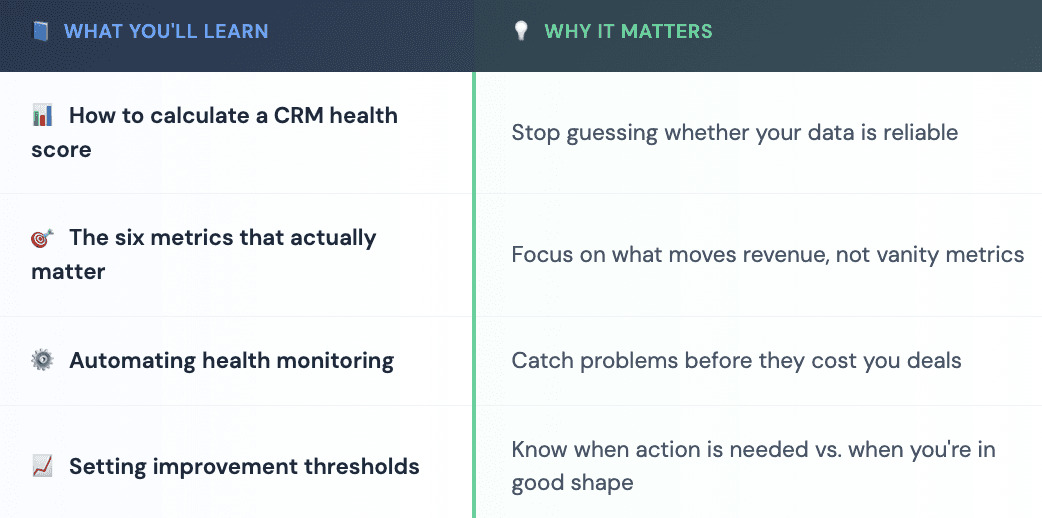
Building Your CRM Health Score Formula
Here's where you combine these metrics into a single, actionable number. The simplest approach is a weighted average:
CRM Health Score = (Completeness × 0.25) + (Accuracy × 0.25) + (Freshness × 0.20) + (Duplicate Penalty × 0.10) + (Consistency × 0.10) + (Engagement × 0.10)
The weights above reflect a typical B2B sales operation. Adjust them based on your business model - for example, if email is your primary outreach channel, accuracy and engagement validity might deserve higher weighting than companies using primarily phone-based sales.
Each component metric should be normalized to a 0-100 scale before combining. For duplicate percentage, invert it (100 minus duplicate percentage) so higher is always better.
Score interpretation:
90-100: Excellent. Your data is trustworthy for most operations.
75-89: Good. Some issues exist but shouldn't significantly impact performance.
60-74: Fair. You're likely seeing symptoms like increased bounce rates or forecast inaccuracy.
Below 60: Poor. Data quality is actively hurting revenue operations.
Setting Up Automated Health Monitoring
Manual health assessments don't scale. By the time someone remembers to run a report, the damage is already done. Automation is what separates organizations that maintain healthy CRMs from those constantly playing catch-up.
Email Validation Automation
Connect an email verification service to run validation checks whenever new contacts enter your CRM. This catches problems at the point of entry rather than waiting for campaigns to bounce. Most platforms support webhook triggers or scheduled batch processing.
Enrichment-Based Freshness Updates
Data enrichment platforms can automatically refresh records on a schedule. Platforms like Databar connect to 160+ data providers and can validate or update company and contact information without manual intervention, filling gaps that would otherwise drag down your completeness and freshness scores.
Duplicate Detection Rules
Set up matching rules that flag potential duplicates as they're created, not just in batch cleanup runs. Fields like email domain, company name plus location, or LinkedIn URL work well as matching criteria.
Scheduled Health Score Reporting
Build a dashboard that calculates your overall health score daily or weekly. Most CRM platforms support custom reports or can export data to visualization tools. The goal is visibility, when everyone on the team can see the score, maintaining it becomes a shared priority.

Warning Signs Your CRM Health Is Declining
Numbers don't always tell the whole story. Watch for these operational symptoms that indicate data quality problems before they show up in your health score:
Sales reps are spending more time researching prospects than usual, often because the information in the CRM is insufficient or suspicious. When reps start building their own spreadsheets outside the system, that's a red flag.
Marketing email metrics are trending down - not just open rates, but deliverability itself. A spike in bounces or unsubscribes often correlates with data decay.
Forecast accuracy is slipping without any clear explanation from pipeline changes. Bad data leads to miscounted opportunities, wrong stage assignments, and contacts attributed to the wrong accounts.
Reps complain about "junk leads" from marketing, even when lead volume looks healthy. Quality issues in data often manifest as quantity problems in perception.
Improving Your CRM Health Score: Practical Steps
Once you've got a baseline score, improvement follows a predictable pattern:
Week 1-2: Fix the worst offenders
Start with duplicates because they compound other problems. A single dedupe pass often improves multiple metrics at once - total record count becomes more accurate, activity history consolidates, and downstream analytics get cleaner.
Week 3-4: Address completeness gaps
Identify your most common missing fields and determine why they're empty. Sometimes it's a form issue (the field isn't required during lead creation), sometimes it's an integration gap (data exists elsewhere but isn't syncing), and sometimes it's enrichment territory (you need external sources to fill in what you can't collect directly).
Ongoing: Establish enrichment routines
Automated enrichment through tools like Databar solves the freshness and completeness problems simultaneously. Instead of treating data maintenance as a project, it becomes a background process that keeps records current without manual effort.
Quarterly: Audit your metrics and weights
As your business evolves, what matters in your CRM changes too. Review whether your health score formula still reflects what actually drives revenue. New sales channels, changed ICP definitions, or expanded product lines all warrant a fresh look at how you're measuring data quality.
CRM Health Score by Role: Who Cares About What?
Different stakeholders need different views into the same underlying data:
RevOps teams care about the overall score and trend lines. They need to know whether data quality is improving or declining, and they're accountable for the infrastructure that maintains it.
Sales leadership cares about score breakdowns by territory, segment, or rep assignment. If one territory has significantly worse data than others, that affects quota attainment and forecast reliability in specific, addressable ways.
Marketing operations focuses on engagement validity and accuracy metrics for the segments they're actively targeting. A low health score in a key campaign audience requires immediate attention.
Individual reps need simple, record-level indicators. Instead of calculating scores themselves, they should see a badge or flag on contact records indicating whether data is trusted, stale, or suspect.
The ROI of CRM Health
Gartner estimates that poor data quality costs organizations an average of over $12 million annually. That includes direct costs like wasted marketing spend and indirect costs like lost opportunities and reduced sales efficiency.
On the flip side, companies with strong data quality practices see measurable gains. Better targeting increases conversion rates. Accurate contact information reduces time spent researching. Clean firmographics enable sharper segmentation and more relevant messaging.
The health score itself doesn't generate ROI - what you do with the information does. But without measurement, improvement is guesswork. With a clear, automated health score, you know exactly where to focus cleanup efforts and whether those efforts are actually working.
Your CRM is either an asset that accelerates revenue or a liability that slows your team down. A CRM health score tells you which one you're working with, and gives you the roadmap to keep it on the right side of that line.
FAQ
How often should I calculate my CRM health score?
Daily or weekly calculations work best for catching problems quickly. Monthly is acceptable for smaller databases, but you'll miss short-term degradation. The key is consistency - pick a cadence and stick with it so you can spot trends over time.
What's a good benchmark for CRM health score?
Above 80% is generally considered healthy for B2B organizations. However, benchmarks vary by industry and business model. A better approach is tracking your own trend, if your score is improving quarter over quarter, you're moving in the right direction regardless of the absolute number.
Does CRM health score replace the need for periodic audits?
Not entirely. Health scores handle ongoing monitoring and catch gradual decay. Periodic audits still add value for deeper analysis - reviewing field usage, identifying unnecessary complexity, and making structural changes to how you collect and organize data.
Which metric should I prioritize first?
Start with accuracy if your sales team is complaining about bad contact information. Start with completeness if records are missing key fields that block outreach or segmentation. Start with duplicates if you suspect inflated contact counts or fragmented activity history.
How does data enrichment affect CRM health scores?
Enrichment directly improves completeness and freshness metrics by filling in missing fields and updating stale records. Quality enrichment platforms also improve accuracy by cross-referencing multiple sources before updating your CRM. The net effect is usually a significant score increase, often 15-25 points depending on starting conditions.
Can I automate CRM health score calculations in HubSpot or Salesforce?
Yes, with some setup. Both platforms support custom reports and calculated fields that can approximate health scoring. For fully automated, multi-metric health scores, you'll likely need a dedicated data quality tool or custom integration work. The CRM platforms provide the raw data; the scoring logic often lives in external reporting or operations tools.
What causes CRM health scores to drop suddenly?
Common causes include bulk imports of low-quality data, integration failures that stop syncing updates, or external events like market layoffs that accelerate contact turnover. Sudden drops warrant immediate investigation, they rarely happen without a specific trigger.
Related articles
See all