
Claude Code hit a $2.5 billion run rate by February 2026, more than doubling since January 1 of this year. Weekly active users doubled over the same period. Eight of the Fortune 10 are now Anthropic customers, and a UC San Diego and Cornell University survey of 99 professional developers found Claude Code among the three most widely adopted AI platforms alongside GitHub Copilot and Cursor.
Those numbers explain the developer adoption story. They do not explain why GTM engineers are the fastest-growing non-technical user group.
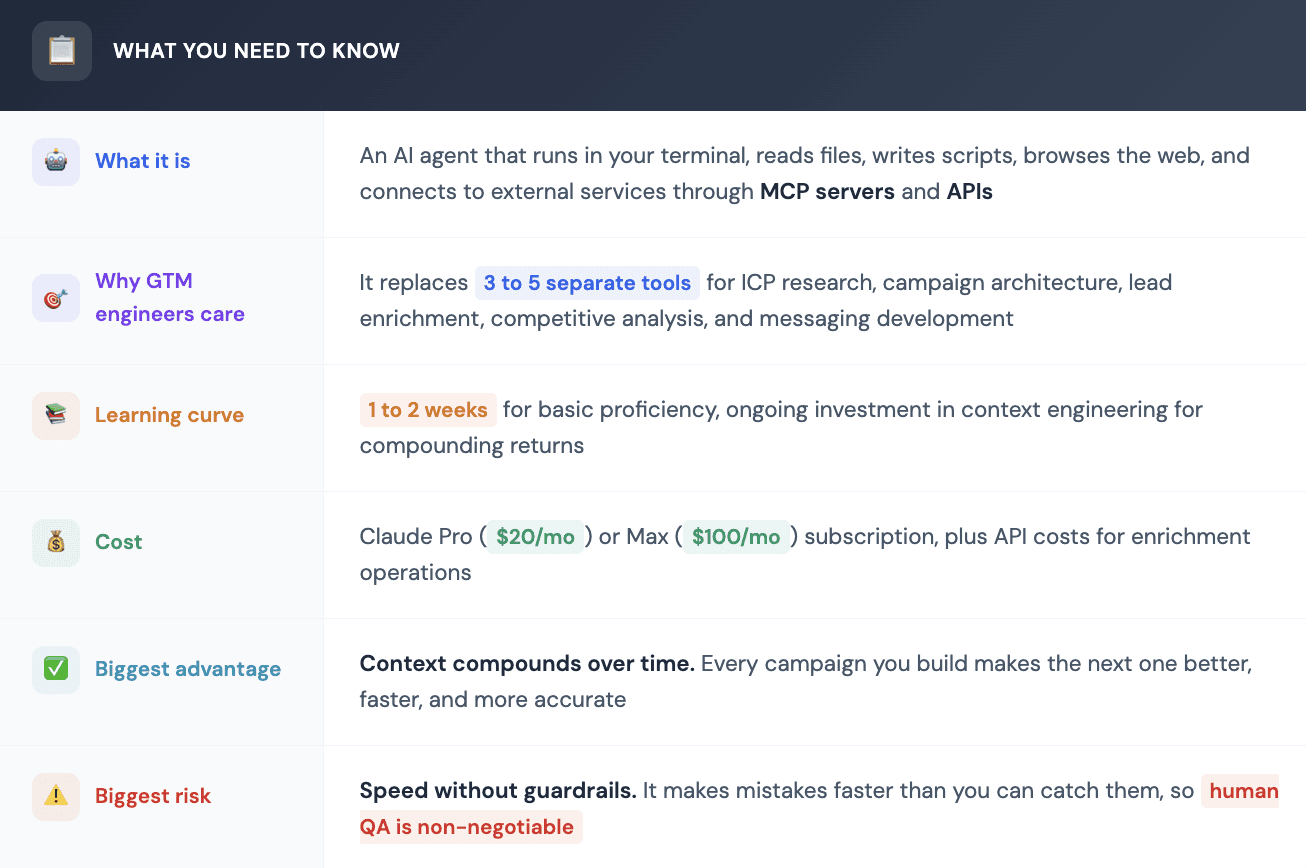
The reason is structural. Claude Code does not just answer questions or generate text. It takes actions. It reads your CRM export, analyzes your call transcripts, builds campaign logic, researches companies, enriches leads, writes and runs code to process data, and produces structured output. All of that happens inside one session where the context from each step carries forward into the next.
For GTM engineers who spend their days stitching together eight different tools, copying data between platforms, and re-explaining their ICP every time they open a new browser tab, that continuity changes everything.
This guide covers the real workflows GTM engineers are running in Claude Code right now: how to build context that compounds, how to use MCP servers for enrichment and prospecting, how to design campaigns from ICP research through list delivery, and where the practical boundaries sit.

What Makes Claude Code Different from ChatGPT and Gemini for GTM Work
The distinction is not about which model is smarter. It is about what the tool can do.
When you use ChatGPT or Gemini in a browser, you paste context in, get text back, and then go do the actual work yourself. Every new chat session starts from zero. You re-explain your company, your ICP, your messaging framework, and your data sources. The model has no persistent memory tied to your project.
Claude Code runs locally. It has access to your file system. It reads your CRM exports, call transcripts, campaign templates, and SOPs without you needing to paste anything. It writes code, runs it, handles errors, and produces files. If you connect it to external services through MCP servers, it can search the web, query databases, pull LinkedIn data, and enrich leads without you touching a browser.

Context Engineering: The Skill That Separates Beginners from Power Users
If there is one concept that defines productive Claude Code usage for GTM, it is context engineering. Not prompt engineering. Not vibe coding. Context engineering.
Prompt engineering is what you do in ChatGPT: craft a single message that gets a good response. Context engineering is building the permanent knowledge layer that makes every future interaction better. You do it once, and it compounds.
The foundation is a file called CLAUDE.md that lives in your project folder. When you type claude in that folder, the agent reads this file automatically and applies every instruction in it to everything it does. Think of it as the operating manual for your GTM agent.
Here is what experienced GTM engineers put in their CLAUDE.md:
Identity and objective. What role the agent plays for your team and what outcome it is optimizing for. This is not decorative. It tells Claude Code whether to prioritize precision over volume, whether to think like an agency operator or an in-house RevOps lead, and what level of detail to operate at.
ICP definition. Company size, revenue range, geography, industry, tech stack signals, and buying triggers. The more specific you get, the better the agent filters. Instead of "50 to 500 employees," describe the actual pain signals: companies that recently hired a VP of Sales, raised Series B funding, or posted job listings for SDR roles.
Product context. What you sell, who it helps, what the value proposition is, and how it differs from competitors. This eliminates the need to re-explain your product every time you ask for messaging help or competitive analysis.
The no-go list. Industries to skip, company types to exclude (agencies, consultancies, companies under a certain size), competitors to never contact, geographies you do not sell into. Telling the agent who to ignore saves you from burning your domain on bad-fit prospects.
Sales methodology. Whether you follow MEDDICC, Challenger, Force Management, GAP, or some custom hybrid. This matters because it shapes how Claude Code analyzes deals, structures discovery questions, and builds qualification rubrics.
You can take context engineering further by maintaining an entire Obsidian vault of context files organized by domain: business profile, personal profile, marketing channels, product details, audience definitions, writing style guide. Each file stays small and focused. The CLAUDE.md contains an index that tells Claude Code which files to pull based on the type of task being requested.
The insight is that more context does not always mean better results. Irrelevant context makes the agent worse. You want a filing cabinet with clear labels, not a giant document dump.
The result: you can say "Claude, blog post review, give me feedback" and the agent automatically pulls the audience file, checks which product the post references, and applies the right style guidelines. All without specifying any of that.
That laziness is the goal. The initial investment in building your context files pays dividends every single day.

The Five Workflows GTM Engineers Are Running Right Now
1. ICP Research and Refinement
Most ICP definitions are built on assumptions. Claude Code lets you build them on data.
The workflow starts by feeding your CRM export into the project folder: closed-won deals, closed-lost deals, deal sizes, sales cycle lengths, and any enrichment data you already have. Claude Code reads all of it, cross-references patterns, and identifies which segments actually convert at the highest rate.
The best approach starts with pain. Instead of saying "companies with 200 to 500 employees," you ask Claude Code to research what makes a 100x customer different from a standard customer. Take a vertical SaaS company serving contractors as an example. Claude Code can identify that roofing companies doing insurance restoration work with multi-state operations have 100x the pain compared to general residential roofers. It can then use FEMA risk data, permit databases, and weather pattern analysis to find the contractors most likely experiencing that pain right now.
That is not a filter-based ICP, but a signal-based ICP. And it requires the kind of multi-source reasoning that Claude Code does well but spreadsheet tools cannot replicate.
For teams using data enrichment tools to supplement their ICP research, the process follows a clear loop: Claude Code defines the criteria, then calls enrichment APIs through MCP servers or SDK integrations to pull firmographic data, technographic signals, hiring patterns, and funding history. The enriched data feeds back into Claude Code for analysis, which refines the ICP further.
2. Campaign Architecture and Messaging Development
Once the ICP is defined, Claude Code builds the campaign blueprint.
This includes segment definitions, messaging frameworks for each segment, personalization variables, sequence cadence, and enrichment specifications for what data needs to be gathered on each prospect. The output is a document that specifies everything the execution layer needs to build lists and launch outreach.
The key advantage over doing this work in a chat interface is context continuity. Claude Code already has your ICP analysis, your product positioning, your competitive intelligence, and your historical campaign performance data all loaded. The messaging it produces is grounded in actual deal patterns, not generic templates.
Here is one approach that works well for agencies. Have your client record a two-hour session doing manual enrichment on five example companies, with a specific cue word spoken each time one enrichment type is completed. Claude Code consumes the transcript, identifies the distinct enrichment steps being performed, builds prompts to replicate each one, and tests them on 10 new companies. The entire prompt development process happens inside a single Claude Code session that references the client's context, ICP data, and enrichment requirements simultaneously.
3. Lead Enrichment and List Building
Claude Code can run enrichment operations directly through MCP connections and API integrations. For small to mid-sized campaigns (a few hundred prospects), you can do the entire enrichment workflow without leaving the terminal.
The practical setup involves connecting MCP servers for the data sources you use most: web search (Brave Search is a popular free option with 2,000 searches per month), LinkedIn data providers, email finders, phone enrichment services, and company intelligence databases.
For higher-volume operations, the same enrichment logic runs more efficiently through a dedicated platform. The Databar SDK is currently the only option that connects 100+ data enrichment providers directly to Claude Code, which means you can run firmographic lookups, waterfall email verification, job posting searches, and technographic scans without switching tools. For operations above a few hundred records, Databar's visual interface provides parallel processing, progress tracking, and team-shareable output if needed.

4. Competitive Intelligence and Market Research
Claude Code browses the web through MCP connections, visits competitor websites, reads their content, and produces structured analysis.
You can ask it to compare your client's messaging against three competitors, identify positioning gaps, analyze competitor pricing pages, track new feature announcements, or build a competitive battle card with specific talk tracks for each rival. This type of open-ended research requires synthesis across multiple sources, which is Claude Code's core strength.
For conference-focused outreach, one of the more creative use cases involves pulling the attendee list from a conference app, finding LinkedIn URLs and emails for each attendee, analyzing their company websites and profiles, and scoring the entire conference to identify the best prospects out of thousands of attendees. The output is a prioritized list with specific reasons for why each person should get a call, not generic firmographic filters.
5. Closed-Won Analysis and Deal Intelligence
This workflow involves feeding all your call transcripts (from Gong, Chorus, or similar tools), CRM deal data, and enrichment information into Claude Code. The agent reads through the transcripts, identifies patterns in why deals close or stall, maps objection themes, tracks which competitor mentions correlate with losses, and produces a structured analysis.
The practical challenge is that call transcripts are too large for any single context window. Claude Code handles this by deploying sub-agents, smaller parallel processes that each read a subset of transcripts and report findings back to the main agent. This keeps the primary context window clean for strategic analysis while the sub-agents handle the data processing.
To give you a sense of the scale: a single research task might use 34 different tools and 44,000 tokens, and then the result gets passed to the main context window. None of that sub-agent work shrinks the main context window.
That separation between research and reasoning is what makes Claude Code practical for large-scale analysis. The manager agent stays focused while the worker agents gather information.

MCP Servers: How to Connect Claude Code to Your GTM Stack
The Model Context Protocol (MCP) is what gives Claude Code hands. Without MCP, it is a brain in a jar. Smart, but unable to interact with the outside world.
MCP servers are standardized connections between Claude Code and external tools: search engines, databases, APIs, CRMs, and any other service with an interface. When you set up an MCP server, Claude Code can call it like any other tool, pulling data in and (if you allow it) pushing data out.
The setup for most GTM engineers involves connecting a few key categories:
Web search: Brave Search is the most common free option. You create an API key at brave.com, run one command in your terminal to register the MCP server, and Claude Code can search the web in real time. This powers the prospecting, competitive research, and enrichment workflows.
Data enrichment: This is where having access to a broad set of prospecting tools matters. You can connect individual provider APIs through their own MCP servers, or connect a unified platform like Databar that gives you access to 100+ providers through a single integration.
CRM access: HubSpot and Salesforce both have MCP servers available. Use read-only access. You want Claude Code to pull data for analysis, not write directly to production records. The risk of unintended modifications is real, and adding a human checkpoint before CRM writes is worth the extra step.
Internal data: Notion, Google Drive, and Obsidian can all be connected through MCP servers, giving Claude Code access to your team's documentation, meeting notes, and strategy documents. This is how the context layer gets richer over time.
Think of MCP as giving your AI access to all the individual nodes in a workflow platform like Zapier or Make, but instead of hard-coding the sequence, you let the AI decide which nodes to call based on the task. That flexibility is powerful for bespoke, high-value tasks like deep research on tier-one accounts.
Context Compounding: Why Knowledge Gets Better Over Time
The most underrated feature of Claude Code for GTM work is not any specific capability. It is the compounding effect of context.
Every time you run a campaign, you learn something. Maybe a particular enrichment step produces low-quality results. Maybe a messaging angle converts better for mid-market than enterprise. Maybe a specific buying signal turns out to be a stronger predictor than the one you were using.
In the old workflow, that learning lived in your head or scattered across Slack messages and spreadsheets. In Claude Code, you can write it back into your context files.
These are called "foundational documents," and building them is the real value of Claude Code. Say you develop a name normalization agent through a conversation in Claude's web interface, test it in Databar, and confirm the results. You then tell Claude Code to create a foundational document according to your knowledge base standards. That document gets a specific naming convention, a change log, an audit trail linking back to the original conversation, and a structured format that makes it easy for the AI to reference in future sessions.
The next time he needs name normalization for a different client, the foundational document is already there. No re-inventing, no re-prompting. The agent pulls the existing specification and applies it.
A useful habit: at the end of every Claude Code session, ask "What did you learn today that we should document?" Claude writes the context files for you. Over time, your project folder becomes a comprehensive knowledge base that makes every future task faster and more accurate.
This is the cycle that creates the defining advantage:
→ Build: Run a campaign or analysis and produce structured output.
→ Learn: Identify what worked, what failed, and what was missing.
→ Document: Write the learning back into your context files or foundational documents.
→ Iterate: The next campaign starts from a higher baseline.
The teams that invest in this cycle report that campaign setup time drops significantly after the first few iterations. More importantly, the quality of targeting and messaging improves because the agent is working from real performance data rather than assumptions.
The CRO Question: Who Needs to Learn This?
There is an active debate about whether revenue leaders need to personally use Claude Code or whether they just need to understand what it can do.
The reality is blunt: if you want to stay relevant in revenue leadership, you need to understand these tools. Entire org functions can be rewritten with AI agents. If you are not delivering dramatic efficiency gains, someone who will is already circling your seat.
The practical argument is less about every CRO becoming a Claude Code power user and more about developing taste. You need enough understanding of agent capabilities to identify which tasks in your organization are good candidates for automation, which require human judgment, and how to break complex roles into atomic tasks that agents can handle reliably.
Here is the framework for evaluating which tasks to automate:
High value for agents: Repetitive, deterministic work with clear inputs and outputs. Lead scoring against a defined rubric. Pre-call research gathering. CRM data hygiene. Competitive monitoring. Meeting transcript summarization. These are tasks where the agent performs at or above human level, and the speed advantage is enormous.
Low value for agents: Anything requiring real-time judgment, emotional intelligence, or trust-building. Discovery calls. Executive negotiations. Complex objection handling. Relationship development. These tasks depend on nuance that agents cannot reliably replicate.
The overlap zone: Tasks where agents handle 80% of the work and humans handle the remaining 20%. Campaign design, where the agent does research and structuring while the human makes final strategic decisions. Deal review, where the agent processes transcripts and flags risks while the human makes the judgment call. Outreach personalization, where the agent drafts messaging and the human approves and adjusts tone.
The Safety Protocol
Claude Code is fast. That speed is the biggest feature and the biggest risk.
Before automation, manual work was actually a safety mechanism. When you copied email addresses one by one, you noticed when a name looked wrong or a company did not fit. That friction gave you time to think. Claude Code removes the friction entirely.
Imagine telling it to personalize emails based on recent company news. It processes Row 42, finds a company that just announced layoffs and a lawsuit, and produces something like "Congrats on the exciting restructuring." That draft goes into your outreach file. If you do not review before sending, that email lands in a CTO's inbox.
Three rules for safe operation:
→ The dry run. Always ask Claude Code to draft, never to send. Build the habit of producing review-ready output rather than pushing directly to any external system. The extra five minutes of review is insurance against the one catastrophic mistake that costs you a key account.
→ The batch limit. Never process your entire list at once. Start with 10 records. If the output looks good, run 50. Scale up gradually. Catch mistakes when they cost you 10 leads, not your entire market.
→ The eye test. Before approving anything, read the outliers. Check the companies with recent news. Did Claude Code misinterpret a hiring freeze as growth? Did it congratulate a CEO on a negative event? The agent does the work. You do the judgment. That is the arrangement, and it does not change no matter how comfortable you get with the tool.
FAQ
Do I need to know how to code to use Claude Code for GTM work?
No. The interactions are in plain English. You describe what you want, and the agent executes. The technical skill required is not programming but context engineering: structuring your files, writing clear CLAUDE.md configurations, and connecting MCP servers. The terminal looks intimidating, but you are just talking to it. Most GTM professionals become productive within a few days of focused learning.
Can Claude Code write directly to my CRM?
Technically yes, through MCP servers or API calls. It can write to HubSpot, Salesforce, and other CRMs. Practically, read-only CRM access is the safer approach. The risk of unintended modifications is real. A better pattern is to have Claude Code produce a structured output file that a human reviews before importing into the CRM.
What MCP servers should I set up first?
Start with web search (Brave Search is free for 2,000 searches per month). Then add your primary enrichment provider. If you use Databar, one SDK connection gives you access to 100+ providers. After that, connect your CRM for read access and any internal tools (Notion, Google Drive) where relevant documentation lives.
How long before I see real results?
Most GTM engineers report producing their first useful output within the first day: a CRM analysis, a competitive brief, or a refined ICP definition. The compounding value kicks in after two to four weeks, once your context files are built out and you have established workflows for your most common tasks. By the second month, campaign setup time typically drops by 50% or more compared to your pre-Claude Code workflow.
Is Claude Code going to replace GTM engineers?
No. It replaces the repetitive parts of the job: manual research, data processing, template management, and context re-assembly. It amplifies the strategic parts: judgment, relationship building, creative problem-solving, and domain expertise. The GTM engineers who learn to use it become dramatically more productive. The ones who do not will find themselves competing against people who are.
Related articles
See all