Your sales rep just called to say a third of their leads bounced back. Your marketing team's campaign flopped because the job titles were three years old. Sound familiar?
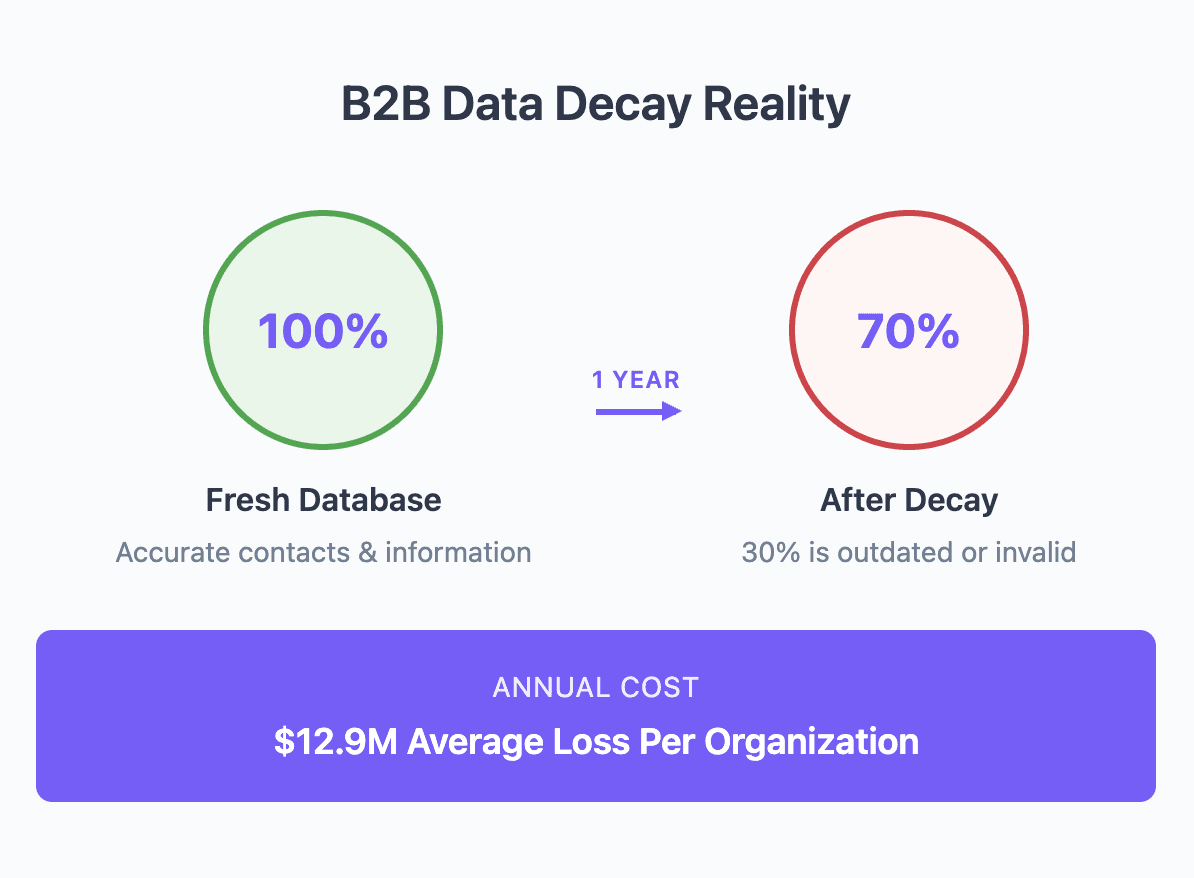
Here's the thing: B2B data decays at 30% annually. That pristine database you built last year? Nearly a third of it is already garbage.
But before you panic, know this - fixing bad data isn't rocket science. It just takes the right approach.
In this guide, you'll discover exactly how to clean your B2B database, which tools actually work, and how to keep your data fresh without burning through your budget.
What is B2B Database Cleaning?
B2B database cleaning is the process of identifying and fixing errors in your business contact data. Think of it as quality control for your CRM - removing duplicates, updating outdated information, and standardizing formats so your data actually works when you need it.
It's not about adding new information (that's data enrichment). It's about making your existing data accurate and usable.
Here's what database cleaning typically fixes:
Duplicate contacts (same person, multiple entries)
Outdated job titles and company information
Invalid email addresses and phone numbers
Inconsistent data formats (USA vs United States)
Incomplete records missing key fields
The difference matters because many companies waste money enriching bad data. You're essentially putting premium gas in a broken engine.
The Cost of Dirty B2B Data
Bad data doesn't just hurt your campaigns - it bleeds money from your entire organization.
According to Gartner, poor data quality costs organizations an average of $12.9 million annually. For B2B companies specifically, the impact hits multiple areas:
Direct Revenue Loss: IBM found that businesses lose 20% of revenue due to poor data quality. When your sales team chases outdated leads or your marketing targets the wrong audience, deals disappear.
Wasted Time: Sales reps spend 27% of their time on data entry and validation instead of selling. That's over 10 hours per week per rep lost to data issues.
Campaign Inefficiency: Email deliverability drops dramatically with dirty data. Every bounced email hurts your sender reputation, making future campaigns even less effective.
Compliance Risks: GDPR fines for poor data management can cost $. One outdated opt-out preference could cost millions.
5 Signs Your B2B Database Needs Cleaning
Not sure if your database has problems? Watch for these warning signs:
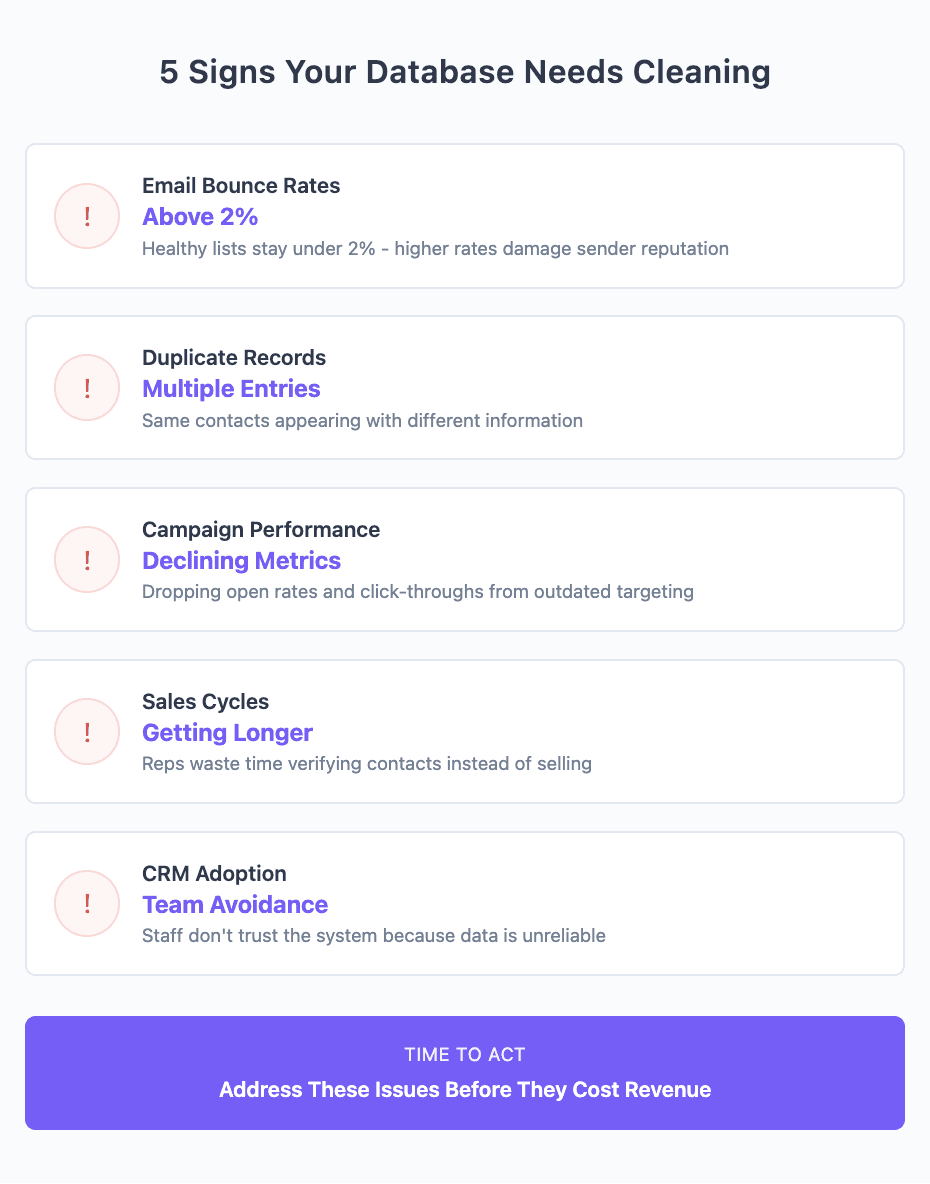
1. Email Bounce Rates Above 2%
Healthy B2B email lists maintain bounce rates under 2%. If you're seeing 5%, 10%, or higher, your data is seriously outdated. Every bounce damages your sender reputation, making it harder to reach even valid contacts.
2. Duplicate Records Everywhere
When the same contact appears multiple times with slightly different information, you've got a duplication problem. This leads to:
Multiple reps contacting the same prospect
Inconsistent communication
Inflated database costs
3. Campaign Performance Tanking
Open rates dropping? Click-throughs disappearing? Before blaming your content, check your data. Outdated job titles and company information mean you're targeting people who no longer fit your ideal customer profile.
4. Sales Cycles Getting Longer
When reps waste time verifying contact information or chasing dead leads, deal velocity suffers. Clean data means reps spend time selling, not data detective work.
5. CRM Adoption Dropping
If your team avoids using the CRM because "the data is never right anyway," you've got a serious problem. Poor data quality creates a vicious cycle - people don't trust the system, so they don't maintain it, making the problem worse.
The B2B Database Cleaning Process: Step-by-Step Framework
Cleaning your database doesn't have to be overwhelming. Follow this systematic approach:
Step 1: Audit Your Current Data
Start by understanding what you're working with. Export your database and analyze:
Volume Metrics:
Total records
Records by source
Age of records
Last activity dates
Quality Indicators:
Percentage of complete records
Email validity rates
Phone number formats
Standardization consistency
Pro tip: Don't audit everything at once. Start with your most valuable segments - active opportunities, recent MQLs, or high-value accounts.
Step 2: Identify Data Quality Issues
Once you've audited, categorize problems by type:
Critical Issues (fix immediately):
Invalid email addresses
Duplicate records
Missing required fields
Important Issues (fix within weeks):
Outdated job titles
Inconsistent formatting
Incomplete phone numbers
Nice-to-Have (ongoing maintenance):
Social profile updates
Company size changes
Industry classification updates
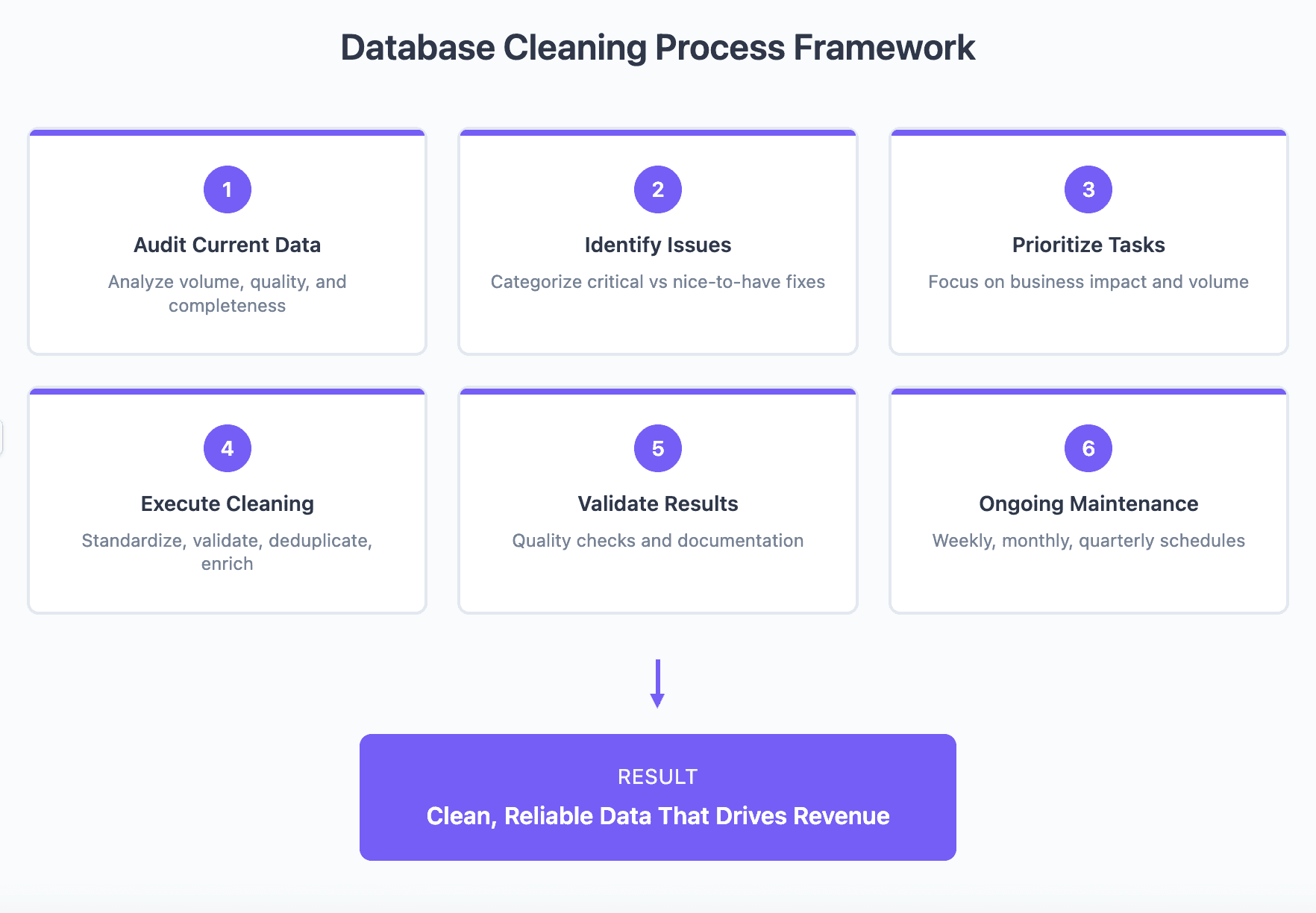
Step 3: Prioritize Cleaning Tasks
Not all data deserves equal attention. Prioritize based on:
Business Impact: Focus on data that directly affects revenue - active prospects, customers, and recent leads.
Volume: Tackle the biggest problems first. If 40% of your records have formatting issues, that's more important than 5% missing social profiles.
Complexity: Start with easy wins like standardization before tackling complex deduplication.
Step 4: Execute Data Cleaning
Now for the actual cleaning. Here's the optimal sequence:
First, standardize formats:
Country names (US → United States)
Phone numbers (+1-555-555-5555)
Company names (IBM Inc. → IBM)
Second, validate accuracy:
Email verification
Phone number validation
Address standardization
Third, deduplicate:
Exact matches first
Fuzzy matching for variations
Manual review for edge cases
Fourth, enrich gaps:
Fill missing required fields
Update outdated information
Add valuable context
Step 5: Validate and Verify
Before pushing clean data back to your CRM:
Run quality checks:
Sample 5% of cleaned records
Verify changes are accurate
Test email deliverability
Document changes:
What was cleaned
How many records affected
Any data removed
Create backups:
Always keep original data
Version control your databases
Document cleaning rules
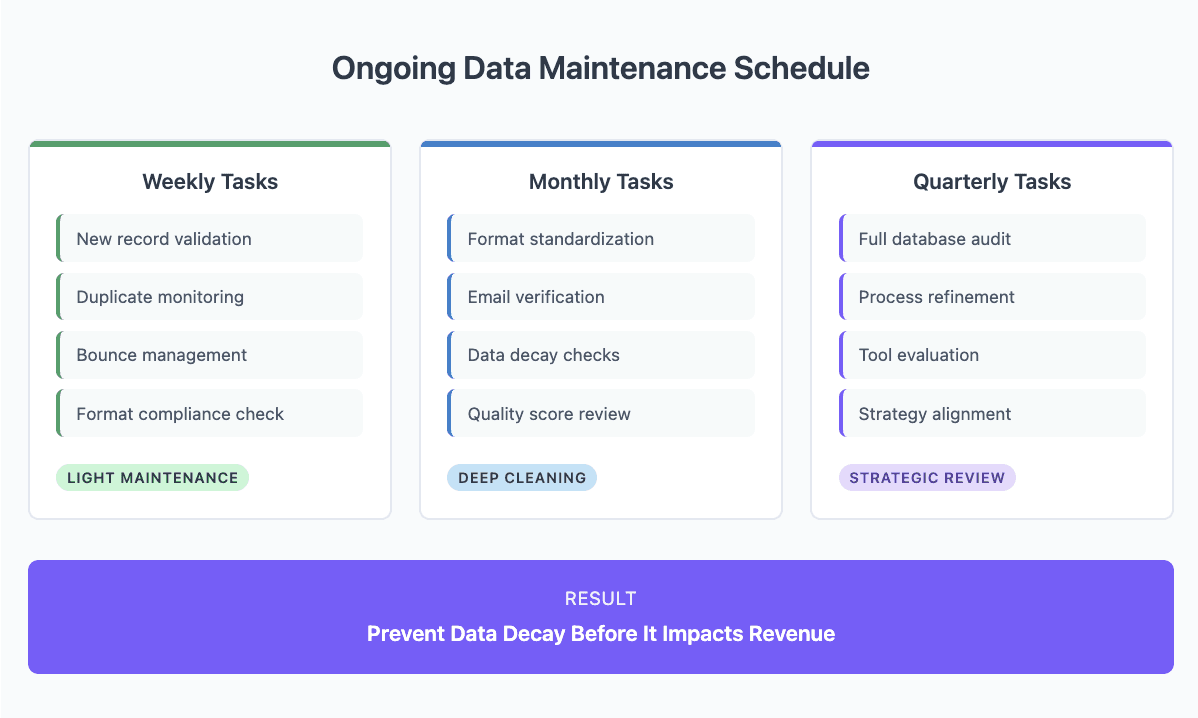
Step 6: Implement Ongoing Maintenance
One-time cleaning isn't enough. Build sustainable processes:
Weekly tasks:
New record validation
Duplicate monitoring
Bounce management
Monthly tasks:
Format standardization
Email verification
Data decay checks
Quarterly tasks:
Full database audit
Process refinement
Tool evaluation
Essential B2B Database Cleaning Techniques
Master these core techniques for effective database cleaning:
Deduplication Methods
Exact Matching: Identifies identical records based on unique identifiers (email, phone, ID).
Fuzzy Matching: Catches near-duplicates with minor variations:
John Smith vs J. Smith
Acme Inc. vs Acme Incorporated
firstname.lastname@company.com vs fname.lname@company.com
Hierarchical Matching: Identifies parent-child relationships:
IBM vs IBM Watson
Walmart vs Walmart Labs
Best practice: Start with exact matching, then apply fuzzy logic with human review for borderline cases.
Standardization Protocols
Create consistency across your database:
Name Standardization:
First name, last name separation
Capitalization rules
Title formatting (Mr., Ms., Dr.)
Company Standardization:
Legal entity removal (Inc., LLC, Ltd.)
Consistent abbreviations
Parent company identification
Address Standardization:
USPS format for US addresses
ISO standards for international
Abbreviation consistency
Validation Processes
Ensure data accuracy through systematic validation:
Email Validation Levels:
Syntax check (proper format)
Domain verification (MX records)
Mailbox verification (actual delivery)
Phone Validation:
Format verification
Country code validation
Carrier identification
Business Validation:
Company existence
Industry classification
Employee count verification
Enrichment Integration
While cleaning, identify enrichment opportunities:
Missing Data Patterns: Track which fields are consistently empty to guide enrichment priorities.
Update Triggers: Set rules for when to refresh data (job change, company merger, 6-month age).
Quality Thresholds: Only enrich records meeting minimum quality standards.
Automation vs Manual Cleaning: Finding the Right Balance
The key to efficient B2B database cleaning is knowing when to automate and when human judgment matters.
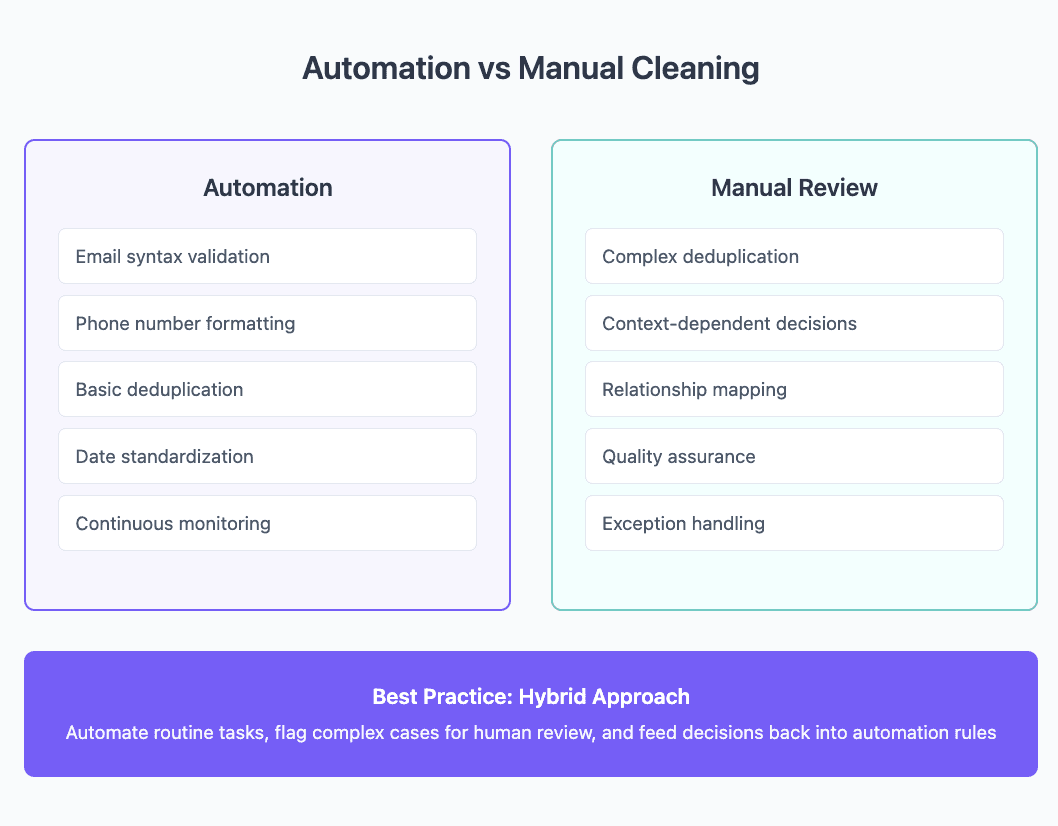
When to Automate
High-volume, low-complexity tasks:
Email syntax validation
Phone number formatting
Date standardization
Basic deduplication
Rule-based cleaning:
Country name standardization
State abbreviations
Industry classifications
Company size brackets
Continuous monitoring:
Bounce tracking
Duplicate detection
Format consistency
Data decay alerts
Automation excels at scale and consistency. Set it up once, run it forever.
When Manual Intervention Matters
Complex deduplication:
Executive vs company accounts
Subsidiary relationships
Merged companies
Name variations
Context-dependent decisions:
Which duplicate to keep
Historical data preservation
Relationship maintenance
Custom field mapping
Quality assurance:
Spot-checking automation
Edge case handling
Final approval processes
Exception management
The Hybrid Approach
The most effective database cleaning strategies combine both:
Automate the obvious: Let machines handle routine tasks
Flag the questionable: Automation identifies issues for human review
Human decides: Your team makes judgment calls on complex cases
Learn and improve: Feed decisions back into automation rules
This approach typically delivers 80% efficiency gains while maintaining 95%+ accuracy.
Tools and Technologies for B2B Database Cleaning
The right tools make the difference between a painful manual process and efficient data management.
Native CRM Features
Most CRMs include basic cleaning capabilities:
Salesforce:
Duplicate management rules
Validation rules
Data.com integration
Mass update tools
HubSpot:
Duplicate detection
Property validation
Workflow automation
Data quality tools
Microsoft Dynamics:
Duplicate detection jobs
Bulk delete wizard
Field validation
Integration tools
Limitations: Basic functionality, limited customization, no cross-platform cleaning.
All-in-One Platforms
Modern platforms like Databar.ai combine multiple database cleaning capabilities in a single solution. Here's what to look for:
Advanced Deduplication Features:
Fuzzy matching algorithms that catch variations (John Smith vs J. Smith)
Custom matching rules based on your specific needs
Bulk merge capabilities with field-level control
Ability to preserve relationship hierarchies
AI-Powered Segmentation:
Automatic categorization based on behavior patterns
Dynamic segments that update as data changes
Natural language queries for complex filtering
Pattern recognition for hidden opportunities
Intelligent Normalization:
Automatic name parsing and formatting
Title standardization across common variations
Company name consistency management
International format handling
Comprehensive Validation:
Multi-level email verification
Phone number validation with carrier checks
Address standardization and verification
Domain and company validation
Workflow Automation:
No-code workflow builders
Scheduled cleaning processes
Trigger-based updates
Integration with existing tools
Platforms like Databar.ai in this category offer access to multiple data providers, eliminating the need for separate subscriptions while maintaining data quality through integrated workflows.
The advantage of integrated platforms: Everything happens in one place. No more exporting, cleaning in one tool, enriching in another, then importing back. The entire process flows seamlessly.
Building a Sustainable Data Quality Culture
Technology alone won't solve data quality issues. You need the right culture and processes.
Team Training Essentials
Data entry standards: Everyone who touches data should understand:
Required fields
Format requirements
Validation rules
Quality expectations
Tool proficiency: Don't assume people know how to use your tools. Provide:
Initial onboarding
Regular refreshers
Best practice sharing
Troubleshooting guides
Quality mindset: Help teams understand why data quality matters:
Share impact stories
Celebrate improvements
Recognize good practices
Address resistance
Process Documentation
Document everything to ensure consistency:
Cleaning procedures:
Step-by-step guides
Decision trees
Exception handling
Escalation paths
Data standards:
Field definitions
Format requirements
Validation rules
Update frequencies
Roles and responsibilities:
Who owns what data
Update responsibilities
Quality checkpoints
Approval processes
Regular Audit Schedules
Prevent data decay through systematic audits:
Weekly audits:
New data quality
Bounce rates
Duplicate creation
User compliance
Monthly deep dives:
Segment analysis
Process effectiveness
Tool performance
Team feedback
Quarterly reviews:
Strategic alignment
Process optimization
Tool evaluation
Budget assessment
Measuring Database Cleaning Success
Track the right metrics to prove ROI and guide improvements.
Key Performance Indicators
Data Quality Metrics:
Completeness rate: Percentage of records with all required fields
Accuracy rate: Percentage of validated, correct data
Consistency rate: Percentage following standard formats
Uniqueness rate: Percentage without duplicates
Business Impact Metrics:
Email deliverability: Should exceed 98%
Campaign engagement: 20-30% improvement typical
Sales productivity: 15-25% time savings
Deal velocity: 10-20% faster cycles
Process Metrics:
Cleaning time: Hours per 1,000 records
Automation rate: Percentage handled without human intervention
Error detection rate: Issues caught before impacting business
Resolution time: Average time to fix identified issues
ROI Calculation Methods
Calculate the return on your database cleaning investment:
Direct savings:
Reduced data storage costs
Lower email sending costs
Decreased tool subscriptions
Fewer compliance violations
Productivity gains:
(Hours saved per rep) × (Number of reps) × (Hourly rate)
(Improved conversion rate) × (Average deal size) × (Volume)
Risk mitigation:
Avoided GDPR fines
Prevented reputation damage
Reduced customer churn
Typical ROI: 3-5x within first year, 10x+ over three years.
Continuous Improvement Metrics
Track trends to optimize your process:
Quality trending:
Monthly data quality scores
Decay rate changes
Issue type distribution
Source quality comparison
Process efficiency:
Cleaning time reduction
Automation percentage increase
Error rate decrease
Cost per record trend
Team performance:
Compliance rates
Training effectiveness
Tool utilization
Feedback scores
Common Data Cleaning Mistakes to Avoid
Learn from others' failures to protect your data quality.
Over-Cleaning Risks
Removing valuable history: Don't delete old interactions, notes, or relationship data just because contacts changed companies. Historical context matters for relationship building.
Aggressive deduplication: Merging records too aggressively can combine different people or lose important variations. When in doubt, flag for review rather than auto-merge.
Standardization extremes: Some variation is natural and valuable. Don't force everything into rigid formats that lose meaning or context.
Timing Errors
Cleaning during peak usage: Running intensive cleaning during business hours slows systems and frustrates users. Schedule for off-hours.
Infrequent cleaning: Annual cleaning projects create massive disruption. Monthly maintenance prevents major issues.
Ignoring data age: Cleaning 5-year-old data with the same priority as current leads wastes resources. Focus on active, valuable data.
Take Action on Your Data Quality with Databar.ai
Poor data quality isn't just a technical problem - it's a revenue problem. While your competitors struggle with spreadsheets and disconnected tools, you could be closing deals with clean, enriched data that actually drives results.
Databar.ai changes the game by bringing together everything you need for B2B database cleaning in one intelligent platform:
✅ Automated deduplication that catches even the trickiest duplicates
✅ AI-driven segmentation that reveals hidden opportunities in your data
✅ Smart normalization that standardizes millions of records in minutes
✅ Real-time validation that ensures your contacts are reachable
✅ Integrated enrichment that fills gaps while cleaning
✅ 160+ data providers accessible without separate subscriptions
✅ Ready-to-use workflows that anyone on your team can build and run
But here's what really sets Databar.ai apart: we don't just clean your data - we keep it clean. Our platform continuously monitors data quality, automatically fixes issues as they arise, and enriches records before they decay.
The result? Your team spends significantly less time on data maintenance and focuses more on revenue-generating activities.
Ready to turn your messy database into a revenue engine? Start your free Databar.ai trial today and see how automated B2B database cleaning improves your entire go-to-market motion.
No credit card required. No complex setup. Just cleaner data and better results from day one.
FAQs
How often should I clean my B2B database?
Light cleaning should happen weekly (bounce management, new record validation). Deep cleaning should occur monthly (deduplication, standardization). Full audits work best quarterly. The exact frequency depends on your data volume and decay rate.
What's the difference between data cleaning and data enrichment?
Data cleaning fixes existing information - removing duplicates, correcting errors, standardizing formats. Data enrichment adds new information - filling missing fields, updating outdated data, adding context. Clean first, then enrich.
How much does B2B database cleaning cost?
Costs vary widely. Manual cleaning runs $0.05-$0.50 per record. Automated tools range from $100-$5,000 monthly. All-in-one platforms like Databar.ai often provide better value by combining multiple capabilities. Calculate ROI based on your specific situation.
What's the biggest mistake companies make with database cleaning?
Treating it as a one-time project instead of an ongoing process. Data decays continuously. Without regular maintenance, you'll face the same problems repeatedly. Build cleaning into your regular workflows.
Related articles
See all