Only 27% of leads sent to sales are actually qualified (Landbase). That means for every 100 leads marketing passes over, 73 are essentially noise. Sales wastes hours chasing prospects who will never buy, and real opportunities slip through the cracks because nobody can tell them apart from the junk.
The real issue isn't lead volume. It's the gap between someone filling out a form and sales having enough information to do something intelligent with it. Inbound lead enrichment closes that gap - automatically.
What Is Inbound Lead Enrichment?
Inbound lead enrichment is the process of automatically appending additional data to form submissions the moment they arrive. Someone fills out your demo request with just their email address. Within seconds, that bare-bones record transforms into a complete profile: company name, employee count, industry, revenue range, tech stack, job title, phone number, and LinkedIn URL.
Marketing gets qualification data. Sales gets context for personalized outreach. And nobody had to ask the prospect to fill out a 15-field form.
The difference between companies that convert inbound at 7% versus 25% often comes down to this: do you enrich inbound leads automatically, or do you dump raw form submissions into the CRM and hope for the best?

Reason #1: Your Forms Ask Too Much (Or Too Little)
Here's the classic trap: Marketing wants short forms because every additional field kills conversions. A Formstack study found form abandonment rates hit 67.8% when forms exceed 7 fields. But sales needs data including company size, industry and budget to know if the lead is worth pursuing.
So companies compromise with medium-length forms that satisfy nobody. Conversions drop. Data quality stays mediocre. Everyone loses.
How form enrichment solves this:
Instead of asking prospects for information you can look up yourself, collect just email (and maybe name) and let enrichment tools handle the rest. According to InsideView, companies using automatic data enrichment reduce form fields by 40% without losing any lead intelligence.
The results speak for themselves. Companies reduce their signup form to three fields, email, first name, last name and see a dramatic increase in form conversions. You're not sacrificing data quality. You're getting better data because it's coming from verified business databases instead of whatever the prospect felt like typing.
Reason #2: You're Responding Way Too Slowly
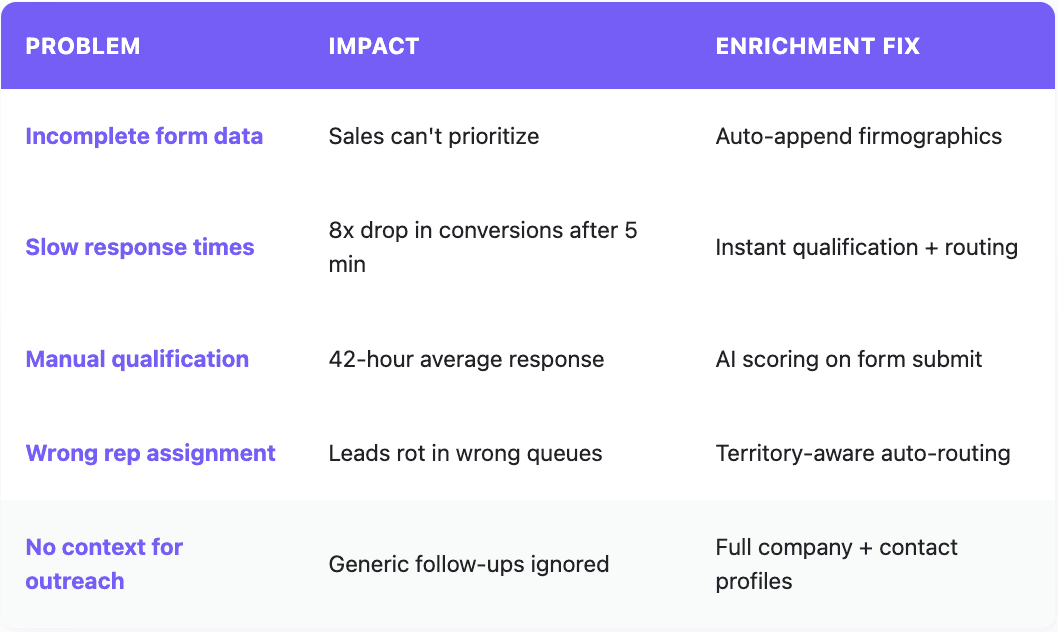
This one's brutal. Research from InsideSales shows conversion rates drop 8x if you wait just 5 minutes to respond to an inbound lead. Wait an hour, and you're 7x less likely to qualify that lead than if you'd called immediately (Harvard Business Review).
Yet the average B2B lead response time is 42 hours (Kixie). That's not a typo. Nearly two full business days before someone picks up the phone.
Why the delay? Usually because leads hit the CRM with minimal data. Someone has to figure out if the lead is even worth calling. Is this company the right size? Are they in our target industry? Is this person a decision-maker? All that research takes time - time the prospect is using to evaluate your competitors.
How enrichment fixes response time:
When you enrich inbound leads automatically, qualification happens in seconds, not hours. The form submits, enrichment runs, and AI scoring assigns a tier before anyone on your team even sees the record.
Tier 1 leads (high-fit companies, decision-maker titles, strong intent signals) can trigger instant notifications or even auto-book meetings. Companies using instant scheduling see 66.7% of qualified form submissions book meetings - more than double the industry average of 30%.
We've seen companies cut lead response time from hours to minutes just by removing the manual qualification step.

Reason #3: Sales Rejects Most of What Marketing Sends
Here's a stat that should keep every VP of Marketing up at night: 61% of B2B marketers send every lead directly to sales without any scoring or qualification (Landbase). No filtering. No prioritization. Just a firehose of names and emails.
The result? Sales rejects the majority of those leads. One CEO reported seeing a 70% MQL rejection rate (LinkedIn). Not because marketing wasn't generating interest, but because the leads lacked the context sales needed to work them effectively.
Common rejection reasons from Forrester's research:
Lead doesn't meet target market criteria
Wrong role or seniority level
Incomplete or inaccurate contact information
Company size doesn't fit ICP
Every single one of these is a data problem, not a lead quality problem.
How enrichment improves lead handoff:
Inbound lead enrichment solves the qualification problem at the source. Instead of sending sales a name and email, you're sending them a complete picture: verified firmographics, contact details, tech stack, and even intent signals.
With this data, you can build scoring models that actually predict sales acceptance. Filter out companies below your minimum employee count before they ever hit the CRM. Route enterprise leads to your enterprise team automatically. Flag leads from target accounts for immediate attention.
The data shows organizations implementing lead scoring report a 40% improvement in lead handoff efficiency between marketing and sales (Landbase). That's fewer arguments about lead quality and more time closing deals.
Reason #4: Leads Get Routed to the Wrong Reps
A lead comes in from a Fortune 500 company. It sits in a generic queue for three days because nobody recognized the company name from the email domain. By the time your enterprise team sees it, the prospect has already moved on.
Sound familiar? Routing failures happen constantly when leads arrive without context. Without knowing company size, industry, or location, how do you know which rep should work it? Manual assignment creates delays. Automatic assignment without enrichment data creates mismatches.
How enrichment enables intelligent routing:
When every inbound lead gets enriched with firmographic data, routing becomes straightforward. A company with 10,000 employees goes to enterprise. A company in healthcare goes to your healthcare specialist. A company in Germany goes to your EMEA team.
The routing rules write themselves because you actually have the data to power them.
This is where how to enrich inbound leads in CRM becomes practical: webhook triggers on form submission and sends data to Databar or another data enrichment tool, enrichment runs in milliseconds, and automated workflows route based on the enriched properties. No human touches the lead until it lands with the right rep.

Reason #5: Reps Have No Context for Personalized Outreach
A lead comes in. Name: John Smith. Email: john@acme.com. Company: (blank). Phone: (blank).
Your SDR has two choices: send a generic "Thanks for your interest" email or spend 15 minutes researching the company before making contact. Most choose option one. The lead never responds. Opportunity lost.
Now imagine the same lead arrives with: Company (Acme Corp, a 500-person SaaS company in fintech), job title (VP of Revenue Operations), LinkedIn URL, direct phone number, tech stack showing they use Salesforce and Outreach, and a note that they've visited your pricing page three times this week.
Suddenly that follow-up writes itself.
How enrichment enables personalized follow-up:
Inbound lead enrichment use cases go far beyond basic qualification. The real power is giving sales the context they need to have relevant conversations.
With enriched data, an SDR can reference the prospect's tech stack, acknowledge their company size and growth stage, and speak to challenges specific to their industry. That's the difference between "Just following up on your demo request" and "Saw you're scaling your outbound team - here's how we've helped similar SaaS companies in fintech solve the data quality problem you're probably hitting."
Research indicates that SDRs using enriched lead data report 28% higher MQL-to-SQL rates compared to those relying on raw form data alone. The data pays for itself.
How to Enrich Inbound Leads in HubSpot (And Other CRMs)
Setting up inbound enrichment isn't complicated. Here's what the architecture looks like:
1. Capture - Form submission triggers a webhook to your enrichment platform
2. Enrich - Waterfall enrichment runs across multiple data providers to maximize match rates
3. Score - AI analyzes enriched data against your ICP and assigns a tier (Tier 1/2/3)
4. Route - Automation assigns the lead to the appropriate rep or queue based on enriched properties
5. Notify - High-priority leads trigger instant alerts (Slack message)
The entire process takes seconds. By the time your rep sees the lead, it's fully enriched, scored, and routed.
Measuring Inbound Enrichment ROI
The impact shows up in several places:
Form conversion rates - Shorter forms convert better. Track before/after when you reduce fields.
Lead response time - Measure time from form submission to first sales touch. Should drop dramatically.
MQL-to-SQL conversion - With better qualification, sales accepts more of what marketing sends.
Sales acceptance rate - Fewer rejections mean less wasted effort on both sides.
Time to close - Better-qualified, better-routed leads close faster.
Companies that prioritize inbound lead quality see compounding benefits. Higher conversion rates mean more pipeline from the same traffic. Faster response times mean winning more competitive deals. Better routing means reps spend time on leads they can actually close.
Getting Started with Inbound Lead Enrichment
If you're running significant inbound volume (50+ leads per day), the math on enrichment is straightforward. Calculate how many hours your team spends on manual research and qualification. Calculate how many leads slip through the cracks because of slow response times. Calculate how many MQLs get rejected because they lack basic qualifying data.
Then compare that cost to an enrichment solution that handles it automatically.
Quick wins to start:
Audit your current forms. How many fields can you eliminate if you're enriching on the backend?
Measure your actual lead response time. The number is probably worse than you think.
Talk to sales about why they reject MQLs. Most reasons trace back to missing data.
Test enrichment on a sample of recent leads to see match rates and data quality.
The companies winning inbound aren't necessarily generating more leads than their competitors. They're just extracting more value from every single one.
FAQ
What is inbound lead enrichment?
Inbound lead enrichment is the process of automatically appending additional data (company information, contact details, firmographics, technographics) to leads as soon as they submit a form. This transforms minimal form data into complete prospect profiles without requiring the lead to fill out lengthy forms.
How do you enrich inbound leads automatically?
Automatic enrichment typically works via webhooks: when a form submits, it triggers an enrichment workflow that queries data providers using the lead's email domain to append company and contact information. The enriched data flows back into your CRM within seconds, ready for scoring and routing.
What's the difference between lead enrichment and lead scoring?
Lead enrichment adds data to records. Lead scoring uses that data (plus behavioral signals) to assign priority rankings. They work together: enrichment provides the inputs, scoring provides the output. You can't score leads effectively without enriched data.
How does form enrichment improve conversion rates?
Form enrichment lets you shorten forms dramatically (sometimes to just email) while still capturing all the data sales needs. Shorter forms convert at significantly higher rates. Studies show reducing fields can increase conversions by 26-54% depending on the original form length.
What data should I capture through enrichment?
Core enrichment data includes: company name, employee count, industry, revenue range, headquarters location, job title, seniority level, direct phone number, and LinkedIn URL. Advanced enrichment can include tech stack, intent signals, and recent company news.
How accurate is enriched data compared to self-reported form data?
Enriched data from reputable providers is generally more accurate than self-reported data. Prospects make typos, use informal job titles, and sometimes provide false information to access gated content. Enrichment providers verify data against multiple sources and update records regularly.
Related articles
See all